Extended Save Manager
⚪ Last updated 2013⚠️ Install Order · 2 steps
Install in this order, then this mod last — most mods fail to load without their framework and dependencies in place.
Preview
🔍 Analysis
- 👍 6.4% endorsement rate — high engagement, a strong quality signal
- 🏆 #40 of 82 User Interface mods in this game by downloads
📋 About This Mod
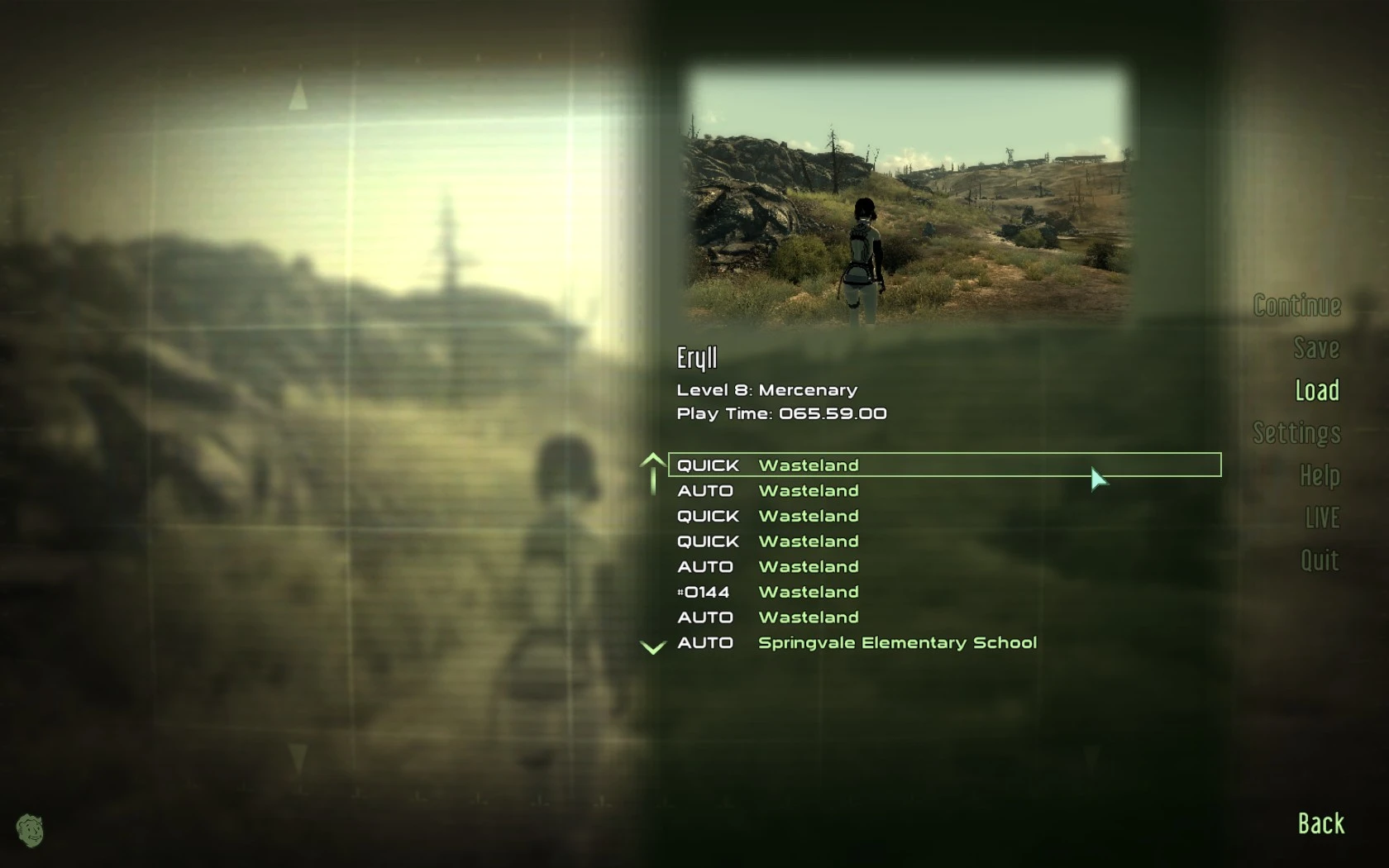
Save manager that behaves similarly to built-in save system with additional features. Features: - Multiple quicksaves and autosaves (customizable) - Timed autosaves with additional long lasting autosaves - Autosaves on location change - Normal saves with a hotkey - Quickload from menu mode - Autoloading on game start --------------- Usage --------------- You can have up to 10 slots of each type: Quicksaves, Autosaves, Long Autosaves and Location Autosaves. Manager will cycle through available slots. Each Long Autosave occurs when the full cycle of normal Autosaves completes. You can disable either Timed or Location Autosaves or temporarily disable autosaving completely in the menu. Location Autosaves have configurable minimum delay: they will not occur within this period. You can customize whether the game is saved in combat: always, never or only on location change. Quicksave and quickload keys are F4 and F8 (these are not directly customizable but stored in rmSvKeySave and rmSvKeyLoad global variables). To activate settings menu press Quickload while holding Ctrl (Ctrl+F8) To create normal save (like hitting Esc and going to Save menu - these will never be overwritten) press Quicksave while holding Ctrl (Ctrl+F4) Quickload automatically shows pause menu before loading and works from anywhere in game including menus. It can load either last quicksave or last known save of any type. Holding Shift when pressing Quickload (Shift+F8) uses the opposite load mode to one set in the menu. Press Quicksave while holding Shift (Shift+F4) to create or overwrite \'AutoloadMe\': until it\'s present, the mod will automatically load this save after you launch the game. Hold any key until cursor appears to prevent it from loading. Delete it from your saves when you no longer need it. Hold RShift until shortly after the game have been loaded to disable Autosaves. Keep in mind that active slots info is kept in saves themselves and loading earlier save will set different numbers: Quickload will work on a slot that was active in that save and saving will overwrite newer slots. The mod works separately from built-in quicksave and autosave and you can keep using them if they are not causing you trouble although it\'s recommended to avoid them (you should disable at least \"on travel\" autosaves). ====================== Installation ====================== Note: This mod requires FOSE. Download it here. Copy .esp to Data folder and activate. ====================== History: ====================== 1. 2, 2013-10-02 NEW: Autoloading save Disable Autosaves if RShift held after loading Minor tweaks (timer handling, menu) 1. 1, 2013-07-22 Fixed Location Autosaves to not occur when they shouldn\'t 1. 0, 2013-06-18 * Initial release Check my other mods which can make your game more comfortable and enjoyable: Revamped Leveling Extended Hotkeys Aim Sensitivity Expanded Megaton House with Univ
Extended Save Manager is a user interface mod for Skyrim that enhances the built-in save system with multiple save slots, separate quicksaves, timed autosaves, and location change autosaves. It also allows normal saving via hotkey. With 920 endorsements and over 14,000 downloads, it's a popular tool for players who want more control over their save files.
✨ Key Features
📊 Pros & Cons
✅ Pros
- Community favorite with 920 endorsements and 14k downloads.
- Gives you more control over saving than the vanilla system.
- Separate quicksaves and timed autosaves are a godsend for modded playthroughs.
⚠️ Cons
- Last updated in 2013 — may be incompatible with the current Skyrim version or other mods.
- Requires a mod manager for proper installation, which might be a hurdle for newbies.
For Skyrim players who want a more robust save system, especially those who frequently use quicksaves or need autosaves on location changes. Also great for modders who want to keep multiple save files organized. Skip if you're fine with the vanilla save system and don't need extra features.
💡 Beginner Tips
- Use a mod manager like Nexus Mod Manager or Mod Organizer 2 to install this mod, as manual installation may lead to file conflicts.
- After installing, check your load order to ensure the mod loads after any other save-related mods.
- Test the hotkey saving feature in a safe area before relying on it during combat.
📊 Mod Details
- Game
- Fallout 3 Mods
- Author
- polbashkisneslo
- Version
- 1.2
- Downloads
- 14,484
- Endorsements
- 920
- Category
- User Interface
- Created
- 6/18/2013
- Updated
- 10/2/2013
🔧 How to Install Fallout 3 Mods
Download from Nexus.
📖 Full step-by-step install guide for Fallout 3 →
Visit the official mod page for specific installation instructions for this mod.
🎮 Need cheat codes or console commands? Check ur gaming wiki for Fallout 3 commands, item IDs, and more.
Keep browsing — more Fallout 3 mods await