Companion Wheel (FOSE)
🟠 Updated over a year agoThis mod was updated after the recent game update — it should work on the current version. (Fallout 3 - Game Launcher Update)
⚠️ Install Order · 3 steps
Install in this order, then this mod last — most mods fail to load without their framework and dependencies in place.
Preview
🔍 Analysis
- 👍 1.5% endorsement rate — high engagement, a strong quality signal
- ✅ Updated 348 days after the latest game patch — actively maintained
- 🏆 #66 of 82 User Interface mods in this game by downloads
📋 About This Mod
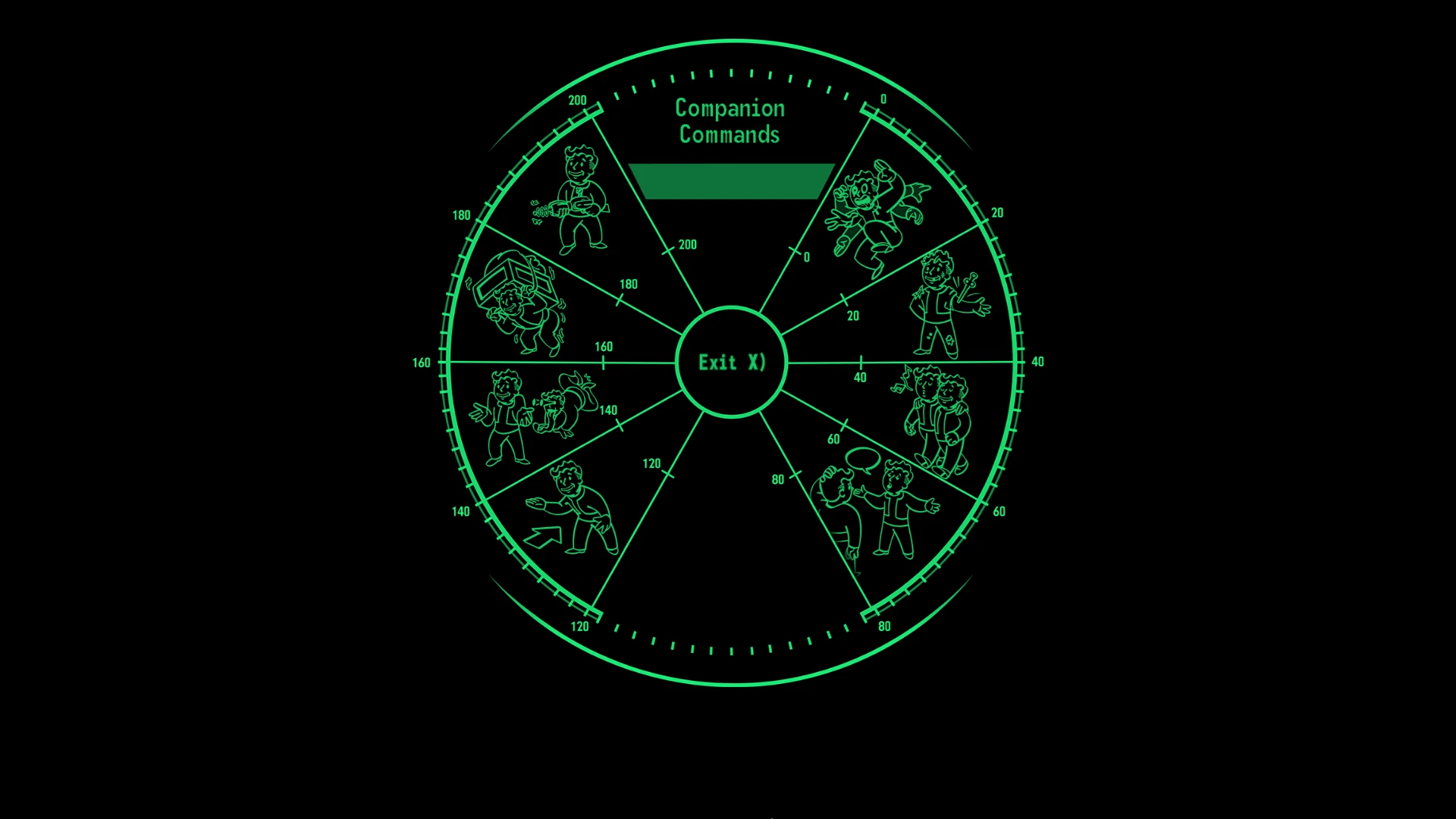
A fully-featured recreation of the companion wheel from New Vegas, made from scratch through an engine-level plugin.
6jWi1MwZVSA
Features
-
[]Old commands: everything you could tell your companion to do through dialogue is available on the wheel, like combat style changes or inventory access.
[
]New commands: Back Up, Use Stimpak, and Passive/Aggressive have been brought back from NV and implemented to work in the same fashion.[]Controls: The menu fully supports controllers, as well as hotkeys (X to exit, Space to select), and the mouse wheel.
[]Dogmeat menu: an all-new sub-menu for your furry companion provides access to his unique commands, like searching for items.
Requirements
-
[]Fallout 3 1. 7. 0. 3 (pre-anniversary update or downgraded)
[
]FOSE 1. 3b2[]Updated Unofficial Fallout 3 Patch - required for its fixes to companion dialogue topics. Things will break without it.
[]Vanilla UI Plus - may work without it, but the mod was designed with its font width in mind, so some elements may be misaligned.
Credits
-
[]ItsMeJesusHChrist - brand new icons, wheel textures and adjustments to the XML. The mod would not exist without their contributions. Check out their new mod Reinvented the (Companion) Wheel and other works.
[
]Special thanks to lStewieAl - their work reverse engineering the menu system in New Vegas paved the way for this mod.If you like what i do, please consider buying me a coffee.
Source code is available here.
Technical details:
Companion Wheel Menu is implemented as a new MenuMode with an ID of 1050. RadialTiles required for it to work did not exist in FO3 either, they are implemented with an id of 908 and work as an extension of regular rects with custom targeting calculation. More info can be found in the source code, I've tried to keep it logically organized.
"Back Up" in New Vegas is implemented as a new type of package called BackUpPackage, to avoid reimpletenting it fully i've imitated its functionality by spawning an XMarker at a random position nearby, setting it as a travel package destination and adding that travel package to the companion. Xmarker refs are persistent, so their ref ID is tracked through an ini file.
"Passive/Aggressive" modes are a New Vegas addition as well - in practice the Passive mode just prevents companions from initiating combat against an enemy, unless the player is already in combat with that enemy. This was reimplemented, with the passive/aggressive state tracked through the unused "No Rumors" extradata.
Most other buttons run existing dialogue topics from the code, which have result scripts doing
-
[]Fallout 3 1. 7. 0. 3 (pre-anniversary update or downgraded)
Companion Wheel (FOSE) recreates the New Vegas companion wheel for Fallout 3, offering a familiar radial menu for managing companions. With 129 endorsements and 8,354 downloads, it's a niche UI mod for players who miss the New Vegas interface. Last updated May 2025, it requires FOSE.
✨ Key Features
📊 Pros & Cons
✅ Pros
- Brings back the beloved New Vegas companion wheel, a huge QoL upgrade for Fallout 3 players
- Solid community support with 129 endorsements and over 8,000 downloads
- Actively maintained, last updated May 2025
⚠️ Cons
- Requires FOSE, so you'll need to install it separately and launch through the script extender
- Only useful if you actually use companions—solo players get nothing from this
For Fallout 3 players who miss the New Vegas companion wheel and want a more intuitive way to manage followers. Skip if you play solo or prefer the vanilla UI.
💡 Beginner Tips
- Make sure you install FOSE correctly and launch the game via fose_loader.exe, not the default launcher, or the mod won't work.
- Check the mod's forum posts or comments for any known issues with specific companion mods, as custom companions might not appear on the wheel.
- If you're using a mod manager like FOMM or Vortex, let it handle the file placement to avoid overwriting issues.
📊 Mod Details
- Game
- Fallout 3 Mods
- Author
- c6 - ItsMeJesusHChrist
- Version
- 2.0
- Downloads
- 8,354
- Endorsements
- 129
- Category
- User Interface
- Created
- 11/17/2024
- Updated
- 5/18/2025
🔧 How to Install Fallout 3 Mods
Download from Nexus.
📖 Full step-by-step install guide for Fallout 3 →
Visit the official mod page for specific installation instructions for this mod.
🎮 Need cheat codes or console commands? Check ur gaming wiki for Fallout 3 commands, item IDs, and more.
Keep browsing — more Fallout 3 mods await