Companion Commander - COCOA
⚪ Last updated 2011⚠️ Install Order · 2 steps
Install in this order, then this mod last — most mods fail to load without their framework and dependencies in place.
Preview
🔍 Analysis
- 👍 4.5% endorsement rate — high engagement, a strong quality signal
- 🏆 #59 of 82 User Interface mods in this game by downloads
📋 About This Mod
Companion Commander Version 1. 0. 3 ToC
- []Description []What it does []Compatibility patches []Supported companions []Requirements []Install
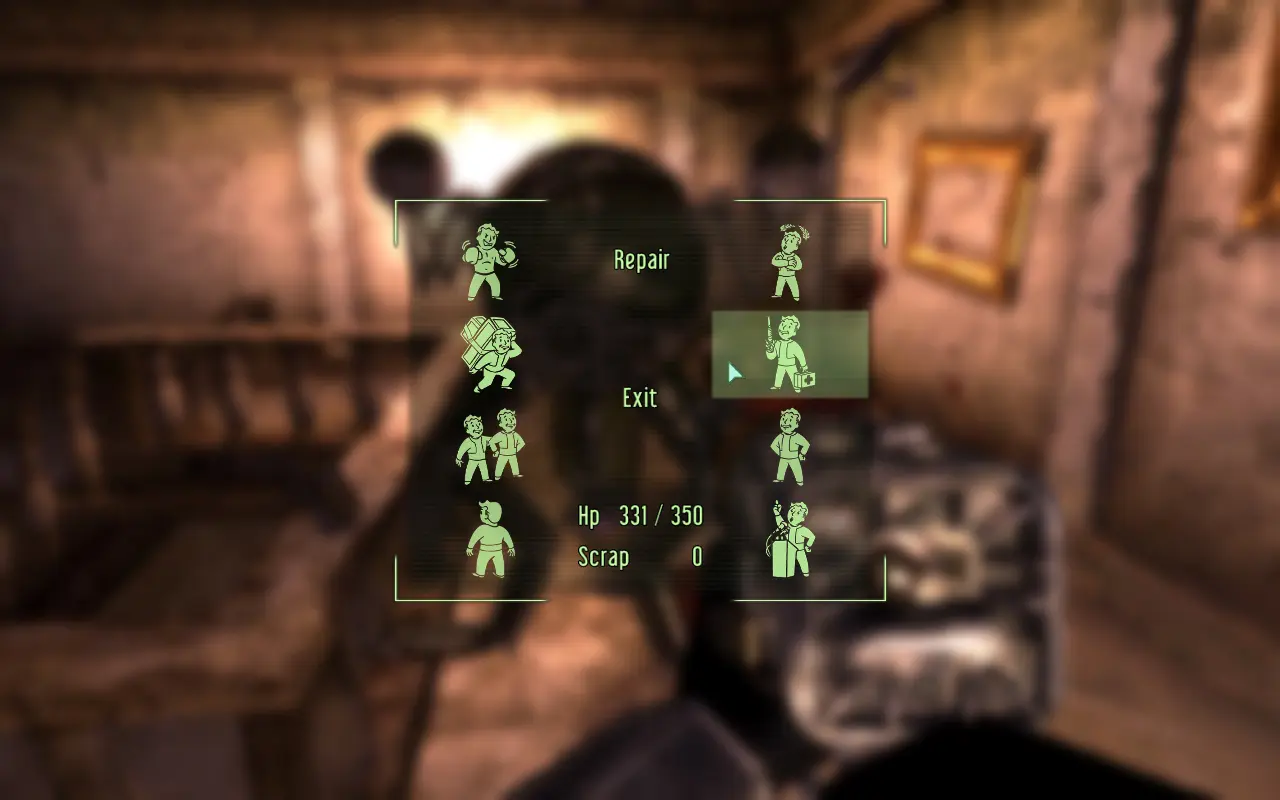
Companion Commander brings Fallout New Vegas\' Companion Wheel functionality to Fallout 3, providing easy control over npc companions. What it does
There are 8 sections on the commander menu, each with a specified function. The available orders are:
- []Use Melee / Use Ranged: This function allows the player to switch the companion\'s fighting preference between ranged and melee weapons. This option reads \"Use Melee\" when the companion is configured to \"Use Ranged,\" and vice-versa. []Open Inventory: Opens the companion\'s and player\'s inventory side-by-side, allowing the player to swap items between the companion\'s and player\'s inventory. (Highlighting this function displays the companion\'s current and maximum carried weight.) []Stay Close / Keep Distance: Instructs the companion to follow the player at either a short or long distance. This option reads \"Stay Close\" when the companion is configured to \"Keep Distance,\" and vice-versa. []Back Up: Commands the companion to back away from the player approximately two meters (6 feet). []Be Passive / Be Aggressive: Switches the companion between \"aggressive\" mode (attacking any enemy he/she detects) and \"passive\" mode (attacking only enemies engaged in combat with the player). This option reads \"Be Passive\" when the companion is configured to \"Be Aggressive,\" and vice-versa. []Use Stimpak / Repair: Instructs the companion to use a stimpak (or scrap metal for robots) from the player\'s inventory. (Highlighting this function displays the companion\'s current and maximum Hit Point total, and the number of Stimpacks / Scrap metal in the player\'s inventory.) []Wait Here / Follow Me: Switches the companion between following the player and staying where instructed to wait. This option reads \"Wait Here\" when the companion is configured to \"Follow Me,\" and vice-versa. []Talk To: Engages the companion in dialogue as with other NPCs. This allows the user to access the options listed above through dialogue, and is the only method by which the player can \"dismiss\" the NPC.
- When highlighting the \"Open Inventory\" function, the displayed inventory weight may slightly wary from the companion\'s actual inventory weight. Generally, the more items from 3rd-party mods you have on your companion, the less accurate it is.
Companion Commander - COCOA is a user interface mod for Fallout 3 that adds a companion wheel-like interface for managing your companions. With 435 endorsements and nearly 10,000 downloads, it's a well-received utility for players who want quicker access to companion commands. Last updated in 2011, it's a classic mod for the original game.
✨ Key Features
📊 Pros & Cons
✅ Pros
- Community-approved with 435 endorsements—players clearly found it useful.
- Nearly 10,000 downloads show it's been a go-to for Fallout 3 players.
- Fills a niche for better companion management in the base game.
⚠️ Cons
- Last updated in 2011—may not be compatible with modern setups or DLC.
- Requires Fallout 3, so it's useless if you're on New Vegas or Fallout 4.
For Fallout 3 players who want a more convenient way to command companions, similar to the wheel in later games. If you're tired of digging through menus to give orders, this mod aims to streamline that. Skip if you're playing a different Fallout title or prefer gameplay overhauls.
💡 Beginner Tips
- Since it's a UI mod, make sure to place the files in your Fallout 3 Data folder and activate the .esp in the launcher.
- If you have Fallout 3 mods that alter the interface, test for conflicts—UI mods can clash.
- Check the mod's compatibility with any DLC you own, as older mods sometimes need patches.
📊 Mod Details
- Game
- Fallout 3 Mods
- Author
- vivanto
- Version
- 1.0.3
- Downloads
- 9,604
- Endorsements
- 435
- Category
- User Interface
- Created
- 4/23/2011
- Updated
- 6/3/2011
🔧 How to Install Fallout 3 Mods
Download from Nexus.
📖 Full step-by-step install guide for Fallout 3 →
Visit the official mod page for specific installation instructions for this mod.
🎮 Need cheat codes or console commands? Check ur gaming wiki for Fallout 3 commands, item IDs, and more.
Keep browsing — more Fallout 3 mods await