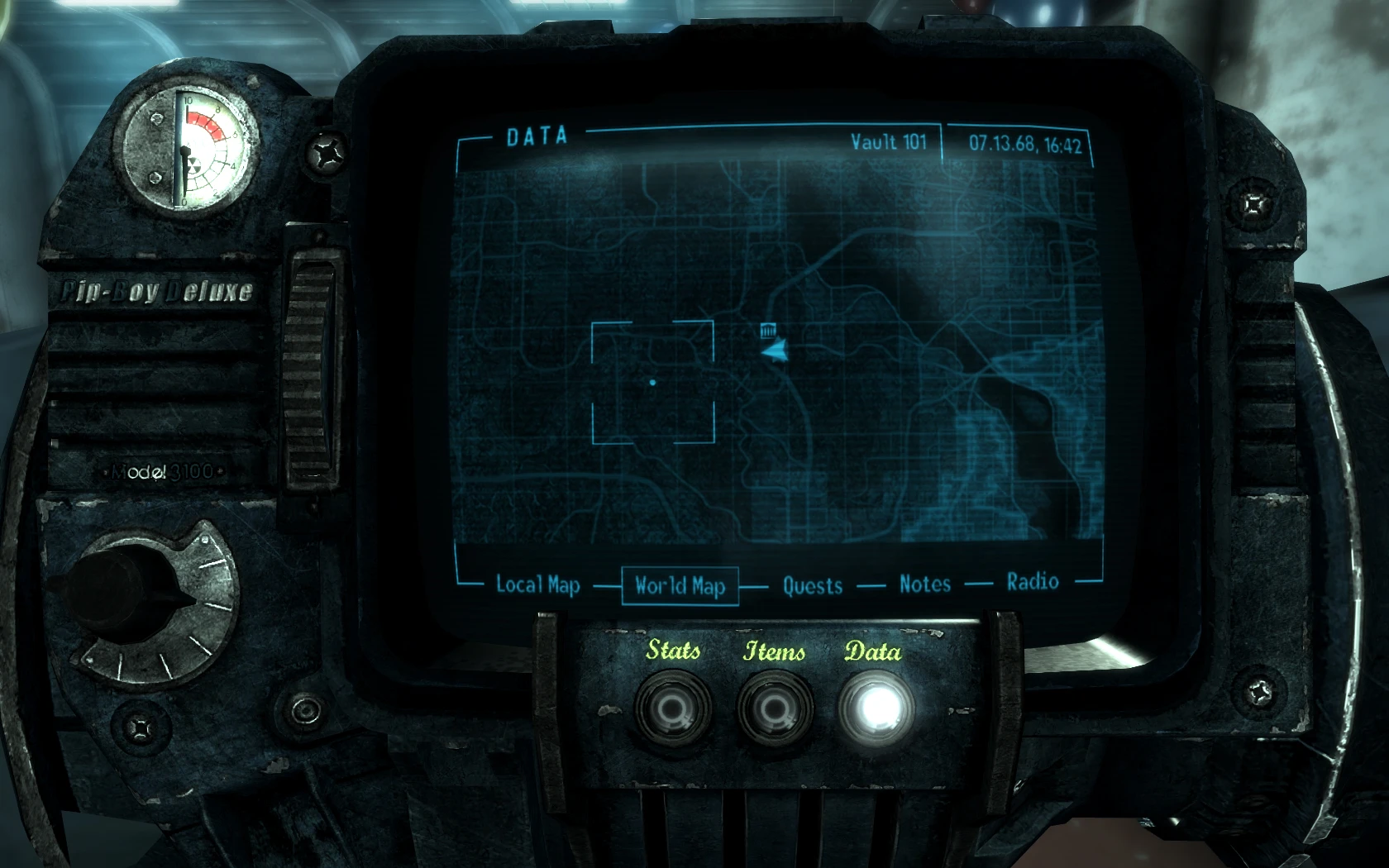
Blue Pipboy Deluxe Update 3
⚪ Last updated 2009⚠️ Install Order · 2 steps
1🛠️ FOSE — Fallout Script Extender Download ↗
2🔧 UFO3P — Unofficial Fallout 3 Patch Download ↗
Install in this order, then this mod last — most mods fail to load without their framework and dependencies in place.
Preview
🔍 Analysis
- 👍 4.2% endorsement rate — high engagement, a strong quality signal
- 🏆 #22 of 82 User Interface mods in this game by downloads
📋 About This Mod
- <span style="color
- #FFA500">Name:</span> Blue Pipboy Deluxe
- <span style="color
- #FFA500">Author:</span> iPlayboy
- <span style="color
- #FFA500">Version:</span> 1. 3
- <span style="color
- #FFA500">Date:</span> 06/02/2009
- <span style="color
- #FFA500">Requirements:</span> Fallout 3
- <span style="color
- #FFA500">Description:</span>
- <span style="color
- #FFA500">Changelog:</span>
- <span style="color
- #FFA500">Installation:</span>
- <span style="color
- #FFA500">Credits:</span>
🤖 AI-enhanced — based on mod data
A simple UI replacer for Fallout 3 that swaps the standard Pip-Boy screen for a blue-tinted, scratchier, higher-resolution version. With 1,618 endorsements and 38,160 downloads, it's a popular cosmetic tweak for players wanting a fresh look. Last updated in 2009, so it's an older mod but still widely used.
✨ Key Features
Replaces the default Pip-Boy interface with a blue-colored, scratchier, and higher-resolution version.
Simple drop-in replacement—no complex installation required.
Popular cosmetic mod with 1,618 endorsements and 38,160 downloads.
📊 Pros & Cons
✅ Pros
- Community favorite—over 1.6k endorsements and 38k downloads prove it's a trusted visual upgrade.
- Gives your Pip-Boy a fresh, gritty look that fits the wasteland vibe.
- Higher resolution means crisper text and icons—easier on the eyes.
⚠️ Cons
- Last updated in 2009—might not be compatible with newer game patches or mods.
- Only changes the color and texture—no functional improvements or new features.
- The scratchy effect might not be everyone's taste; some players prefer a clean, modern UI.
🎯 Is This For You?
For Fallout 3 players who want a quick visual refresh of the Pip-Boy without overhauling the entire UI. If you're tired of the default green and want a blue, worn-out look, this is for you. Skip if you're looking for functional changes or a full UI overhaul.
For Fallout 3 players who want a quick visual refresh of the Pip-Boy without overhauling the entire UI. If you're tired of the default green and want a blue, worn-out look, this is for you. Skip if you're looking for functional changes or a full UI overhaul.
📦 Install:Easy· Under 1 minute
💡 Beginner Tips
- Since it's a simple texture replacement, just drop the files into your Data folder and enable the mod in your launcher.
- If you use a mod manager like FOMM, you can install it with one click—just make sure it's active in your load order.
- Check if you have any other Pip-Boy retextures installed—they might conflict, so only use one at a time.
📊 Mod Details
- Game
- Fallout 3 Mods
- Author
- unperfek7
- Version
- 1.3
- Downloads
- 38,160
- Endorsements
- 1,618
- Category
- User Interface
- Created
- 2/6/2009
- Updated
- 3/3/2009
🔧 How to Install Fallout 3 Mods
Download from Nexus.
📖 Full step-by-step install guide for Fallout 3 →
Visit the official mod page for specific installation instructions for this mod.
🎮 Need cheat codes or console commands? Check ur gaming wiki for Fallout 3 commands, item IDs, and more.
Keep browsing — more Fallout 3 mods await