Better Crosshair - FPS Style
⚪ Last updated 2011⚠️ Install Order · 2 steps
Install in this order, then this mod last — most mods fail to load without their framework and dependencies in place.
Preview
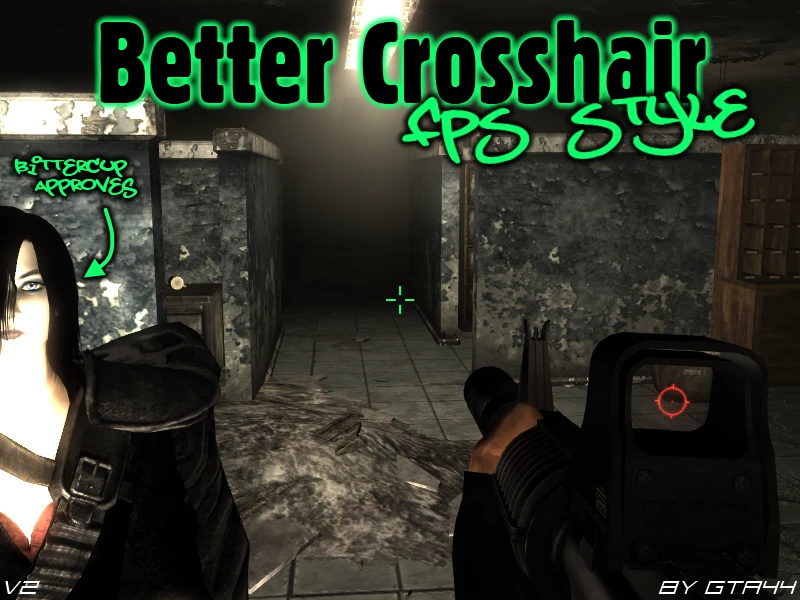
🔍 Analysis
- 👍 3.6% endorsement rate — high engagement, a strong quality signal
- 🏆 #24 of 82 User Interface mods in this game by downloads
📋 About This Mod
New Vegas version: http://www.newvegasnexus.com/downloads/file.php?id=36789 Description & Details Changes the default crosshair into a typical FPS style crosshair (four lines around an open center point). It was designed to be used with DUI, but will work just as well in Vanilla, however it might be a bit big. Idle Crosshair: Four lines around an open center point. (Centre-less Plus Sign - Alt w/ Center-Dot) Interact Crosshair: Four lines around an open center point, with corner brackets around it. (Centre-less Plus Sign with Square - Alt w/ Center-Dot) Install ---Make sure you have some form of ArchiveInvalidation!--- Copy \'interfaceshared0.dds\' into \'\\Fallout 3\\Data\\Textures\\Interface\'. Overwrite if necessary. Uninstall Delete \'interfaceshared0.dds\' from \'\\Fallout 3\\Data\\Textures\\Interface\'. Incompatibility This mod will be incompatible with any mods that change \'interfaceshared0.dds\', i.e. Crosshair mods, cursor mods etc. Credits Myself, GTA44. Permissions You can upload this mod to other Fallout modding sites, but you must credit me as the creator. If you want to edit and re-upload this mod, you must contact me first and get permission. However if you want to include this in your own mod without modifying it, you can do so, but still must credit me as the creator.
This mod replaces Skyrim's default crosshair with a classic FPS-style design featuring four lines around an open center point. It's a simple, lightweight UI tweak for players who prefer a more traditional shooter aesthetic. With over 1,200 endorsements and 34,000 downloads, it's a proven favorite despite its age.
✨ Key Features
📊 Pros & Cons
✅ Pros
- Community favorite with 1,222 endorsements and 34,228 downloads
- Gives a clean, classic FPS look that many players prefer
- Zero impact on performance or gameplay
⚠️ Cons
- Last updated in 2011, so it may have compatibility issues with current Skyrim versions
- No screenshots or detailed installation instructions provided
- Only changes the crosshair appearance—no customization options
For Skyrim players who want a more traditional FPS-style crosshair without any extra bells and whistles. If you're tired of the default crosshair and want a simple, clean replacement, this is for you. Skip if you're looking for customizable crosshair options or gameplay changes.
💡 Beginner Tips
- Make sure to place the mod files in your Skyrim Data folder or use a mod manager like Vortex or Mod Organizer 2.
- If the crosshair doesn't appear in-game, check that the mod is activated in your load order.
- Since the mod is old, consider using a mod manager to easily disable it if you encounter issues.
📊 Mod Details
- Game
- Fallout 3 Mods
- Author
- GTA44
- Version
- v2
- Downloads
- 34,228
- Endorsements
- 1,222
- Category
- User Interface
- Created
- 7/5/2009
- Updated
- 5/29/2011
🔧 How to Install Fallout 3 Mods
Download from Nexus.
📖 Full step-by-step install guide for Fallout 3 →
Visit the official mod page for specific installation instructions for this mod.
🎮 Need cheat codes or console commands? Check ur gaming wiki for Fallout 3 commands, item IDs, and more.
Keep browsing — more Fallout 3 mods await