Elden Ring Mods Manager - Merger
⚪ Last updated 2024⚠️ Install Order · 1 step
Install in this order, then this mod last — most mods fail to load without their framework and dependencies in place.
Preview
🔍 Analysis
- 👍 2.4% endorsement rate — high engagement, a strong quality signal
- 🏆 #10 of 93 Utilities mods in this game by downloads
📋 About This Mod
Elden Ring Mods Manager - Merger
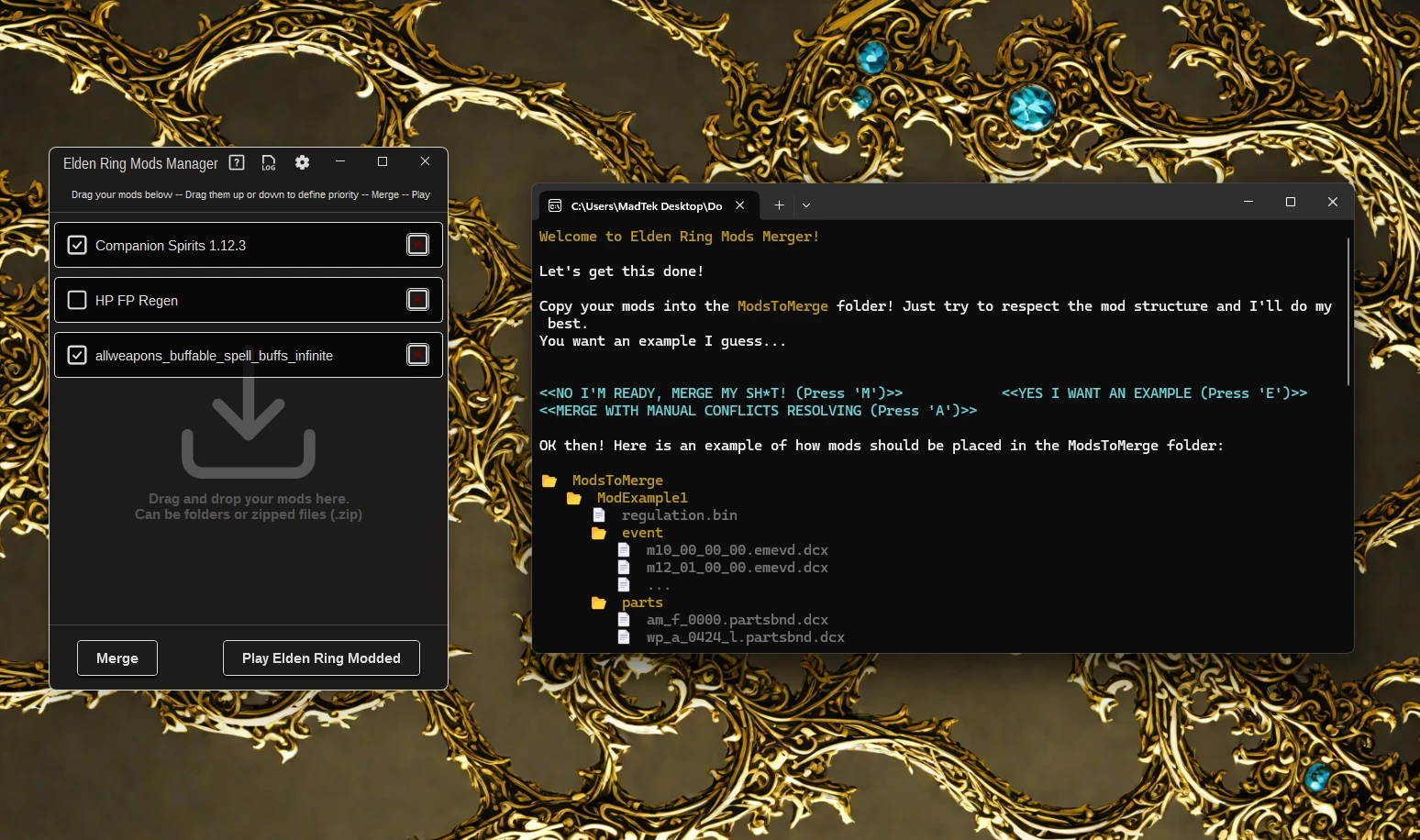
Open source tool to merge mods. Can only merge regulation.bin files for now (every other files will be overwrited depending of priority order), more merging capabilities will be added in the future.
NOTE: This tool is alpha and still under testing. Thanks to report if you have issues.
- Place ERModsManager.exe wherever you want. Desktop for example.
- If the app ask you the game path at launch, just navigate to where eldenring.exe is.
- The fun part now, drag and drop your mods (can be .zip or folder) directly in the app (don't worry, the app will most likely handle it)
- Then define mods priority by dragging them up or down in the list (top is highest)
- Press Merge and wait the logs telling you the merge is done.
- Press Play & Enjoy!
Elden Ring Mods Merger (Console App)
Console App version with merging and automation features.
Highly recommended: Use ModEngine2, place ERModsMerger.exe in the same folder and edit config_eldenring.toml as follow:
{ enabled = true, name = "default", path = "MergedMods" }
Launch ERModsMerger.exe and let it guide you through the process, it will self extract and create all the folders you need, it will also give you an example and explanations to make it easy.
Troubleshooting & Solutions
- ERModsMerger.exe don't launch: Make sure . Net 8 Desktop Runtime is installed on your system.
- Fail to load config or could not locate regulation bin: This likely happen when ERModsMergerConfig\\config.json is modified with invalid values / format. Here is an example of a modified config.json:
"GamePath": "C:\\New\\path\\to the folder of\\ELDEN RING\\Game",
"ModsToMergeFolderPath": "ModsToMerge",
"MergedModsFolderPath": "MergedMods"
* Respect the format presented above and dont forget to add double \\ between each folders in paths.
- Vanilla game/modded regulation.bin don't load: The app might be not compatible with this regulation.bin, make sure your game/mods are up to date (working regulation version is 1. 12. 4)
- Game don't launch,
A simple utility for merging Elden Ring mods, currently in alpha and a work in progress. It has 1,936 endorsements and 82,098 downloads, showing strong community interest despite its early stage. For modders who want to combine multiple mods without conflicts.
✨ Key Features
📊 Pros & Cons
✅ Pros
- Solid community trust with 1,936 endorsements.
- High download count (82,098) shows real demand.
- Fills a niche for mod merging in Elden Ring.
⚠️ Cons
- Alpha build — expect bugs and missing features.
- No detailed instructions or documentation provided.
- Last updated July 2024 — may not support latest game patches.
For Elden Ring modders who want to combine multiple mods without conflicts. If you're tired of juggling separate mod files, this tool aims to simplify that. Skip if you prefer manual mod management or need a polished, fully-featured utility.
💡 Beginner Tips
- Since it's an alpha, back up your mod folder before merging.
- Check the mod's forum posts for user-reported issues and workarounds.
- Test merged mods in a fresh save to avoid corruption.
📊 Mod Details
- Game
- Elden Ring Mods
- Author
- MadTek
- Version
- 1.3.1
- Downloads
- 82,098
- Endorsements
- 1,936
- Category
- Utilities
- Created
- 7/1/2024
- Updated
- 7/19/2024
🔧 How to Install Elden Ring Mods
Download from Nexus.
📖 Full step-by-step install guide for Elden Ring →
Visit the official mod page for specific installation instructions for this mod.
🎮 Need cheat codes or console commands? Check ur gaming wiki for Elden Ring commands, item IDs, and more.
Keep browsing — more Elden Ring mods await