Dying Light XBox UI Tool Extension
⚪ Last updated 2024Preview
🔍 Analysis
- 🏆 #22 of 27 Utilities mods in this game by downloads
📋 About This Mod
This extension allows you to conveniently change the HUD interface in the Xbox UI Tool software.
░░░░░▒▒▒▓▓███████████████▐▐▐▐▐▐▐▐▐▐▐▐▐───Install───▌▌▌▌▌▌▌▌▌▌▌▌▌▌███████████████▓▓▒▒▒░░░░░
1) Install XBOX360 SDK 21256. 3 from here or here
2) Unpack folder _hud in \DyingLight\
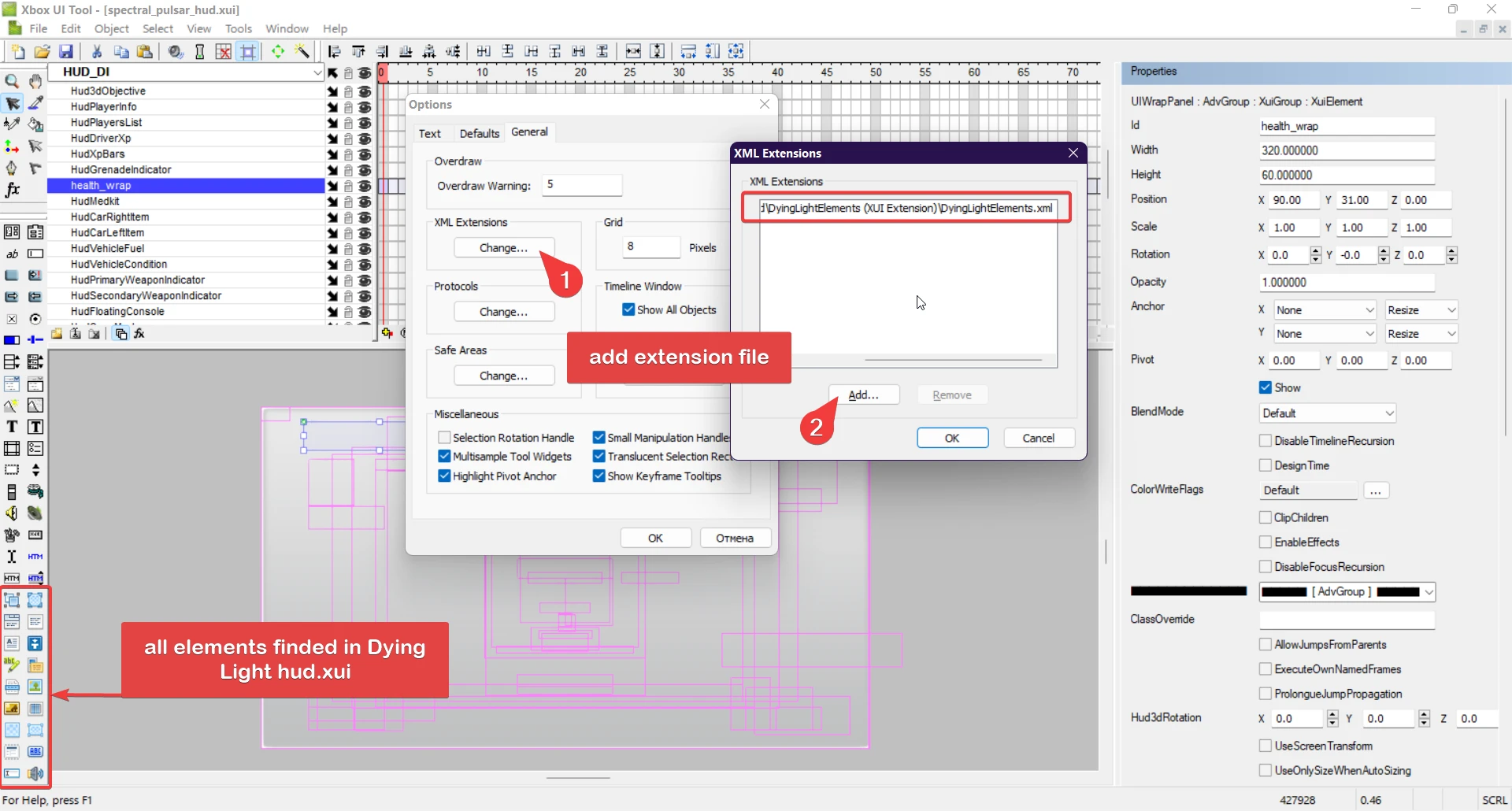
3) Add Extension DyingLightElements.xml in Xbox UI Tool
Tools --> Options --> General --> XML Extensions --> Change...
select file \DyingLight\_hud\DyingLightElements (XUI Extension)\DyingLightElements.xml
Associate .xui files default open Xbox UI Tool
USE ONLY NEW ICON ELEMENTS UI for correct parsing in game engine
░░░░░▒▒▒▓▓██████████████▐▐▐▐▐▐▐▐▐▐▐───Development───▌▌▌▌▌▌▌▌▌▌▌▌██████████████▓▓▒▒▒░░░░░
Tools that simplify the work with hud.xui files many times:
Visual Studio Code
Use first --> Extension Pretty XML - formatting and checking for typical xml file errors
Extension fold-level - fold/unfold xml tree elements (check "fold sub levels")
Extension Numbered Bookmarks - key binding as starcraft
Extension MOHAA Morpheus Script - highlight DL .scr files
If the file opens with an error, then most likely the element has an invalid property,
the <Timelines><Timeline></Timeline></Timelines> specifies an component that is not on the group level.
"CTRL + /" - fast comment/uncomment block
📊 Mod Details
- Game
- Dyinglight Mods
- Author
- truepatch
- Version
- 1.3
- Downloads
- 207
- Endorsements
- 4
- Category
- Utilities
- Created
- 4/24/2024
- Updated
- 5/6/2024
🔧 How to Install Dyinglight Mods
Download from Nexus Mods.
📖 Full step-by-step install guide for Dyinglight →
Visit the official mod page for specific installation instructions for this mod.
🎮 Need cheat codes or console commands? Check ur gaming wiki for Dyinglight commands, item IDs, and more.
Keep browsing — more Dyinglight mods await