Dying Light Manager
⚪ Last updated 2019Preview
🔍 Analysis
- 👍 3.0% endorsement rate — high engagement, a strong quality signal
- 🏆 #1 of 27 Utilities mods in this game by downloads
📋 About This Mod
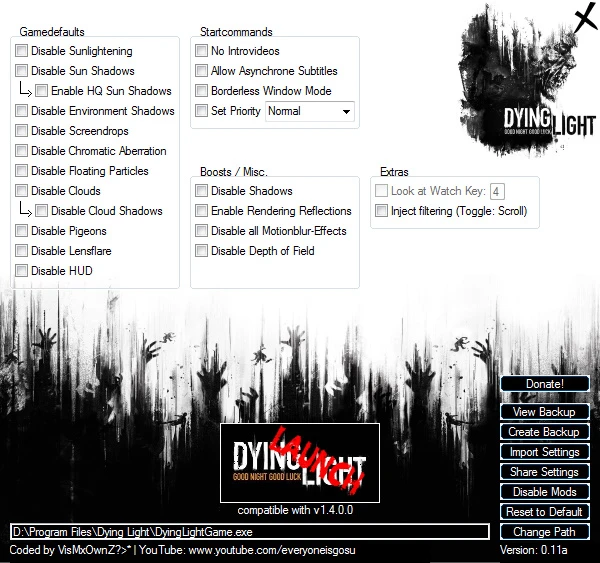
WORKS WITH 1. 4. 0. 0 ! NOTE: Compatible with Windows x64-Bit Systems NOTE: If you already have Mods installed, BACKUP them! before using the Manager, - after you made your settings, you can apply them simply by copy&paste (if you have to overwrite existing Files, the Settings (indicated with the overwritten Files) will not work properly!) NOTE: If you made changes on the Gamesettings menu (like low textures, etc) DO NOT enter the graphicsmenu - it will reset the whole File. Blackscreen/Stuckscreen: If you experience this Problem while DISABLED Chromatic Aberration make sure your "Motion Blur" is turned ON at the INGAME-Settings If you don't like Motion Blur you can disable it via the Manager, Motion-blur has to be enabled ingame (while disabled Chromatic Aberration) - it won't be shown anyway if disabled at the Manager.
INSTRUCTIONS:
After you download it, run as administrator.
It will ask you to update. Click 'cancel'.
Dying Light Manager is a utility that lets players tweak Dying Light options. It requires running as administrator and canceling an update prompt. With 1,915 endorsements and 63,895 downloads, it's a popular tool for customizing the game, though it hasn't been updated since 2019.
✨ Key Features
📊 Pros & Cons
✅ Pros
- Solid community trust with 1,915 endorsements
- Over 63,000 downloads shows it's widely used
- Simple utility for players who want to adjust game settings
⚠️ Cons
- Last updated in 2019 — may not work with the latest Dying Light patches
- No detailed instructions beyond basic steps
- Forced update prompt is a hassle to cancel every time
For Dying Light players who want a quick way to tweak game options without digging into config files. Skip if you're on the latest version and worried about compatibility — this tool hasn't been updated in years.
💡 Beginner Tips
- Always right-click and run as administrator, or the tweaks won't apply.
- When the update prompt appears, click 'cancel' — the tool works fine without it.
- If you're on a newer Dying Light version, test the tool after applying changes to ensure nothing breaks.
📊 Mod Details
- Game
- Dyinglight Mods
- Author
- Techland
- Version
- 0.11a
- Downloads
- 63,895
- Endorsements
- 1,915
- Category
- Utilities
- Created
- 5/19/2019
- Updated
- 5/19/2019
🔧 How to Install Dyinglight Mods
Download from Nexus Mods.
📖 Full step-by-step install guide for Dyinglight →
Visit the official mod page for specific installation instructions for this mod.
🎮 Need cheat codes or console commands? Check ur gaming wiki for Dyinglight commands, item IDs, and more.
Keep browsing — more Dyinglight mods await