Enhanced Warfarer Vocation
🟢 Updated this monthPreview
🔍 Analysis
- 👍 1.7% endorsement rate — high engagement, a strong quality signal
- ✅ Updated 90 days after the latest game patch — actively maintained
- 🏆 #98 of 392 Gameplay mods in this game by downloads
📋 About This Mod
After playing Dragons Dogma 2 and finding the limitations of the current Warfarers implementation, having only 3 skills didn't seem great! Whilst other mods do similar to this, they don't do it all in one place and with even more features!
Unique features:
-
[]Performance friendly, only using updates where needed and limits how much work it does in the background[/]
[]Customisable Vocation UI (scale, position, offsets)[/]
[]Dynamic Vocation UI Icons which will hide/show based on vanilla HUD, and show the order in which the vocations will be triggered[/]
[]Enable/Disable Rearmament stamina consumption without resetting script, simple check box[/]
[]Skillset per vocation, with correct skill names as you upgrade them and as they become available[/]
[]Dedicated Rearmament button allowing 4 skills per preset[/]
[]Toggle/Hold hotkey, which can either provide toggling between up to 5 preset allowing 20 skills in total or holding for switching between 2 skillsets on the fly.[/]
[]Both hotkeys have gamepad support[/]
[]In-game skill swapping via the vocation guild menu, including equipping master skills.[/]
[]Custom skill mod support is being added, awaiting Dullahan update for August - https://www.nexusmods.com/dragonsdogma2/mods/817[/]
[]Support for Transmogify (5. 1. 0) - https://www.nexusmods.com/dragonsdogma2/mods/420[/]
Feature Breakdown:
Vocation UI Icons -
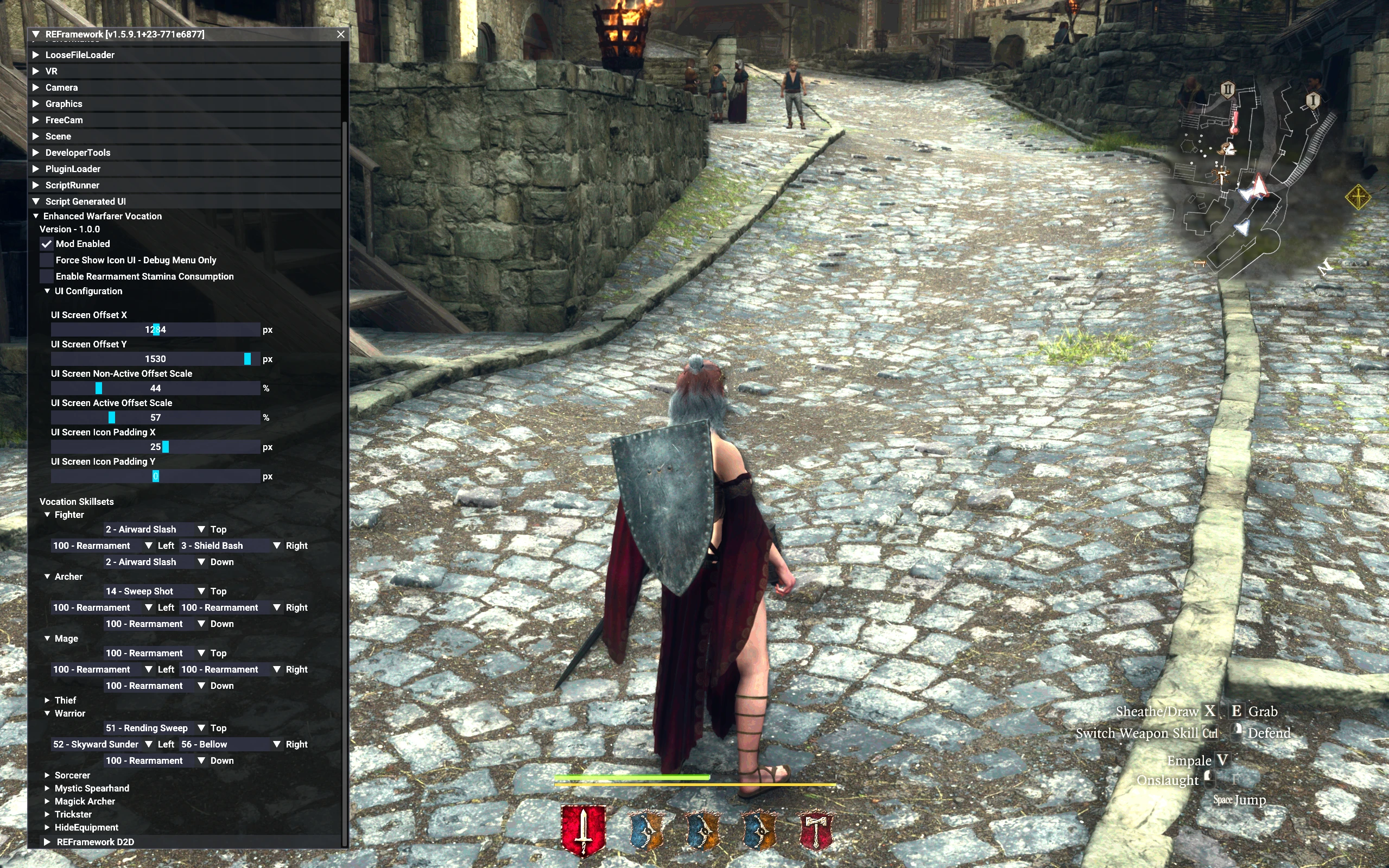
These will automatically update based on the weapons you have equipped and the order you have them set up in. The in-active icons will be at a 50% opacity, whilst the active vocation icon will be at 100%. This will auto hide/show when the HUD is hidden, based on it's timer automatically. It will automatically update the active vocation when a change weapon via Rearmament has been triggered.
This section can also be toggled on/off, if you wish not to use it.
A few things to point out before going into the sliders, when the Mod Enabled has been disabled this is for both the UI AND Skillset, it is joint together.
The "Force Show Icon UI - Debug Menu Only" is an override, so that when you have ReFramework open, the Vocation Ui Icons will be displayed regardless of the HUD hide timer being set. This is ONLY available whilst the ReFramework menu is open.
UI Configuration -
Determining the X and Y position of the icons are done with the following two sliders - it will automatically get your current screens size as the max size for the sliders
UI Screen Offset X - This will determine the X co-ordinates of the icons start position. Note - the icons are centered
UI Screen Offset Y - This will determine the Y co-ordinates of the icons start position.
Determining the scale in size for each icon, to help make the active vocation pop a bit more.
UI Screen Non-Active Offset Scale - This will determine the scaling size of the non-active vocation icons
UI Screen Active Offset Scale - This will determine the scaling size of the active vocation icones
Determining the padding for the icons between each other, do note that the Padding Y will provide an offset to the non-active icons relative to the active icon.
UI Screen Icon Padding X - This will add padding between each icon on the X axis
UI Screen Icon Padding Y - This will add padding to the top/bottom of the non-active icons to help position them better when the scaling is used
Rearmament Stamina Consumption
Use the checkbox shown in the image above for "Enable Rearmament Stamina Consumption", when ticked it will consume stamina, when unticked it will not consume stamina. Simple!
Skillset Per Vocation -
Each vocation will have it's own dropdown, and you can select skills that you have currently unlocked for those vocations. As you unlock more skills, and upgrade them, more will be available to pick from. I have limited the selection to only available skills that you currently have, and also to show the skill name relative to the skill level to help you pick the appropriate one (no need to select the new skill when upgraded, as they use the same skill Id)
You can update these in real-time and it will be reflected if
Enhanced Warfarer Vocation is a gameplay overhaul for Dragon's Dogma 2 that combines the best features from other Warfarer mods. It adds a customizable UI showing the active vocation weapon, dynamic updates based on equipped weapons, unique multiple skillsets per vocation, and rearmament. With 120 endorsements and recent updates, it's a solid choice for players wanting a more flexible Warfarer experience.
✨ Key Features
📊 Pros & Cons
✅ Pros
- Community-approved with 120 endorsements and over 7,300 downloads.
- All-in-one solution that merges popular Warfarer overhaul features.
- Recent update (June 2026) shows active maintenance.
⚠️ Cons
- Niche mod for Warfarer players only; if you don't use that vocation, it's useless.
- Potential conflicts with other Warfarer overhauls or UI mods.
- Limited to gameplay tweaks; no new content or quests.
For Dragon's Dogma 2 players who main the Warfarer vocation and want a more polished, feature-rich experience. If you're tired of juggling multiple mods or want a UI that shows your active weapon, this is for you. Skip if you don't play Warfarer or prefer vanilla gameplay.
💡 Beginner Tips
- Make sure to back up your save before installing any gameplay mod, just in case.
- Check the mod page for any load order recommendations if you use other UI mods.
- Test the UI in a safe area to see how it displays with different weapon loadouts.
📊 Mod Details
- Game
- Dragonsdogma2 Mods
- Author
- Keegars
- Version
- v1.9.1
- Downloads
- 8,597
- Endorsements
- 143
- Category
- Gameplay
- Created
- 4/1/2025
- Updated
- 9/23/2026
🔧 How to Install Dragon's Dogma 2 Mods
Download from Nexus Mods.
📖 Full step-by-step install guide for Dragon's Dogma 2 →
Visit the official mod page for specific installation instructions for this mod.
🎮 Need cheat codes or console commands? Check ur gaming wiki for Dragon's Dogma 2 commands, item IDs, and more.
Keep browsing — more Dragon's Dogma 2 mods await