DLSS 3 FrameGen For 20 and 30 GPUs
⚪ Last updated 2024Preview
🔍 Analysis
- 👍 1.5% endorsement rate — high engagement, a strong quality signal
- 🏆 #12 of 392 Gameplay mods in this game by downloads
📋 About This Mod
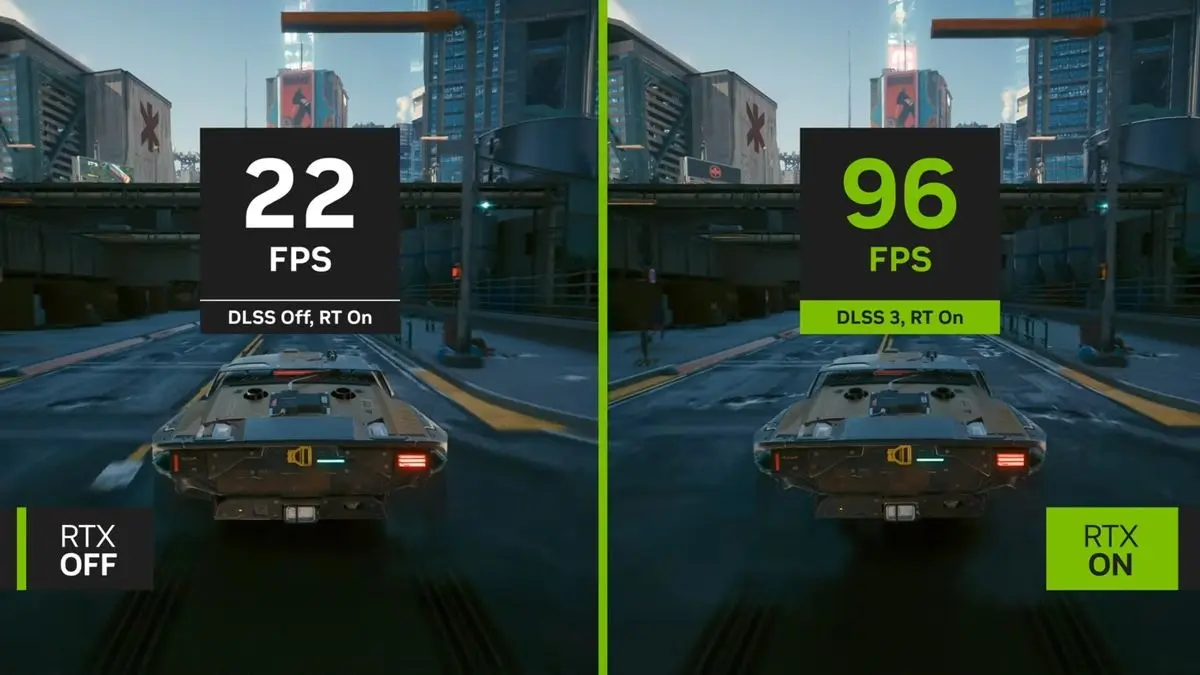
this a collection of files and a guide on how to enable FrameGen on non-40 series cards
this mod contains a file from PureDark Patreon that enables DLSS FG which is disabled by the developers
Installation:
first: launch the game normally and set those Graphics settings as follows: DLSS: anything except off. Nividia Reflex: on. framerate: variable. Vertical Synchronization: on
second: Download and unpack both .dll files from this mod to your Dragons Dogma 2 folder
third: download Nukem's dlssg-to-fsr3-0. 90 (Universal) mod and within that folder you'll find multiple folders. the one we need is dll_version. open that folder and copy: dlssg_to_fsr3_amd_is_better.dll and version.dll to your Dragons Dogma 2 folder.
Now, in your Dragons Dogma 2 Folder, find the file named shader.cache2 and delete it. (you have to do this step Each time you want to launch the game)
(Optional)added a batch file that automatically deletes the shader.cache2 each time you launch the game. treat it as the game launcher
Tip!!! Deleting shader.cache2 is not necessary if you are using ReFramework. Check Compatibility.
We're almost done! All you have to do now is make sure NVIDIA Overlay or Msi Afterburner is turned off, if not the game will crash on launch. if the game still crashes on launch, check if you have any performance monitor overlay turned on and try to turn it off
lastly in the Windows search bar Search for graphics settings, once you're there, depending on the Windows version you have you'll see an option Named Hardware-accelerated GPU scheduling, turn it on. if it's not there there should be some blue text called something like "Change default Graphics settings" Within it you will find the Hardware-accelerated GPU scheduling just turn it on.
now after launching you will notice the UI stuttering, well that's the only downside, But You can disable it by pressing the End Key which will stop both The FG and the stuttering.
for non-Nvidia cards try downloading the first file from dlssg-to-fsr3 and only copy the DisableNvidiaSignatureChecks.reg to the game folder and run it.
since I only have a Nvidia card, I don't know if this will work but if anyone knows or has tried it please let me know to update the description
Uninstallation:
delete: nvngx_dlss.dll, sl.interposer.dll, dlssg_to_fsr3_amd_is_better.dll, and version.dll located in the game's folder
then download the optional backup file on the files tap and place it in the same folder. done
Compatibility
If you have ReFramework Installed, all you have to do is launch the game once with ReFramework installed, it will then c
This mod enables DLSS 3 Frame Generation on RTX 20 and 30 series GPUs, which normally require an RTX 40 series card. It's a performance-focused utility for gamers with older RTX cards who want to boost frame rates in supported games. With over 1,000 endorsements and 73,000 downloads, it's a popular solution.
✨ Key Features
📊 Pros & Cons
✅ Pros
- Huge community trust: 1,092 endorsements and 73,425 downloads
- Unlocks a major performance feature for older GPUs
- Simple drop-in installation—no mod manager needed
⚠️ Cons
- Compatibility with specific games and driver versions is not documented
- May require manual updates as games or drivers change
- No official support from NVIDIA—use at your own risk
For gamers with RTX 20 or 30 series GPUs who want to experience DLSS 3 Frame Generation in supported titles. Perfect for those seeking higher frame rates without upgrading their graphics card. Skip if you have an RTX 40 series card or if you're not comfortable with potential stability issues.
💡 Beginner Tips
- Make sure your game has DLSS 3 Frame Generation support before installing.
- After installation, enable Frame Generation in the game's graphics settings.
- If you encounter crashes, try updating your GPU drivers to the latest version.
📊 Mod Details
- Game
- Dragonsdogma2 Mods
- Author
- XProo
- Version
- 1.0
- Downloads
- 73,425
- Endorsements
- 1,092
- Category
- Gameplay
- Created
- 3/24/2024
- Updated
- 3/27/2024
🔧 How to Install Dragon's Dogma 2 Mods
Download from Nexus Mods.
📖 Full step-by-step install guide for Dragon's Dogma 2 →
Visit the official mod page for specific installation instructions for this mod.
🎮 Need cheat codes or console commands? Check ur gaming wiki for Dragon's Dogma 2 commands, item IDs, and more.
Keep browsing — more Dragon's Dogma 2 mods await