FtG UI Mod - More Readable Fonts and UI
⚪ Last updated 2010Preview
🔍 Analysis
- 👍 3.5% endorsement rate — high engagement, a strong quality signal
- 🏆 #1 of 44 User Interface mods in this game by downloads
📋 About This Mod
Announcements
- []New! (May 8, 2011) Quickbar mod released. Use up to fifty slots total, multiple rows, quickbar centering options. FtG Quickbar. Compatible with FtG UI Mod without needing to optionally enable it. []If you plan on playing the latest DLC, you ought to upgrade to mod v2. 1. Mod v2. 1 should work with game v1. 03 or v1. 04.
- []Released the mod configuration tool for Mac OS X. Thanks to Paulyboy69 for the request and trying it out. []Uploaded a backported version of FtG UI Mod v2. 0b2r3 that should run on game versions 1. 0 up to 1. 02a. NOT OFFICIALLY SUPPORTED - I only heard anything from Riddleofsteel (thanks!) for my request for testing.
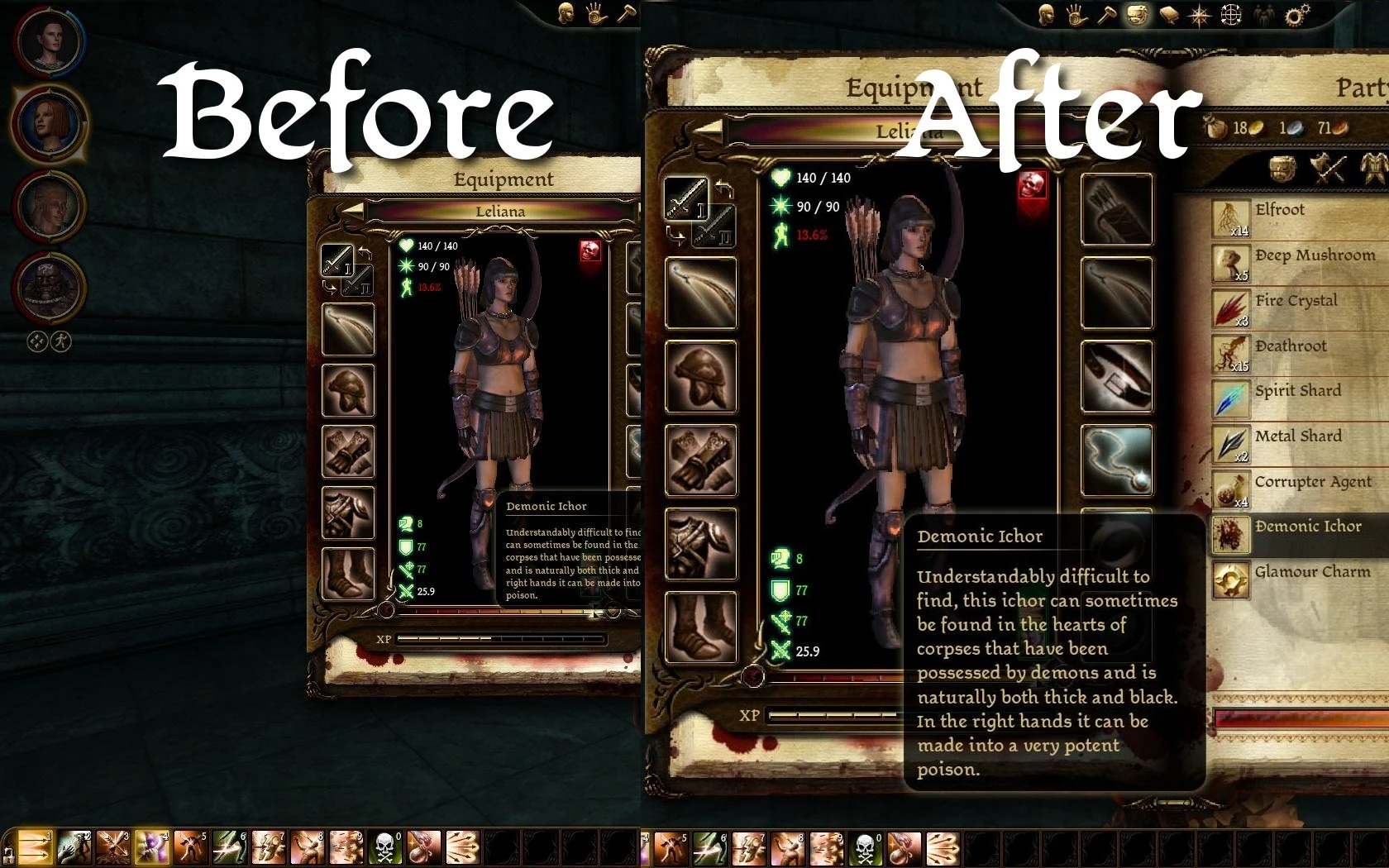
Summary (Formerly \"Larger Conversation Text\") This is still a work in progress, but has reached a decent level of completion. Rome wasn\'t sacked in a day, and not even just once. Readability improvements for:
- []Cutscenes []Quest journal []Codex []Tooltips (still in progress) []Inventory []Conversation history []Other various menus
FAQ []I don\'t like how the textures or paperdoll (character) in the inventory or character sheet looks when scaled up. Is there any way to change that? - Currently, you can configure the mod to not scale up any of the menus t
🤖 AI-enhanced — based on mod data
FtG UI Mod improves readability across Dragon Age: Origins by enhancing fonts and UI elements in cutscenes, quest journal, codex, conversation history, tooltips, inventory, and other menus. With over 12,000 endorsements and 357,000 downloads, it's a popular quality-of-life mod for players who find the default text hard to read.
✨ Key Features
Improves readability in cutscenes, quest journal, codex, conversation history, tooltips, inventory, and other menus.
Focuses on font and UI clarity enhancements.
Author notes more improvements are planned for future versions.
📊 Pros & Cons
✅ Pros
- Huge community trust with 12,419 endorsements and 357,892 downloads.
- Tackles a real pain point—hard-to-read text in a classic RPG.
- Covers multiple UI areas, not just one menu.
⚠️ Cons
- Last updated in 2010—may not be compatible with newer patches or DLC.
- Author explicitly says there's 'lots more to go,' so it's incomplete.
🎯 Is This For You?
For Dragon Age: Origins players who struggle with small or blurry text and want a cleaner UI. If you're a completionist who reads every codex entry, this is a must-have. Skip if you're happy with the default fonts or want more comprehensive UI overhauls.
For Dragon Age: Origins players who struggle with small or blurry text and want a cleaner UI. If you're a completionist who reads every codex entry, this is a must-have. Skip if you're happy with the default fonts or want more comprehensive UI overhauls.
📦 Install:Easy· Under 1 minute
💡 Beginner Tips
- Make sure to extract the files into your Dragon Age: Origins 'override' folder (usually Documents/BioWare/Dragon Age/packages/core/override).
- If you use other UI mods, test for conflicts—this mod changes fonts globally.
- Check the mod's page for any compatibility notes with Awakening or other DLC.
📊 Mod Details
- Game
- Dragonage Mods
- Author
- FollowTheGourd
- Version
- v2.1
- Downloads
- 357,892
- Endorsements
- 12,419
- Category
- User Interface
- Created
- 11/19/2009
- Updated
- 11/14/2010
🔧 How to Install Dragon Age: Origins Mods
Download from Nexus Mods.
📖 Full step-by-step install guide for Dragon Age: Origins →
Visit the official mod page for specific installation instructions for this mod.
🎮 Need cheat codes or console commands? Check ur gaming wiki for Dragon Age: Origins commands, item IDs, and more.
Keep browsing — more Dragon Age: Origins mods await