Auto Highlight
⚪ Last updated 2009Preview
🔍 Analysis
- 👍 4.5% endorsement rate — high engagement, a strong quality signal
- 🏆 #6 of 44 User Interface mods in this game by downloads
📋 About This Mod
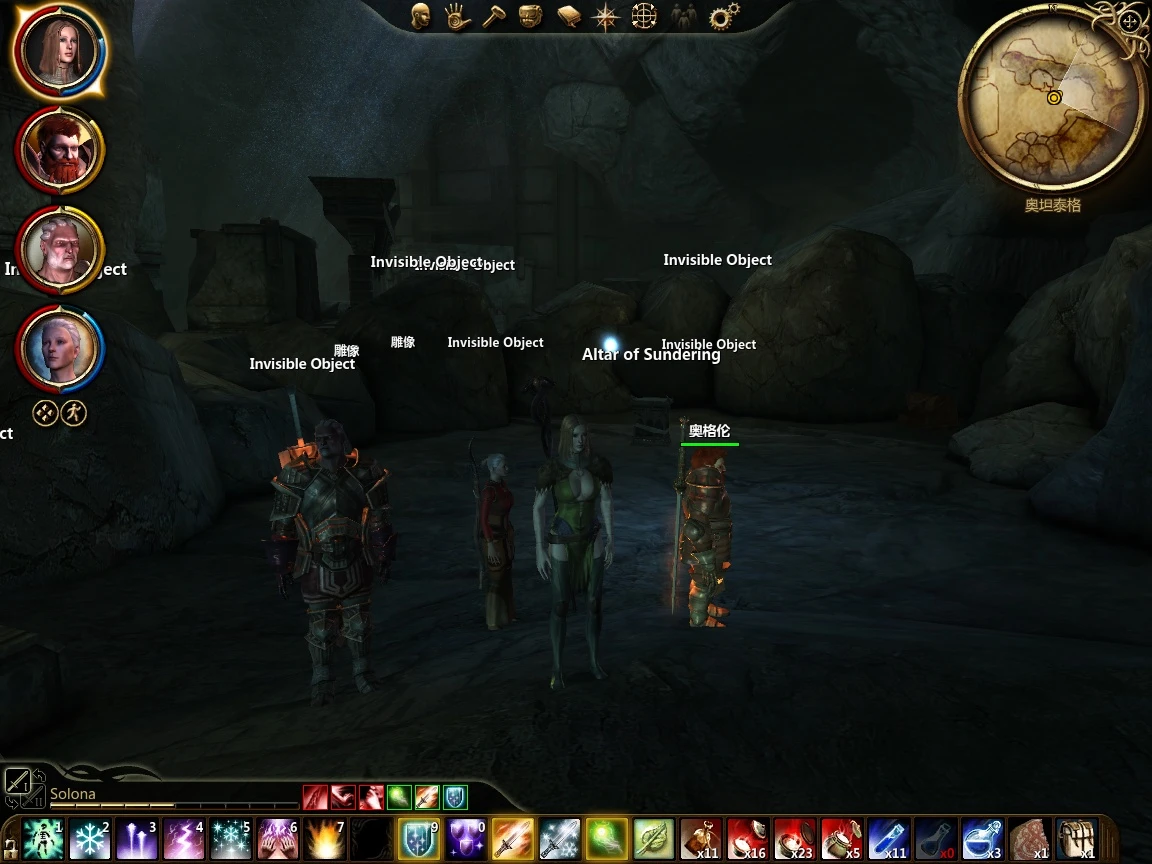
#Auto Highlight Version: 1. 3 Date: 12/21/2009 Author: jwvanderbeck (Beyond Ferelden) Homepage: http://dragonagemodding.wordpress.com/category/mods/ ##Description Floats the name of placeables, and optionally creatures, above the object similiar to what holding the TAB key does. ##Details Makes placeables, and optionally creatures, highlighted by floating the object\'s name above it. This AddIn can be configured by adding options to the DragonAge.ini file. By default this file is located in: `My Documents\\Bioware\\Dragon Age\\Settings\\DragonAge.ini` Open the file and at the very end of the file paste the following text: ShowCreatures=0 ShowTags=0 Distance=20 Duration=45 ShowHero=0 ShowFollowers=0 Set ShowCreatures to 1 if you want creatures to be highlighted as well. Set ShowTags to 1 to see the item\'s internal game tag. This is useful for modders. Set distance to how many meters away you want to highlight objects. Farther distances may affect perfrmance! Set duration to how long you want the name about placeables to remain before refreshing. See note below. NOTE: The AddIn will not display the name over placeables that have nothing inside them to loot. However, when you loot the items out of a placeable, the name will still be floating above it until such time as the name is \"refreshed\" by the script. By default this is every 45 seconds, which means you are usually gone. If you want placeables you loot to have their name dropped more quickly, you can set the duration much lower. However, lower settings will cause the name to drop for a few seconds between refreshes. ##Install Installation using DAModder is highly recommended, as it provides for easy 1-click installation and uninstallation. You can find DAModder here: http://dragonagemodding.wordpress.com/damodder/ ###DAModder (Recommended) 1. Drag & Drop the ZIP file you downloaded onto DAModder. ###DAUpdater 1. Unzip the ZIP file you downloaded. 2. Use DAUpdater.exe (located in your Dragon Age install directory, in the bin_ship subdirectory) and select the DAZip file. 3. Select the AddIn in the list and click install. 4. Once the progress says \"Installed.\", exit DAUpdater and run the game. ##Uninstall You can uninstall this mod using DAModder. ##Incompatibility This mod should be fully compatible with the base game. ##Known Issues or Bugs Due to the way this mod operates, there are some quirks you should be aware of. Names over creatures will \"refresh\" themselves every 8-10 seconds, and you will se a mommentary pop of the name. Also, over placeables such as chests, the game does not allow more than one bit of text to appear, so this means that only the name from Auto Highlight will appear. Any other messages, such as the floating text that would tell you the lock is unpickable, will not display. There is nothing I can do to fix the
Auto Highlight floats the names of placeables and optionally creatures above objects, similar to holding the TAB key. This UI mod for Neverwinter Nights provides a persistent highlight feature, eliminating the need to hold a key. With 744 endorsements and 16,613 downloads, it's a well-received utility for players who want constant object labels.
✨ Key Features
📊 Pros & Cons
✅ Pros
- Community favorite with 744 endorsements and over 16k downloads.
- Saves you from holding TAB constantly—just set it and forget it.
- Simple UI tweak that makes finding placeables way easier.
⚠️ Cons
- Last updated in 2009, so it might not play nice with newer game patches or mods.
- Could clutter your screen if you're in a dense area with tons of objects.
- Potential conflicts with other UI mods that alter name display.
For Neverwinter Nights players who hate holding TAB to see object names and want a hands-free alternative. Also great for builders and DMs who need to quickly identify placeables. Skip if you prefer a clean, uncluttered screen or use other UI overhauls that might conflict.
💡 Beginner Tips
- Since it's an older mod, test it in a safe save before using it in a serious campaign.
- If you use other UI mods, install Auto Highlight first and see if they conflict.
- Check if the mod requires any specific game version—older mods sometimes need compatibility patches.
📊 Mod Details
- Game
- Dragonage Mods
- Author
- jwvanderbeck
- Version
- 1.2
- Downloads
- 16,613
- Endorsements
- 744
- Category
- User Interface
- Created
- 11/22/2009
- Updated
- 12/22/2009
🔧 How to Install Dragon Age: Origins Mods
Download from Nexus Mods.
📖 Full step-by-step install guide for Dragon Age: Origins →
Visit the official mod page for specific installation instructions for this mod.
🎮 Need cheat codes or console commands? Check ur gaming wiki for Dragon Age: Origins commands, item IDs, and more.
Keep browsing — more Dragon Age: Origins mods await