GlovePIE Script for Xbox 360 Controller
⚪ Last updated 2011Preview
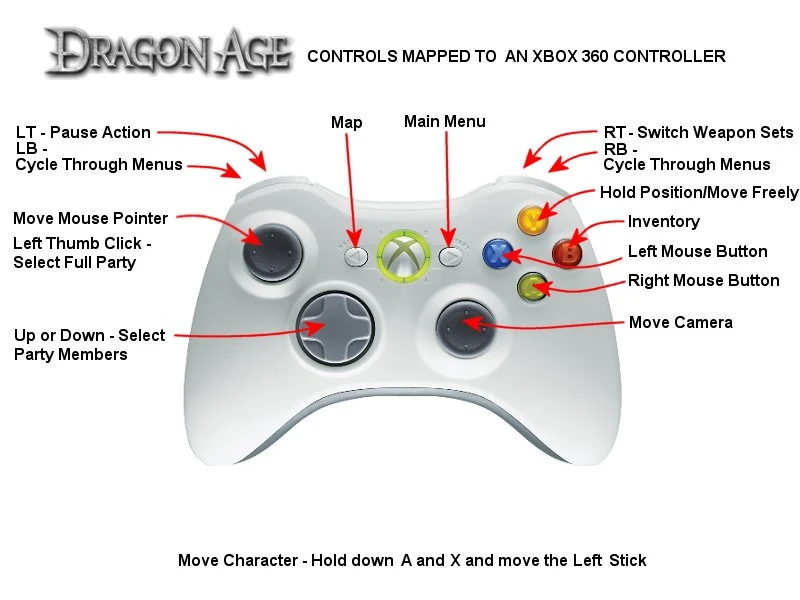
🔍 Analysis
- 👍 3.4% endorsement rate — high engagement, a strong quality signal
- 🏆 #6 of 26 Utilities mods in this game by downloads
📋 About This Mod
A GlovePIE controller script for use with the Dragon Age games that will let you use the Xbox 360 controller. For a rundown on the controls: Left Stick moves the mouse pointer Right Stick moves the camera D-Pad Up or Down is for selecting party members; to select full party, click in the Left Stick Button A is for the right mouse button Button B is for accessing inventory Button X is for the left mouse button: to move, hold down Buttons A and X while moving the Left Stick Button Y toggles whether you want your party members to hold position or to move freely LB and RB cycles through the menus: map, journal, inventory, character stats, abilities, spells & talents (not used in Dragon Age II), and tactics LT is for pressing the space bar to pause RT is for switching between your character\'s weapon sets (not used in Dragon Age II) Back is for accessing the area map Start is for the main menu INSTRUCTIONS FOR USE: 1. Download the GlovePIE controller mapping program, install it, and run it. 2. Open up the controller script by using GlovePIE. 3. Click on the Run button in the program window. You should be able to move the mouse pointer around with the Left Stick. 4. Run the Dragon Age game you want to use it on (Origins, Awakening, II), and you should be good to go!
📊 Mod Details
- Game
- Dragon Age 2 Mods
- Author
- Victor George
- Version
- 1
- Downloads
- 18,390
- Endorsements
- 618
- Category
- Utilities
- Created
- 4/17/2011
- Updated
- 4/19/2011
🔧 How to Install DA2 Mods
Use DA2 Mod Manager.
📖 Full step-by-step install guide for DA2 →
Visit the official mod page for specific installation instructions for this mod.
🎮 Need cheat codes or console commands? Check ur gaming wiki for DA2 commands, item IDs, and more.
Keep browsing — more DA2 mods await