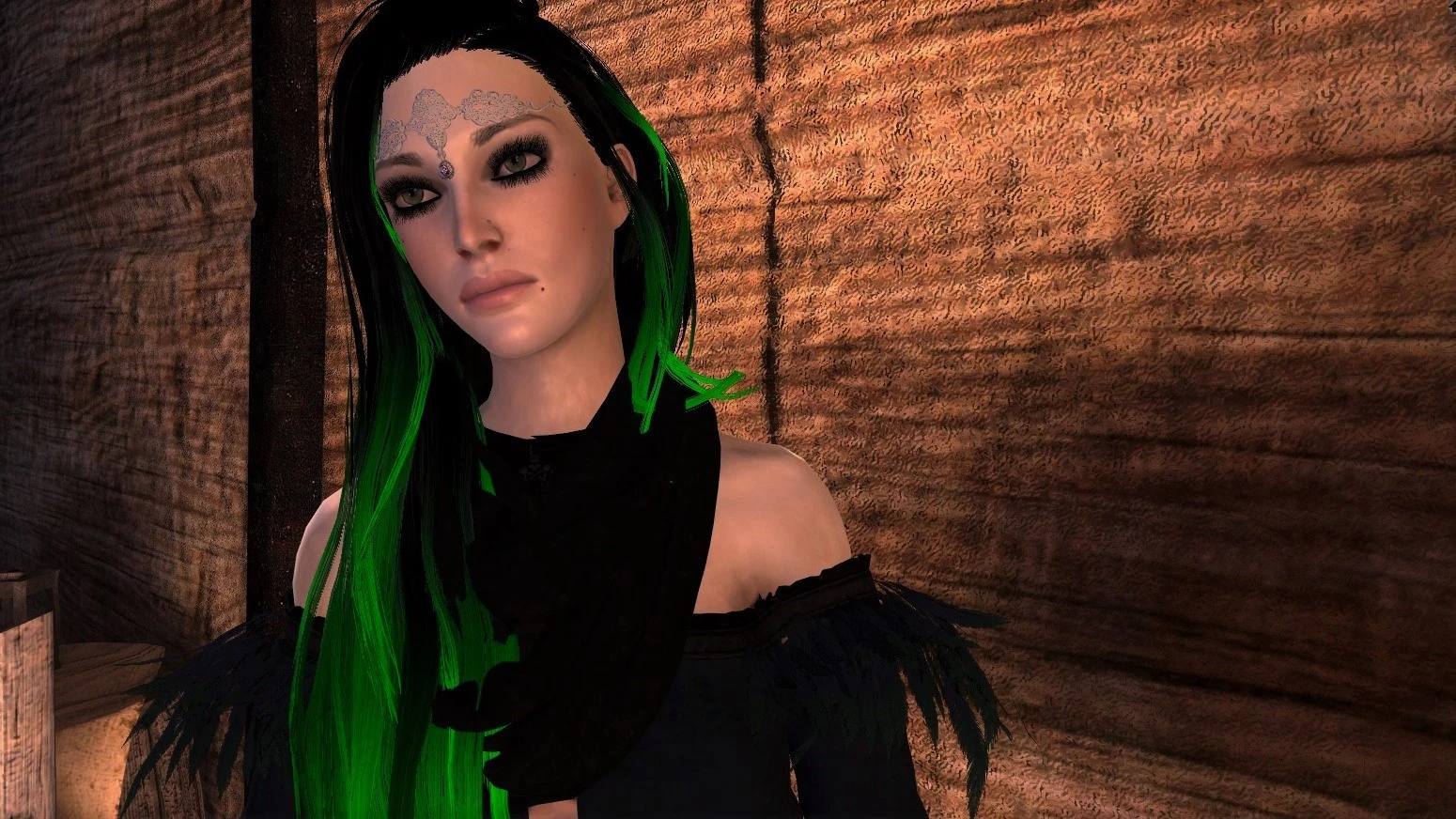
Eyeliner Tattoo - Waterline Makeup
⚪ Last updated 2019Preview
🔍 Analysis
- 👍 4.4% endorsement rate — high engagement, a strong quality signal
- 🏆 #56 of 157 Face and Hair mods in this game by downloads
📋 About This Mod
Makeup lovers rejoice! This adds a tattoo in the character creation menu that allows for tightlining of the eyes (eyeliner on the waterline).
Uploading a personal mod that I hope makeup conscious users will benefit from! I love black smokey eyes and it always bothered me that I couldn't darken eyeliner ontop of dark eyeshadow. Soooo...this mod aims to delineate Hawke’s eyeshadow from their eyeliner through a tattoo on the upper and lower lash line. Though, keep in mind that the eyeliner on the lower lash line is moreso visible as the upper is potentially obscured by lashes.
Through the function of the tattoo slider, eyeliner opacity is adjustable (works bests with black on black color as opposing colors can potentially mute one another). If you prefer a colored waterline that works fine too! Please note that due to the mods I use, this may look different in your game.
Installation:
1. Drag and drop the .erf file in your override folder. If this is your first time using mods, create one in the file path: My Documents > Bioware > Dragon Age 2 > packages > core > override.
2. In the override folder, open the chargenmorph file (I personally prefer notepad). Find <tattoos> & add the line:
<resource name="eyelinertat\eyelinertat_0t"/>
3. Save and close! :)
4. Alternatively, a chargenmorph file has been uploaded in optional downloads. For those without a chargenmorph, please drag and drop both the mod file & the optional download’s chargenmorph file into the override folder. For those using this in conjunction with chargenmorph compiler (due to multiple character creation mods), please see the note in asterisks at the bottom of the page.
Zimpra Female CC Presets
Vaelsmod Chargen Pack
Pineapple Tree Makeup Intensifier
Nightcrawl Hairs
Additional Hair Tints
At First Sight
Fialka Eye Tints
Korcari Grace
Elvish Jewelry Retexture for Accessorize Your Life
SJC Lashes for Zimpra Presets
Multicolored Hair for DA2
Witcher 3 Outfits for FemHawke
<resource name="t1_mue_bk1"/>
<resource name="t1_mue_bk2"/>
<resource name="t1_mue_bk3"/>
**Lastly, if you use chargenmorph compiler & merge additional chargenmorph files AFTER this one, the black eyeshadow may revert to the previous eyeshadow color you had replaced it with. In my optional chargenmorph file provided, I replaced green. This happens as black is not a default character creator eyeshadow color, even though it is available in the game. When you compile chargenmorph files, the default color values are reset. Just simply change the desired eyeshadow color back to black or merge th
📊 Mod Details
- Game
- Dragon Age 2 Mods
- Author
- Elle
- Version
- 1.0
- Downloads
- 8,575
- Endorsements
- 375
- Category
- Face and Hair
- Created
- 9/4/2019
- Updated
- 10/28/2019
🔧 How to Install DA2 Mods
Use DA2 Mod Manager.
📖 Full step-by-step install guide for DA2 →
Visit the official mod page for specific installation instructions for this mod.
🎮 Need cheat codes or console commands? Check ur gaming wiki for DA2 commands, item IDs, and more.
Keep browsing — more DA2 mods await