WyldTats and Skins
⚪ Last updated 2011Preview
🔍 Analysis
- 👍 4.7% endorsement rate — high engagement, a strong quality signal
- 🏆 #6 of 157 Face and Hair mods in this game by downloads
📋 About This Mod
Update - Well, this little file is still getting downloads and endorsements it seems. I am glad for all of the support this mod has gotten, but I need to let everyone know, that as of this time, I won\'t be offering much in the way of support or updates. Life has a way of interfering, and for now, I won\'t be modding anytime soon. ********************************************************* WYLDTATS COMPLETE: Alright, the new file contains all of the WyldTats and Skins stuff to date with a chargenmorph. I have left all of the individual packs under the old versions section for download for those that want the individual packs. If you already have all of the packs, then there is no need to download the complete version, as there is nothing new in it. Just unzip the folder, and follow the installation instructions as found below. If you are using the chargen revamped or another chargenmorph, then follow the instructions as found below on how to edit the chargen to get the tats and skins to work. ------------------------------------------------------------ Update - Tummy_Za\'s scars get smeared! Someone recommended seeing if we could make this happen, I spoke with Tummy, and it seems we can! Under the optional files, you can now find some of Tummy_Za\'s scars with the \"smeared\" blood smear. All credit for those skins and scars goes to Tummy, all we did was add our smear. Thanks to Tummy for the okay on this, and enjoy everyone! I will work on getting the update set up with the chargen revamped, until then, just follow the manual editing instructions found below. Much like our smeared skins, you can mix and match these skins with your favorite tats. A quick note...the Tummy_Za skins work best with males. Technically, they can be applied to a female, but your gal may be sporting some stubble. You have been warned. There is a new tat pack in the works...it will be done when I get some free time on my hands, but keep your eyes peeled! ------------------------------------------------------------ Update - Old School and WyldTats: Smeared So, we have a few new things for you. The Old School Pack is a port of original WyldTats into DA2. Smeared is a custom blood smear made into a reworked package of basic skins. Now you can have your blood smear with a tat to boot! As well, these re-workings will not override the basic ones already in DA2. Chargen Revamped should be updated with the Strikes Back, Old School, and Smeared packs (not certain if the Tummy Za Smeared Pack made the update): http://www.dragonagenexus.com/downloads/file.php?id=2145 There should not be any issues with the new packs, but if you do experience any problems, please let us know so we can get things corrected ASAP. Just add the new erfs as per the main download, add your chargen, and enjoy! BIG NOTE: The Smeared pack were made as skins, and can be used with the tats. You can mix and match your favorite WyldTats
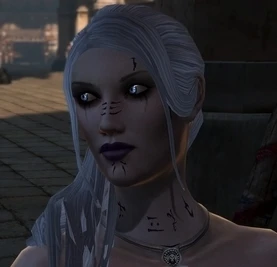
WyldTats and Skins is a Dragon Age 2 mod that adds a tattoo pack and skins for use in the character creator. With over 9,000 endorsements and 191,000 downloads, it's a popular choice for players looking to customize their Hawke's appearance. Last updated in 2011, it remains a staple for CC customization.
✨ Key Features
📊 Pros & Cons
✅ Pros
- Huge community trust: 9,099 endorsements show it's a well-loved mod.
- Massive download count (191k) proves it's been a go-to for years.
- Adds both tattoos and skins, giving you more CC options in one package.
⚠️ Cons
- Last updated in 2011, so it may not be compatible with newer DA2 patches or DLC.
- No detailed feature list, so you'll have to test in-game to see exactly what's included.
If you're a DA2 player who loves tweaking your Hawke's look in the character creator, this mod is for you. It's especially great for roleplayers who want unique tattoos and skin tones to stand out. Even if you're new to modding, this is a safe bet given its popularity.
💡 Beginner Tips
- Make sure to place the mod files in the correct override folder (Documents/BioWare/Dragon Age 2/packages/core/override).
- If you're using other CC mods, check for conflicts in the same override folder to avoid missing textures.
- Since the mod is old, test it in the character creator before starting a new game to ensure it works with your version.
📊 Mod Details
- Game
- Dragon Age 2 Mods
- Author
- Wyldsong and Roma Victa
- Version
- N/A
- Downloads
- 191,874
- Endorsements
- 9,099
- Category
- Face and Hair
- Created
- 3/17/2011
- Updated
- 4/23/2011
🔧 How to Install DA2 Mods
Use DA2 Mod Manager.
📖 Full step-by-step install guide for DA2 →
Visit the official mod page for specific installation instructions for this mod.
🎮 Need cheat codes or console commands? Check ur gaming wiki for DA2 commands, item IDs, and more.
Keep browsing — more DA2 mods await