Ashara Dragon Age 2 Characters
⚪ Last updated 2011Preview
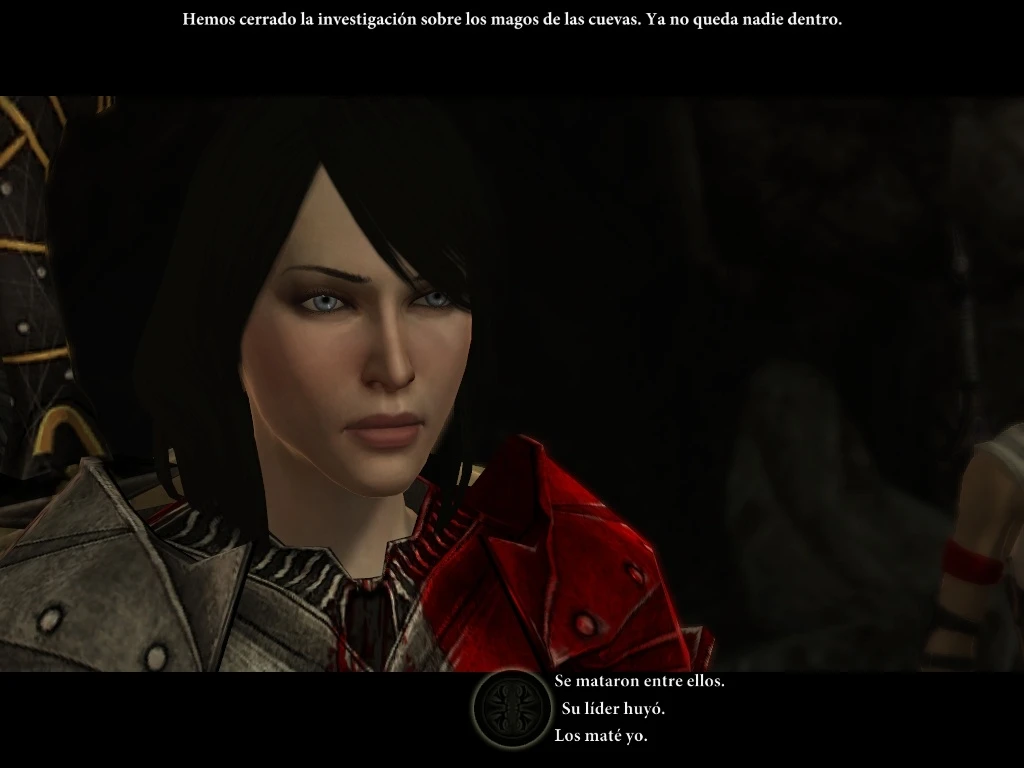
🔍 Analysis
- 👍 2.4% endorsement rate — high engagement, a strong quality signal
- 🏆 #59 of 157 Face and Hair mods in this game by downloads
📋 About This Mod
This file contains the mor files with the faces of my Dragon Age 2 characters: * Heather Hawke: female rogue, hf_Heather_Hawke.mor * Robyn Hawke: female warrior, hf_Robyn_Hawke.mor * Meghan Hawke: female mage, hf_Meghan_Hawke.mor * Kyra
Name: Ashara\'s Dragon Age 2 characters
Version: 4. 0
Date: 09-10-2011
Category: Hair and Face
Requirements:
Author(s): Ashara
Source: http://www.dragonagenexus.com/members/editfile.php?id=2605
Description
===========
This file contains the mor files with the faces of my seven Dragon Age 2 characters:
Heather Hawke: female rogue, hf_Heather_Hawke.mor
Robyn Hawke: female warrior, hf_Robyn_Hawke.mor
Meghan Hawke: female mage, hf_Meghan_Hawke.mor
Kyra Hawke: female rogue, hf_Kyra_Hawke.mor
Alys Hawke: female mage, hf_Alys_Hawke.mor
Garlan Hawke: male warrior, hm_Garlan_Hawke.mor
Laureen Hawke: female rogue, hf_Laureen_Hawke.mor
In the Saves folder I\'ve also added savegames just after the first time of the creation of the characters.
In the chargenmorphcfg file folder I\'ve added a chargenmorphcfg.xml file that contains entries for all the required mods and makes them compatible. To use it, copy it into your override folder and delete any other chargenmorphcfg.xml you have under that folder.
How to use one of these face files to replace your character face
==================================================================
Tools needed:
pyGFF: http://social.bioware.com/project/1936/
Run the editor.exe of the pyGFF tool
Open the savegame you want to edit (make first a backup copy, just in case) by selecting the menu option File -> Open and then select the savegame from your \\My documents\\Bioware\\Dragon Age 2\\Characters\\ folder
Expand 16002 - SAVEGAME_PLAYERCHAR
Expand 16208 - SAVEGAME_PLAYERCHAR_CHAR
Select 16950 - SAVEGAME_PLAYER_MORH
In the Edit box you\'ll see a lot of text. Right click on it and select \"Import from file\"
Select the mor file of the character whose face you want to copy from the \"Face mor files\" of this mod (for example, select hf_Robyn_Hawke.mor if you want to use Robyn\'s face)
Press the Save button under the Edit box
Save changes by selecting the menu option File -> Save As and then overwriting your savegame
IMPORTANT: Using this method you won\'t be able to change the new face at the Black Emporium. If you look at the mirror, your character face will revert to the original one.
The face won\'t revert to the former one in Act 2 and 3, when getting to the Hawke Estate, though.
How to use one of these face files as presets
=============================================
Copy the file Ashara_faces.erf to your override folder \\My documents\\Bioware\\Dragon Age 2\\packages\\core\\override\\
Edit your chargenmorphcfg.xml using Notepad or another text editor (more information here: http://wiki.tesnexus.com/index.php/Installing_cosmetic_mods_for_Dragon_Age)
Go to section
📊 Mod Details
- Game
- Dragon Age 2 Mods
- Author
- SydneyB
- Version
- 4.0
- Downloads
- 8,003
- Endorsements
- 190
- Category
- Face and Hair
- Created
- 4/8/2011
- Updated
- 12/6/2011
🔧 How to Install DA2 Mods
Use DA2 Mod Manager.
📖 Full step-by-step install guide for DA2 →
Visit the official mod page for specific installation instructions for this mod.
🎮 Need cheat codes or console commands? Check ur gaming wiki for DA2 commands, item IDs, and more.
Keep browsing — more DA2 mods await