Shoot and then Quickswap Autohotkey Script
⚪ Last updated 2021Preview
🔍 Analysis
- 🏆 #8 of 11 Utilities mods in this game by downloads
📋 About This Mod
I can't Quickswap that good so I made this: Hold down binded macro to shoot and then switch guns repeatedly. Let go to stop.
Configurable Autohotkey script:
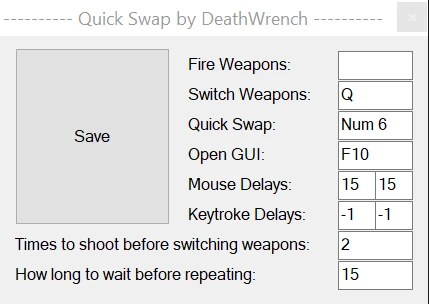
Drag and drop anywhere, run once, configure and then save.
Hold down binded macro to shoot and then switch guns repeatedly. Let go to stop.
Delays, and whatnot have to be configured manually, default for delays will probably be off a bit.
Left click doesn't show up in GUI but it is there, check the QuickSwap.ini that it saves.
~NumpadRight:: ; this is the QuickSwap hotkey, the "~" prefix makes it work with all modifier keys (CTRL, ALT, etc)
setmousedelay, 80, 10 ; Time between mouse clicks
setkeydelay, 100, 10 ; Time between key strokes
Send {Click 4}{q} ; Presses fire weapon key 4 times and then presses switch weapon key
sleep 100 ; Rests for x milliseconds
This is a more basic version but should help understanding what the things below mean.
These are the values I use:
📊 Mod Details
- Game
- Doometernal Mods
- Author
- DeathWrench
- Version
- 1.0
- Downloads
- 315
- Endorsements
- 11
- Category
- Utilities
- Created
- 5/14/2021
- Updated
- 5/14/2021
🔧 How to Install DOOM Eternal Mods
Download from Nexus Mods.
📖 Full step-by-step install guide for DOOM Eternal →
Visit the official mod page for specific installation instructions for this mod.
🎮 Need cheat codes or console commands? Check ur gaming wiki for DOOM Eternal commands, item IDs, and more.
Keep browsing — more DOOM Eternal mods await