Soulstruct Mod Creator
⚪ Last updated 2021Preview
🔍 Analysis
- 👍 4.3% endorsement rate — high engagement, a strong quality signal
- 🏆 #7 of 50 Utilities mods in this game by downloads
📋 About This Mod
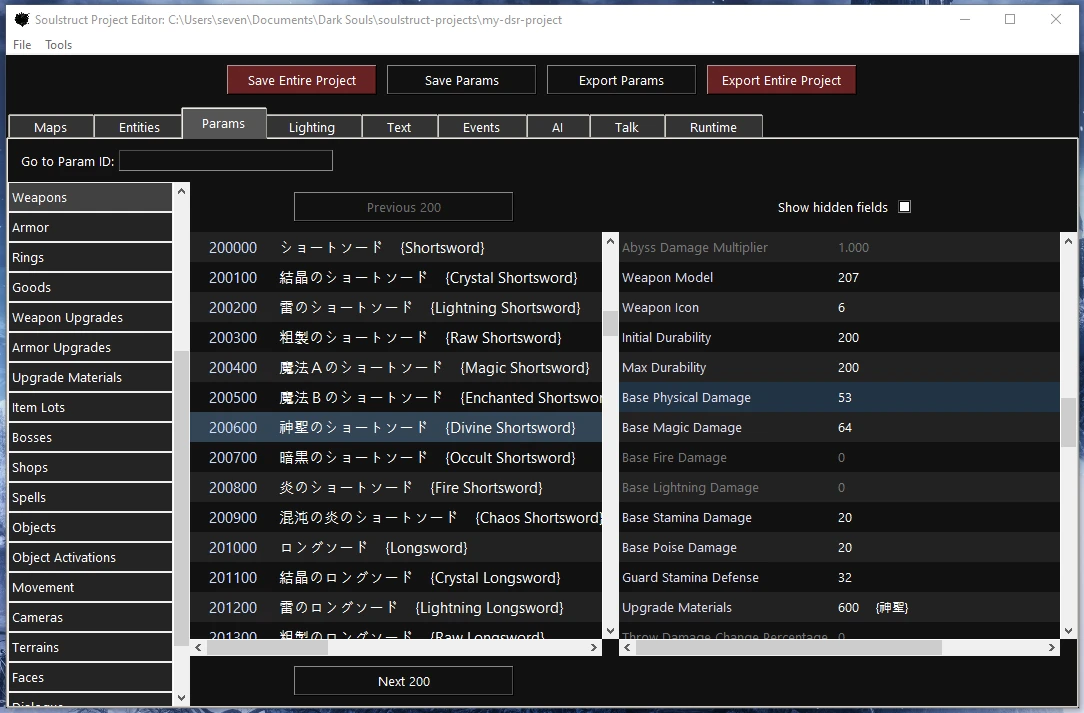
Soulstruct is a many-in-one tool for modding game data and scripts in Dark Souls (either game version). It's a graphical interface built around the Python package of the same name.
Recent updates:
-
[]1. 1. 1: Fixed import bug.
[
]1. 1. 0: Custom script support added, and Bloodborne project bug fixed.[]1. 0. 0: Big internal overhaul, Bloodborne support, and bug fixes.
[]0. 10. 3: Config export fixed (from GUI File menu).
[]0. 10. 2: Errors logged properly, some field name updates.
[]0. 10. 1: Runtime hook fixed.
- 0. 10. 0: Faster runtime hook, pop-out draw group editor, custom enum values, and various linking/bug fixes.NOTE: Your antivirus software may flag the Soulstruct executable as malicious, which is likely due to a combination of the game-hook code and the software used to convert Python code to an executable file (PyInstaller). If you're concerned about it, you can always use the Python module directly from GitHub!
See the GitHub release page for a more comprehensive version history.
Simply run the executable, point it to an empty or existing project directory, and (if it's a new project) point it to the Dark Souls executable for either game version. The mod will ask if you want to import game files. Say yes (and wait a bit), and the window will open, ready for modding. Use the export options at the top or in the File menu to export individual data types or export the entire project. (Note that Params contains a lot of data and take a few seconds to export.) You can also re-import particular game types, re-import everything, and import or export from arbitrary game folders if that's relevant to your setup.
You can use the File > Set as Default Project option to set the current project as the default (or edit the config.py file that will appear next to the executable).
If anything goes wrong, check the contents of the soulstruct.log file that should appear next to the executable before you submit a bug. It will contain the error log from the last time the executable was run.
NOTE: In these early days of Soulstruct, I may occasionally make changes to the internal structure of project files (the .d1s files that store your modded game data). This is necessary as we learn more about what certain unknown variables do. When such a change happens, you may need to export the changed file type (e.g. Maps) from the old version of Soulstruct (to binary game files), then import those binary game files into the new version. You can use the "Export to..." and "Import from..." options in the "File" menu to do this with arbitrary directories rather than exporting to the actual game directory. (If you don't care about that data t
Soulstruct Mod Creator is a graphical utility for modding Dark Souls (either version) and Bloodborne, allowing users to edit and export game files. With 358 endorsements and 8,313 downloads, it's a niche but established tool for modders. Last updated in March 2021, it remains relevant for those seeking a unified interface.
✨ Key Features
📊 Pros & Cons
✅ Pros
- Solid track record: 358 endorsements and 8,313 downloads show it's trusted by the community.
- One tool for multiple games—Dark Souls (both versions) and Bloodborne—saves you from juggling separate editors.
- Graphical interface beats fiddling with raw files; it's a huge time-saver for serious modders.
⚠️ Cons
- Last updated in March 2021, so it might not play nice with newer game patches or modding trends.
- No active updates means potential compatibility issues with current game versions or other mods.
- It's a specialized tool—if you're just dipping toes into modding, the learning curve could be steep.
For Dark Souls and Bloodborne modders who want a unified, graphical way to edit game files without diving into hex editors. If you're a casual player looking for quick tweaks, this might be overkill—it's built for serious modding projects.
💡 Beginner Tips
- Check the mod's forum or comments for any known issues with your specific game version before diving in.
- Since it's a utility, make sure you have the game files extracted and backed up before editing anything.
- If you're new to modding, start with simple edits to understand the workflow before tackling complex changes.
📊 Mod Details
- Game
- Darksoulsremastered Mods
- Author
- Grimrukh
- Version
- 1.1.1
- Downloads
- 8,313
- Endorsements
- 358
- Category
- Utilities
- Created
- 2/6/2020
- Updated
- 3/11/2021
🔧 How to Install Dark Souls Remastered Mods
Download from Nexus Mods.
📖 Full step-by-step install guide for Dark Souls Remastered →
Visit the official mod page for specific installation instructions for this mod.
🎮 Need cheat codes or console commands? Check ur gaming wiki for Dark Souls Remastered commands, item IDs, and more.
Keep browsing — more Dark Souls Remastered mods await