Dark Souls II GUI-based Auto Save Backup
⚪ Last updated 2014Preview
🔍 Analysis
- 👍 4.1% endorsement rate — high engagement, a strong quality signal
- 🏆 #40 of 169 Gameplay Changes mods in this game by downloads
📋 About This Mod
UPDATES: v1. 1 (7/1/2014) - app will now save preferences (save directory, backup directory, update and delete frequency) so you don't have to change them every time the app loads
This is a GUI based program to handle automatic save backups for DS2. Supports custom save/backup directories, backup file management, multiple save files, custom update frequency, instant restore, and more!
I created this program primarily for myself. I have been using other programs, but have wanted a program with a GUI interface that has a few more elaborate features than simply copying files from one directory to another. As such, I made this. But there is no point in me hording it, so I'm sharing it with everyone else :)
Compared to other DS2 save backup programs, this has all of the standard plus a few unique features:
- GUI!
- Automatic save directory detection
- Customizable backup frequency (in minutes)
- Backup file size tracking
- Easy way to manually clear out all existing backups
- Optional automatic cleanup of old backups (in terms of number of backups kept - option to keep under a file size coming soon)
- Support for multiple save files
- Instant backup option when you need a quick backup
- Instant restore option, which will replace your saves with your most recent backups
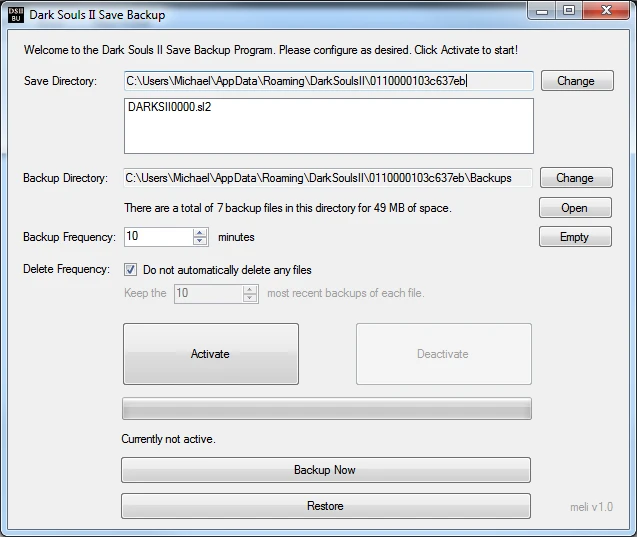
The program is a single .exe file. After opening the program, you will be presented with a screen where you can customize your settings.
- Save Directory - navigate to your desired save directory. This SHOULD automatically detect your save directory, but if it does not you can easily browse for it.
- Backup Directory - this defaults to a Backup folder in the Save Directory. Obviously, you can customize it to whatever you want easily. Empty with the empty button.
- Backup Frequency - how many minutes a backup is created
- Delete Frequency - if you wish to manage your backup directory, you can do so here. By default, no backup files will be deleted, but you can choose to keep a certain number of the most recent backups.
- Activate - start backing up!
- Deactivate - stop backing up!
- Backup Now - create a backup file instantly
- Restore - replace your save file with the most recent backup
BUGS AND FEATURE REQUESTS:
If you come across any bugs or have a request for a feature, feel free to comment on this page, or more directly you can email me at mjmeli94@gmail.com
KNOWN ISSUES: - Trying to either copy or restore the save file while it is being saved may display an unhandled exception error - this isn't a problem and you can ignore it. I will try and hide that.
This program does work w
📊 Mod Details
- Game
- Darksouls2 Mods
- Author
- Meli
- Version
- 1.1
- Downloads
- 2,991
- Endorsements
- 123
- Category
- Gameplay Changes
- Created
- 6/29/2014
- Updated
- 7/2/2014
🔧 How to Install Dark Souls 2 Mods
Download from Nexus Mods.
📖 Full step-by-step install guide for Dark Souls 2 →
Visit the official mod page for specific installation instructions for this mod.
🎮 Need cheat codes or console commands? Check ur gaming wiki for Dark Souls 2 commands, item IDs, and more.
Keep browsing — more Dark Souls 2 mods await