Curved Dragon Greatsword Retexture
⚪ Last updated 2014Preview
🔍 Analysis
- 👍 6.2% endorsement rate — high engagement, a strong quality signal
- 🏆 #52 of 128 Weapons mods in this game by downloads
📋 About This Mod
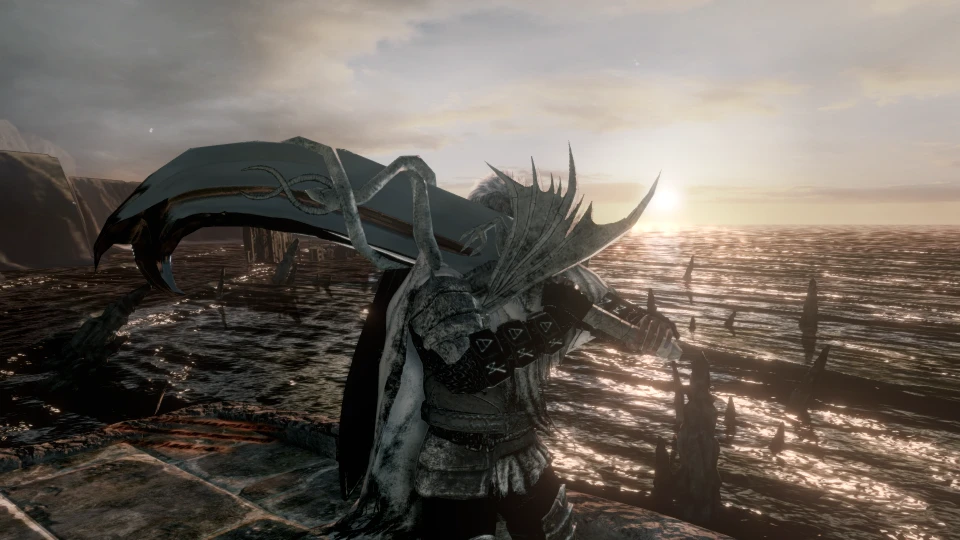
I really loved the curved dragon greatsword, but to me it looked like it had a slab of rock for a blade. This was my attempt to clean up the blade and make it actually look metal, and now it is nearly mirrored, but the color of the blade is actually black. The hilt and dragon were lightened and had the contrast increased to make it easier to distinguish, and it is now more of a white dragon.
This is my first mod that I am posting, forgive me if you notice any issues with it, but please feel free to tell me so that I can post an updated version.
A compact retexture mod for the Curved Dragon Greatsword in Dark Souls 2, featuring a black mirrored blade and weathered white dragon hilt. Textures are properly aligned to fix the vanilla version's issues. With 36 endorsements and 584 downloads, it's a niche but appreciated fix for players who want a cleaner look.
✨ Key Features
📊 Pros & Cons
✅ Pros
- Fixes the vanilla texture alignment, which is a real pet peeve for fashion souls players
- The black mirrored blade looks sleek and fits the dragon theme
- Small but dedicated following (36 endorsements) — it's a niche fix that people appreciate
⚠️ Cons
- Last updated in 2014 — may not be compatible with current game versions or DLC patches
- No screenshots or installation instructions provided, so you're flying blind until you try it
- Only one weapon retextured — if you're not using the Curved Dragon Greatsword, this mod does nothing for you
For Dark Souls 2 players who main the Curved Dragon Greatsword and want a cleaner, more polished look without overhauling the whole game. Skip if you're not using that weapon or if you prefer a more dramatic visual change.
💡 Beginner Tips
- Back up your original texture files before overwriting, so you can revert if you don't like the look.
- Use a mod manager like Mod Organizer 2 to keep track of your texture mods and avoid conflicts.
- Check the mod's file structure to ensure you place the textures in the correct game directory (usually 'parts' folder).
📊 Mod Details
- Game
- Darksouls2 Mods
- Author
- Aether
- Version
- 1.0
- Downloads
- 584
- Endorsements
- 36
- Category
- Weapons
- Created
- 8/31/2014
- Updated
- 8/31/2014
🔧 How to Install Dark Souls 2 Mods
Download from Nexus Mods.
📖 Full step-by-step install guide for Dark Souls 2 →
Visit the official mod page for specific installation instructions for this mod.
🎮 Need cheat codes or console commands? Check ur gaming wiki for Dark Souls 2 commands, item IDs, and more.
Keep browsing — more Dark Souls 2 mods await