Center Deadzone Mod
⚪ Last updated 2023Preview
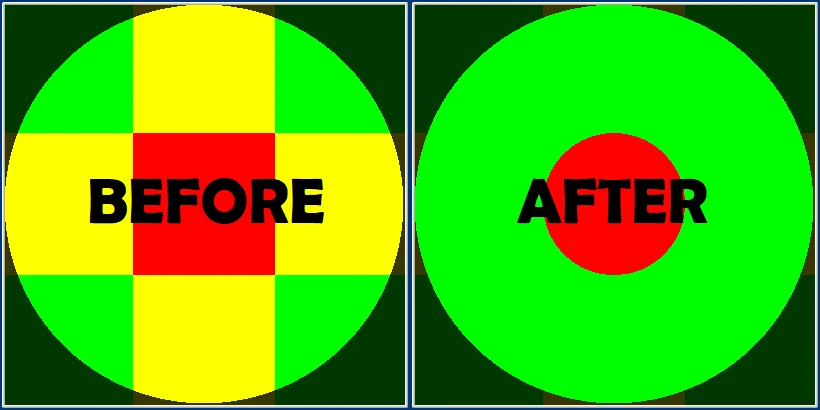
🔍 Analysis
- 👍 2.3% endorsement rate — high engagement, a strong quality signal
- 🏆 #9 of 170 Gameplay Changes mods in this game by downloads
📋 About This Mod
Center Deadzone Mod is only compatible with Dark Souls 2: Scholar of the First Sin.
No Deadzone Mod is compatible with both versions of Dark Souls 2, but requires you to configure your own deadzone profile, most likely through Steam.
Instructions:
0) (Optional) Back up the original DarkSoulsII.exe file.
1) Run DarkSoulsII.poc.exe.
2) In the first window, select the original DarkSoulsII.exe file in your Dark Souls II Scholar of the First Sin\Game directory.
3) In the second window, press Save. It will create a new file called Patched DarkSoulsII.exe in your Game directory.
4) Delete the original DarkSoulsII.exe file.
5) Rename Patched DarkSoulsII.exe to DarkSoulsII.exe.
6) (If you're using the No Deadzone Mod) Configure your own deadzone profile.
If you want to return to the original deadzone implementation, replace the modded DarkSoulsII.exe with the original version you saved, or just delete it, then verify the integrity of your game files using Steam. If using the No Deadzone Mod, disable Steam Input for Dark Souls 2.
The code changes to DarkSoulsII.exe are fully contained to the function that calculates the deadzone, which is almost certainly not checked by the anticheat, so it is extremely unlikely that this mod will cause a softban. There have been no reports to date of softbans from people who use this mod.
@LordRadai for teaching me a lot about Cheat Engine and Ghidra, which made this mod possible, and informing me that redistributing a patched .exe file is against the law
2BrightSparks for developing PatchOnClick, which this mod uses to modify DarkSoulsII.exe
Center Deadzone Mod adjusts Dark Souls 2: Scholar of the First Sin's gamepad deadzone to a 36% radial deadzone, matching other Dark Souls titles for smoother, more precise movement and camera control. This gameplay tweak is for players using controllers who find the default stick response imprecise.
✨ Key Features
📊 Pros & Cons
✅ Pros
- Community-trusted with 685 endorsements and nearly 30k downloads.
- Brings DS2's controller feel in line with the rest of the series—if you've played DS1 or DS3, you'll feel right at home.
- Simple, focused fix that targets a common complaint without bloating your mod list.
⚠️ Cons
- Only affects gamepad users—keyboard and mouse players get nothing from this.
- The 36% deadzone is a specific preference; some players might find it too loose or too tight for their taste.
- Last updated in 2023, so it may not be compatible with future game patches or other controller mods.
For Dark Souls 2 players who use a controller and feel the default stick response is sluggish or imprecise. If you've played other Souls games and noticed the difference, this mod brings DS2 in line. Skip if you play with keyboard and mouse or if you're happy with the default deadzone.
💡 Beginner Tips
- Make sure you're playing Scholar of the First Sin, not the original DS2, as this mod targets that version.
- If you use other controller tweaks, install this mod last to avoid conflicts.
- Test the deadzone in the game's settings menu to see if the new feel suits your controller.
📊 Mod Details
- Game
- Darksouls2 Mods
- Author
- HalfGrownHollow
- Version
- 1.0
- Downloads
- 29,855
- Endorsements
- 685
- Category
- Gameplay Changes
- Created
- 10/23/2023
- Updated
- 11/13/2023
🔧 How to Install Dark Souls 2 Mods
Download from Nexus Mods.
📖 Full step-by-step install guide for Dark Souls 2 →
Visit the official mod page for specific installation instructions for this mod.
🎮 Need cheat codes or console commands? Check ur gaming wiki for Dark Souls 2 commands, item IDs, and more.
Keep browsing — more Dark Souls 2 mods await