Blood Souls - HUD
⚪ Last updated 2015Preview
🔍 Analysis
- 👍 3.5% endorsement rate — high engagement, a strong quality signal
- 🏆 #18 of 172 User Interface mods in this game by downloads
📋 About This Mod
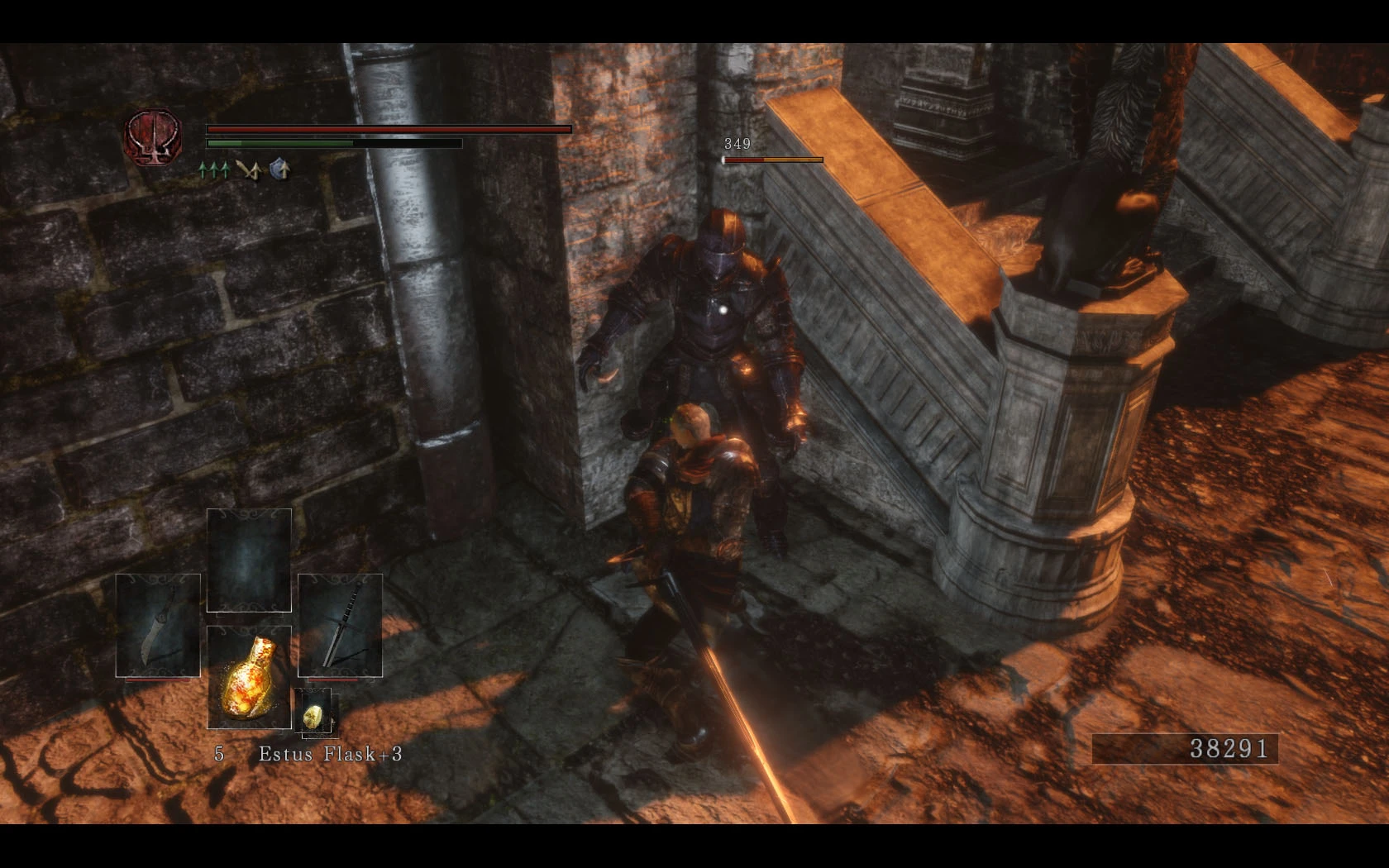
Bloodborne inspired HUD retexture.
What is this?
This mod makes several changes to the HUD that are inspired by Bloodborne and aims at overhauling most parts of the HUD in such a way.
I say inspired because it's impossible to get the exact same look due to limitations in the way Dark Souls II handles its textures. I'd really like to have a glowing orb to show an enemies actual health, but that isn't possible as far as I know (I'd love to be proven wrong!).
The changes that Clean UI makes are incorporated into this mod, since they only consist of some changes to the alpha maps of one file.
Check out this mod for the SoTFS version.
Installation
Just like any other texture mod around here, this one requires GeDoSaTo.
To install, extract the contents of the downloaded archive to path/to/GeDoSaTo/textures/DarkSoulsII/Override and enjoy.
To uninstall, just delete all files you just copied (they are listed further down, too).
Compatibility
Except for Clean UI, this mod is incompatible with any mod that contains one of the following textures:
01d82cb0.(dds|png)
1c829c43.(dds|png)
28c3d77f.(dds|png)
44f4f8ce.(dds|png)
2048c901.(dds|png)
becd99d0.(dds|png)
As usual, the mod you installed the latest will overwrite any previous mods.
Changelog
The following parts of the HUD are changed as of version 0. 1:
version 0. 2:
-
[]removed the ugly lines in loading screens
[
]phantom healthbars now look more similar to those of regular enemies[]removed dark background from phantom names
[]some small tweaks
version 0. 1:
- []targetting reticle
[
]selection for weapons, spells/hexes/miracles, items, arrows etc. in the bottom left corner[]soul counter
[]health and stamina bars of the PC
[]enemies's health bar
ToDo:
- []curse/poison bar thingies
[]all messages
[]menus
Thanks to...
... Durante for GeDoSaTo.
... From Software for the excellent Souls Games.
- []curse/poison bar thingies
- []targetting reticle
📊 Mod Details
- Game
- Darksouls2 Mods
- Author
- Shadowthorne
- Version
- 0.2
- Downloads
- 4,867
- Endorsements
- 168
- Category
- User Interface
- Created
- 4/2/2015
- Updated
- 4/25/2015
🔧 How to Install Dark Souls 2 Mods
Download from Nexus Mods.
📖 Full step-by-step install guide for Dark Souls 2 →
Visit the official mod page for specific installation instructions for this mod.
🎮 Need cheat codes or console commands? Check ur gaming wiki for Dark Souls 2 commands, item IDs, and more.
Keep browsing — more Dark Souls 2 mods await