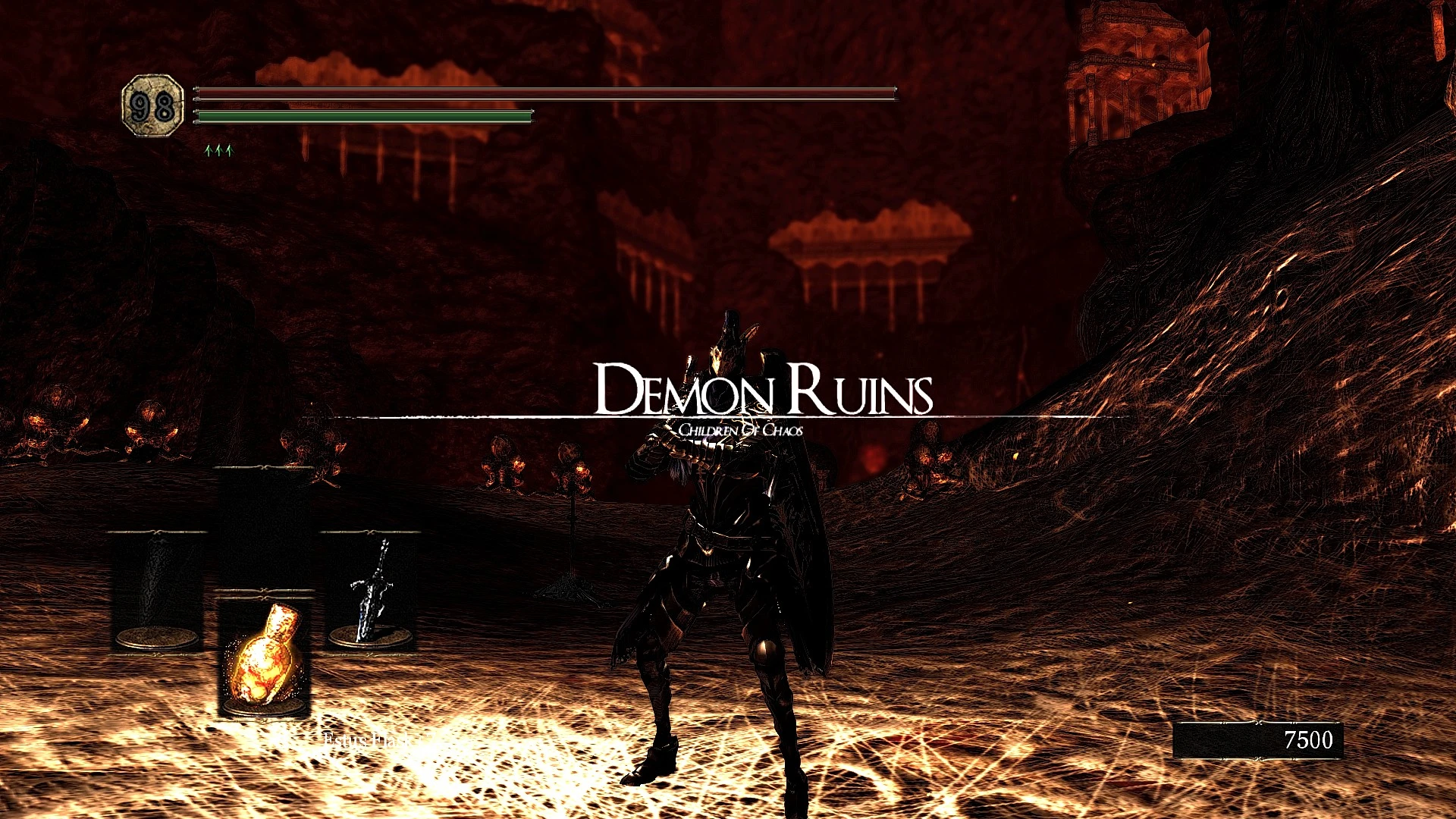
Der Sweet FX preset 2017
⚪ Last updated 2017Preview
🔍 Analysis
- 👍 3.0% endorsement rate — high engagement, a strong quality signal
- 🏆 #10 of 39 Visuals and Graphics mods in this game by downloads
📋 About This Mod
Hi. This is my sweet Fx preset.
I've been tinkering with it a lot and a few places are still not optimal, but I am quite happy with how it turned out. This Preset includes the following fixes(sweetFX 1. 51):
- FXAA - LumaSharpen (Sharpens antialiased edges) - Cineon DPX - VIbrance
(Also keep in mind that I heavily modded my version with hd textures and etc. So don't be suprised if it doesn't look the same fo you.)
ATTENTION: If you want to use this, I recommend to push your ingame brightness to the max( or you prefer pitch black souls?)
Instructions:
1) Download the file 2) extract everything into(its usually here) C:\Program Files (x86)\Steam\steamapps\common\Dark Souls Prepare to Die Edition (into the data folder with the exe file.) 3) Recommended: Set ingame brightness to max!
So apparently people have some issues with the toggle, but fret not!!!!
If you don't know how to toggle the effect DO this:
1. Go to the data Folder find the sweefx_preset txt file 2. Open it with notepad 3. Scroll all the way down to find a section titled "Key settings" 4. There you will see something like this: key_toggle_sweetfx = 145 (number may vary) 5. Remember the number 6. Go to this site: http://www.cambiaresearch.com/articles/15/javascript-char-codes-key-codes 7. FInd your code on the site. For example here 145 means that you can toggle the effect with the scroll lock key. 8. YOu can easily change this, by looking up the key you want to use for toggling the effect. Then replace the number accordingly in the notepad to make it look like this for example: key_toggle_sweetfx = 120 <--- Now the effect will toggle with the f9 key
9. Save the changes
If you want to completly deinstall it: Delete the following files--> SweetFX(folder),SweetFX_x64(folder), d3d9.dll, dxgi.dll, SweeFX_readme, SweetFX_settings, SweetFX_preset
While sweetFX improves the graphics dramatically, this works best with all the other popular mods on nexusmods(DsFix, hdtextures, flora overhaul,...etc.) PS: Yes I am german. If you like this: German engineering ftw. If you hate this: Hans get ze Flammenwerfer
📊 Mod Details
- Game
- Darksouls Mods
- Author
- Leylek
- Version
- 1.1
- Downloads
- 1,512
- Endorsements
- 45
- Category
- Visuals and Graphics
- Created
- 4/12/2017
- Updated
- 5/9/2017
🔧 How to Install Dark Souls Mods
Download from Nexus Mods.
📖 Full step-by-step install guide for Dark Souls →
Visit the official mod page for specific installation instructions for this mod.
🎮 Need cheat codes or console commands? Check ur gaming wiki for Dark Souls commands, item IDs, and more.
Keep browsing — more Dark Souls mods await