Dark Souls PTD SweetFX 1-5-1 Profiles
⚪ Last updated 2014Preview
🔍 Analysis
- 👍 3.0% endorsement rate — high engagement, a strong quality signal
- 🏆 #1 of 39 Visuals and Graphics mods in this game by downloads
📋 About This Mod
- --------------
- I. INTRODUCTION
- --------------
- SweetFX is a universal image improvement and tweaking mod with a goal to provide video processing tools to games in real-time.
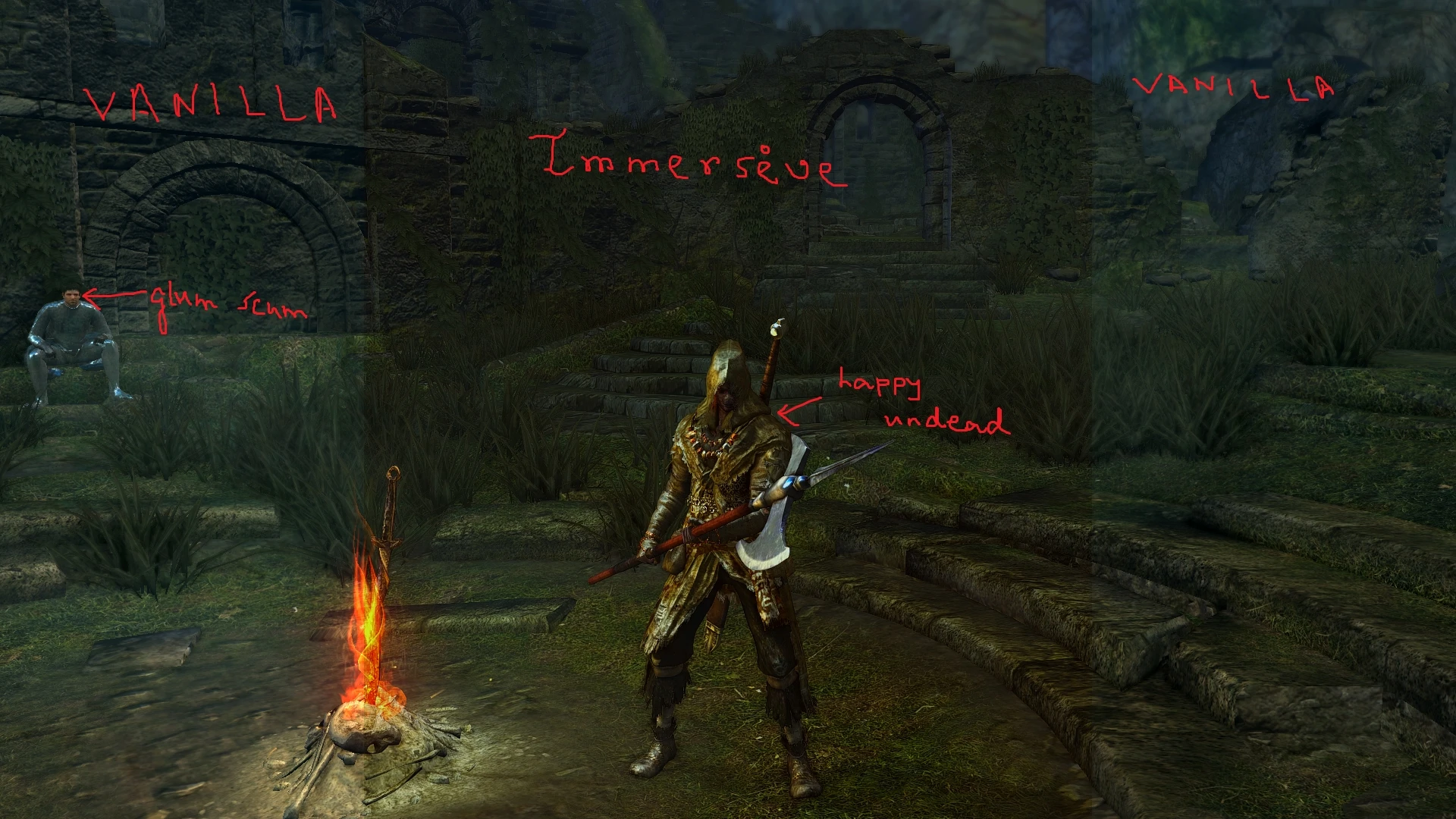
- These are my personal SweetFX profiles for Dark Souls with an objective to provide lore-friendly and realistic aesthetics. I am sharing these profiles so that you can try them and enjoy yourselves. Believe me when I say that screenshots do not do these justice: try them in-game and prepare to be blown away. At the most, it will take you five minutes to try these out.
- Finally, don't forget to ENDORSE and VOTE this mod if you feel it deserving of your praise! Also, spread the word so that others may enjoy the mod as well.
- --------------
- II. DESCRIPTION
- --------------
- There are 2 presets which utilise post-processing effects to perfectly complement the moody lighting of the game:
- 1) Immersive 2) Legacy.
1) The Immersive preset comprises of various tweaks to enhance the visuals subtly, taking care not to cause undesirable distraction to the player. No fancy cinematic effects have been used. SMAA is used instead of FXAA for better approximation and to avoid too much blur. Simulated HDR is used to promote a more dynamic feel, but the intensity is kept balanced so as not to overwhelm the player. Lumasharpen is used to sharpen the image and give it a realistic and rough HD look. The strength is kept low to prevent the anti-aliased edges from becoming jaggy again. Cineon DPX is used in moderated strength to give a sunny look to the image without being overwhelming. Vibrance is used to increase saturation just a little so as to prevent the washed-out look and immerse the player better in the gameworld. Curves is used to increase contrast a little in order to better define highlights and shadows, and to give the metallic objects their characteristic lustre. Also helps prevent the washed-out look. Sepia is used to give the image a slight cold forbidding tint to match the bleak gothic tone of the game.
2) The Legacy preset is designed to provide a dark, cel-shaded appearance, somewhat similar to Demon's Souls and Dark Souls 2. It is meticulously tweaked to fit in with the overall theme of the game. Neither SMAA nor FXAA is used and I would advise against any other form of anti-aliasing as well, to preserve the hand-drawn look of the artstyle. Explosion is used in minute amount to scatter the pixels and render a slight fuzzy look to the image. Cartoon is used to impart a characteristic cel-shaded look that complements the graphic style really well. Technicolor is used to give an archaic, uninviting feel to the land of Lordran. Vibrance is used to desaturate the image a little in order to add to the bleak, hopeless vibe of the game. Curves is used to increase contrast in order to make the highlights and sha
SweetFX 1-5-1 profiles for Dark Souls Prepare to Die Edition provide a post-processing injector that upgrades visuals with negligible performance impact. The mod works with all mods including DSFix and HD textures, making it ideal for players seeking an immersive experience without sacrificing compatibility. Community-backed with 2,016 endorsements and 67,277 downloads.
✨ Key Features
📊 Pros & Cons
✅ Pros
- 2,016 endorsements and 67,277 downloads prove this is a community favorite visual mod.
- Negligible performance impact means prettier graphics without a framerate hit.
- Plays nice with DSFix and HD texture packs, so it fits right into existing setups.
⚠️ Cons
- Last updated in 2014, so it hasn't been tested on modern Windows or GPU drivers.
- SweetFX injectors can conflict with other overlays or ReShade if you stack them.
- Results vary depending on your monitor's calibration and GPU color settings.
For Dark Souls PTD players who already use DSFix and HD textures and want a visual boost without losing performance. If you're on Dark Souls Remastered, skip this—it's built for the original PC port. Not for gameplay changes; purely a graphics enhancement.
💡 Beginner Tips
- Install DSFix first and set it to borderless fullscreen, then drop SweetFX files into the game's DATA folder.
- Disable in-game anti-aliasing before applying SweetFX to avoid double-filtering.
- If colors look off, open SweetFX_settings.txt and tweak saturation and vibrance to taste.
📊 Mod Details
- Game
- Darksouls Mods
- Author
- anandamaypax
- Version
- 2.0
- Downloads
- 67,277
- Endorsements
- 2,016
- Category
- Visuals and Graphics
- Created
- 1/3/2014
- Updated
- 5/9/2014
🔧 How to Install Dark Souls Mods
Download from Nexus Mods.
📖 Full step-by-step install guide for Dark Souls →
Visit the official mod page for specific installation instructions for this mod.
🎮 Need cheat codes or console commands? Check ur gaming wiki for Dark Souls commands, item IDs, and more.
Keep browsing — more Dark Souls mods await