UnpackDarkSoulsForModding
⚪ Last updated 2017Preview
🔍 Analysis
- 👍 3.4% endorsement rate — high engagement, a strong quality signal
- 🏆 #4 of 43 Utilities mods in this game by downloads
📋 About This Mod
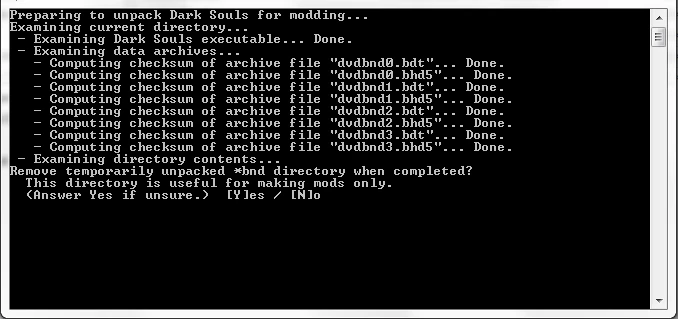
Unpacks Dark Souls 1 archive files for easier modding, by modifying the .exe to patch references to the dvdbnd files so that they refer to files unpacked from the dvdbnd archives instead. Additionally, patches the .exe so that it no longer reads content as DCX-compressed. Finally, it unpacks the dvdbnd archives so that the modified .exe can read from them, and also decompresses the unpacked files.
Once the .exe has been patched and the dvdbnd archives unpacked, the game reads from individual files (texture, scripting, map data, etc.) rather than the 4 dvdbnd archives. This allows mods to be distributed as modified versions of the exact files they modify, rather than having to be packed into modified versions of the entire dvdbnd archives. This also makes combining mods substantially easier.
NOTE: Because this utility modifies an .exe file, some anti-virus programs flag it as suspicious.
Instructions:
It is highly recommended that you start from a fresh installation of Dark Souls 1. If you have previously unpacked your Dark Souls 1 archive files by hand (through hex-editing & Wulf's BND Rebuilder) or automatically (using a previous version of UDSFM), it is recommended that you erase and re-install Dark Souls 1 before using UDSFM. However, if you do not wish to do so, it is still possible to use UDSFM by following the second, more complicated set of instructions below.
Before beginning, make sure you have at least 10GB of free hard-disk space and 1GB of available RAM.
If your archive files are not already unpacked:
[]Make a backup of any saved games. (The tool should not modify or delete these files.)
[]Install and set up DSFix or other .dll-based mods. Some users have reported that installing these mods after unpacking causes crashes.
[]Download UnpackDarkSoulsForModding and place the executable file in your Dark Souls DATA directory.
[]Run UnpackDarkSoulsForModding.exe by double-clicking on it. A command prompt window should appear.
[]Do not close the window until the prompt indicates that the process has completed. Make sure you read any prompts carefully before answering.
[]If you are not using a standard installation, the tool will prompt you for input if it discovers irregularities. Choosing to continue will attempt unpacking, but may crash or p
Unpacks Dark Souls 1 archive files for easier modding, allowing mods to be distributed as raw files instead of packed dvdbnd archives. A popular utility with 9,302 endorsements, ideal for modders who want to work with unpacked game data.
✨ Key Features
📊 Pros & Cons
✅ Pros
- Huge community trust with 9,302 endorsements and 271k downloads.
- Simplifies mod distribution by using raw files instead of packed archives.
- Essential tool for any Dark Souls 1 modder.
⚠️ Cons
- Last updated in 2017, so may not support newer game versions or modding practices.
- Niche utility—only useful if you're actually modding Dark Souls 1.
For mod authors who want to distribute their Dark Souls 1 mods as raw files, and for players who want to install mods that come in unpacked form. Also useful for anyone learning to mod the game and needing to unpack archives.
💡 Beginner Tips
- Make sure you have a backup of your original game files before unpacking anything.
- Use this tool if you're installing a mod that comes as raw files—just drop them into the game directory after unpacking.
- Check the mod's description for any specific instructions on which archives to unpack.
📊 Mod Details
- Game
- Dark Souls Mods
- Author
- HotPocketRemix
- Version
- v2.0.2
- Downloads
- 271,756
- Endorsements
- 9,302
- Category
- Utilities
- Created
- 7/23/2017
- Updated
- 8/1/2017
🔧 How to Install Dark Souls Mods
Use DSFix and manual.
📖 Full step-by-step install guide for Dark Souls →
Visit the official mod page for specific installation instructions for this mod.
🎮 Need cheat codes or console commands? Check ur gaming wiki for Dark Souls commands, item IDs, and more.
Keep browsing — more Dark Souls mods await