Dark Souls Texture Extractor
⚪ Last updated 2017Preview
🔍 Analysis
- 👍 5.9% endorsement rate — high engagement, a strong quality signal
- 🏆 #28 of 43 Utilities mods in this game by downloads
📋 About This Mod
Dark Souls Texture Extractor
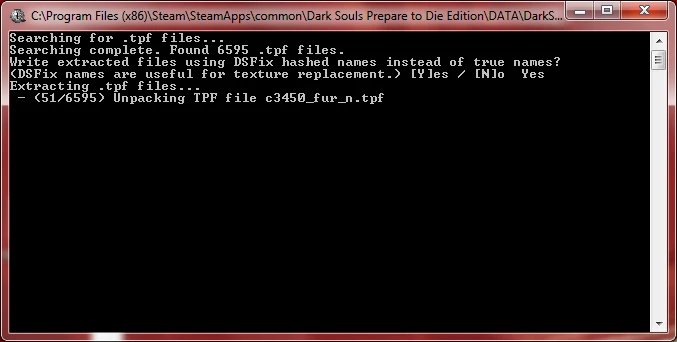
Unpacks Dark Souls 1 texture files from the unpacked game files, bypassing DSFix's texture dump feature to grab all textures all at once. This means the user doesn't have to visit every area, equip every item, etc. to dump their textures; the game does not need to even be started.
Instructions:
Before beginning, make sure you have at least 10GB of free hard-disk space and 1GB of available RAM to run UDSFM, and 2 additional GB of free hard-disk space for the texture files.
-
[]If you have not done so already, use UnpackDarkSoulsForModding to unpack your Dark Souls files. Important Note: Many texture files are inside the bnd files. To make the contents of these files available to the unpacker, you must answer "No" when UDSFM asks if you want to delete temporary files.
[]Place DarkSoulsTextureExtractor.exe and superfasthash.dll in your DATA directory.
[]Run DarkSoulsTextureExtractor.exe by double-clicking on it. A command prompt window should appear.
- Do not close the window until the prompt indicates that the process has completed. Make sure you read any prompts carefully before answering.
The output files are placed in DATA\unpacked-textures and are grouped into three sub-directories, textures for plain texture files, normals for normal maps, and speculars for specular maps. These classifications are based on the true file name (that is, the name of the texture file as it appears in the unpacked files) and so is not guaranteed to be 100% accurate.
Technical Notes:
The distributed library superfasthash is compiled C implementing the SuperFastHash hashing algorithm that DSFix uses to name its texture files. This is implemented in C to provide a significant speed boost over a pure Python implementation.
📊 Mod Details
- Game
- Dark Souls Mods
- Author
- HotPocketRemix
- Version
- v1.0
- Downloads
- 777
- Endorsements
- 46
- Category
- Utilities
- Created
- 10/13/2017
- Updated
- 10/13/2017
🔧 How to Install Dark Souls Mods
Use DSFix and manual.
📖 Full step-by-step install guide for Dark Souls →
Visit the official mod page for specific installation instructions for this mod.
🎮 Need cheat codes or console commands? Check ur gaming wiki for Dark Souls commands, item IDs, and more.
Keep browsing — more Dark Souls mods await