PS3 Interface Icons
⚪ Last updated 2012Preview
🔍 Analysis
- 👍 4.2% endorsement rate — high engagement, a strong quality signal
- 🏆 #7 of 268 User Interface mods in this game by downloads
📋 About This Mod
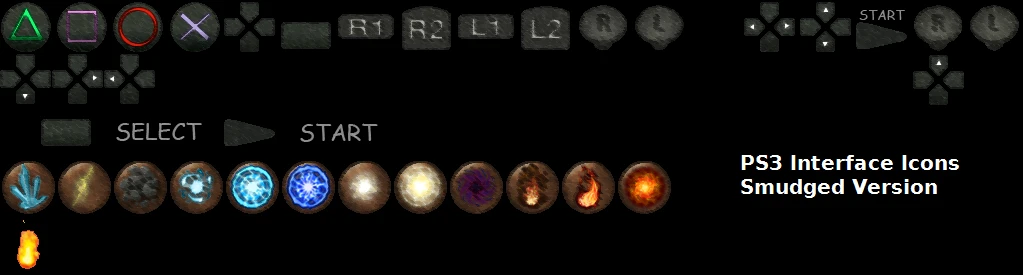
New textures for the official PS3 controller. Replacing the default in game Xbox buttons with custom made PS3 ones. Choose from three different view-styles in game, simple/liquified/smudged. Recommended for use with MotionJoy Xbox 360
LIKE THIS TEXTURE MOD? THEN PLEASE ENDORSE, VOTE, COMMENT, AND SHARE! ^_^
What is this?
New textures for the official PS3 controller. Meant for use with MotionJoy Xbox 360 Controller Emulator mode, makes all the buttons in game appear with PS3 controller button icons instead of Xbox ones.
Why get it?
These textures beat the confusion from the default in-game Xbox button icons. Those are replaced by the ones in this mod. Best used when playing with a PS3 controller using MotionJoy.
Requirements
-Requires DS fix installed. Find it here: http://darksouls.nexusmods.com/mods/19
-IMPORTANT! In DSfix.ini set enableTextureOverride value to 1 otherwise the textures won't work!
-IMPORTANT! TURN OFF ANTI-ALIASING IN-GAME after installing DSFix!
-To install, first extract chosen zip file anywhere, and put PNG file to folder "/DATA/dsfix/tex_override" inside your dark souls game directory. Or just use the Nexus Mod Manager.
-Using MotionJoy Xbox 360 Emulator mode HIGHLY RECOMMENDED as the icon displaying is built around that setup.
You will find MotionJoy here: http://www.motioninjoy.com/download
Version History
v1-Official release. Simple Version Only.
v2-First update.
Simple Version: Tried to minimize icon outline graininess, looks much better now.
Liquified Version: Released this version for some variety, result looks great.
v3-All textures updated! Now all of the Xbox icons including the arrow pad & start/select buttons are PS3 icons! New Smudged version also released for some more variety.
-Fix any pixel graphic mistakes.
-Suggestions?
Extra & Thanks
Official link to mod (YOU ARE HERE):
http://darksouls.nexusmods.com/mods/200
Thank you for considering this texture mod! I will try my best to make it better in any way I can, so tell me how I can improve!
Good luck! You'll need it in Dark Souls.
LIKE THIS TEXTURE MOD? THEN PLEASE ENDORSE, VOTE, COMMENT, AND SHARE! ^_^
The bottom half of this texture (the light brown icons with the crystal/magic stuff) are from an altered version of (DS HD Interface Icons by Mordhar) and Xbox 360 HD Interface Icons by iwa360. Not sure if they actually do anything, but I left them there because they look cool. I only claim credit for the top half of the texture, containing the custom PS3 icons that I made. If there are any concerns, contact me and I will remove the bottom half f
📊 Mod Details
- Game
- Dark Souls Mods
- Author
- XULTRAX
- Version
- 3
- Downloads
- 45,746
- Endorsements
- 1,926
- Category
- User Interface
- Created
- 11/2/2012
- Updated
- 11/3/2012
🔧 How to Install Dark Souls Mods
Use DSFix and manual.
📖 Full step-by-step install guide for Dark Souls →
Visit the official mod page for specific installation instructions for this mod.
🎮 Need cheat codes or console commands? Check ur gaming wiki for Dark Souls commands, item IDs, and more.
Keep browsing — more Dark Souls mods await