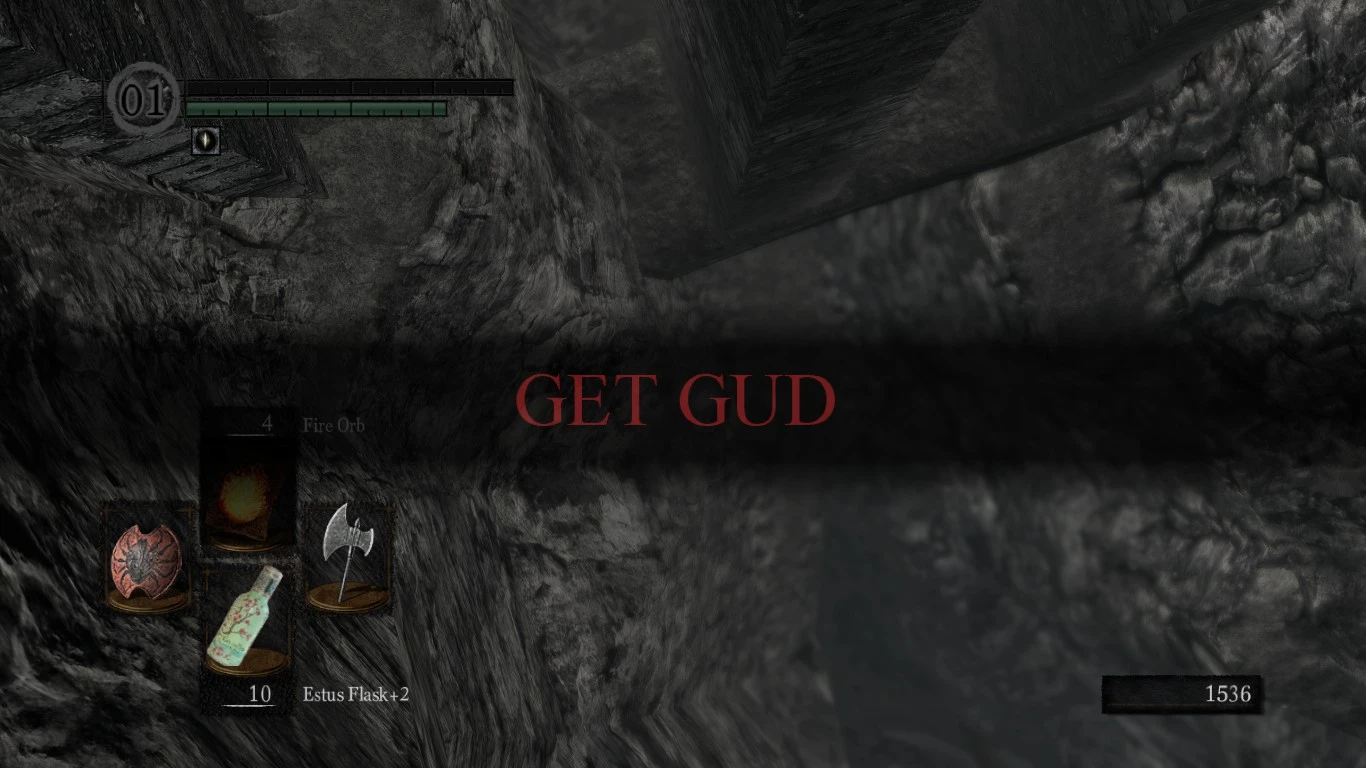
GET GUD death message
⚪ Last updated 2013Preview
🔍 Analysis
- 🏆 #167 of 268 User Interface mods in this game by downloads
📋 About This Mod
This simply replaces the default \\\"YOU DIED\\\" death message to \\\"GET GUD\\\"
Installation : You need DSFix installed. Put "3abef6fc.png" in "C:\Program Files (x86)\Steam\steamapps\common\Dark Souls Prepare to Die Edition\DATA\dsfix\tex_override\". Finally you need to open DSFix.ini and set "enableTextureOverride" to 1
📊 Mod Details
- Game
- Dark Souls Mods
- Author
- BillyB0y
- Version
- N/A
- Downloads
- 430
- Endorsements
- 29
- Category
- User Interface
- Created
- 7/31/2013
- Updated
- 7/31/2013
🔧 How to Install Dark Souls Mods
Use DSFix and manual.
📖 Full step-by-step install guide for Dark Souls →
Visit the official mod page for specific installation instructions for this mod.
🎮 Need cheat codes or console commands? Check ur gaming wiki for Dark Souls commands, item IDs, and more.
Keep browsing — more Dark Souls mods await