True Minimalist HUD
⚪ Last updated 2021⚠️ Install Order · 1 step
Install in this order, then this mod last — most mods fail to load without their framework and dependencies in place.
Preview
🔍 Analysis
- 👍 4.8% endorsement rate — high engagement, a strong quality signal
- 🏆 #27 of 133 User Interface mods in this game by downloads
📋 About This Mod
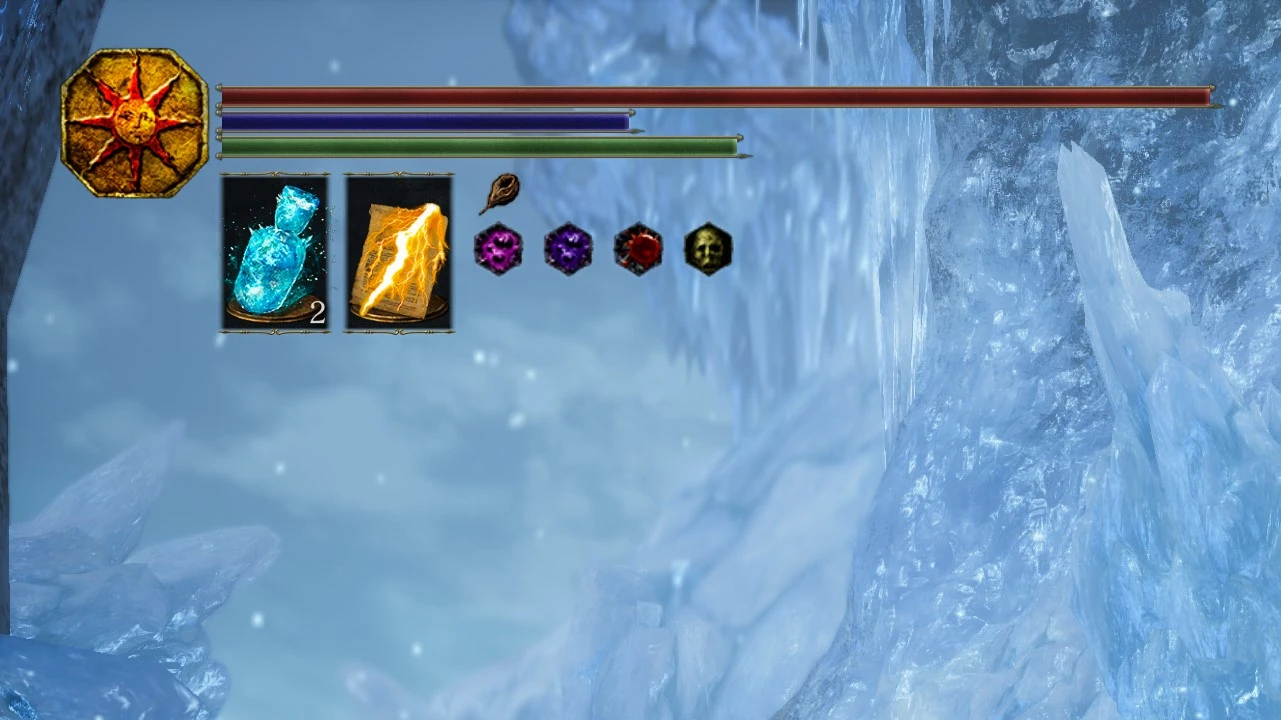
This mod cleans up the HUD and only keeps the essential components for gameplay.
Goal: The goal of this mod is to create a HUD design that is as seamless and unobtrusive as possible. This design allows users to capture/record and enjoy gameplay without distracting HUD elements.
Features: The features of this HUD include resized and repositioned health/stamina/FP bars, hidden status ailment build-up bars with repositioned icons, removed left and right-hand weapon boxes, removed all character status icons except invasion eye and seed, removed item names, removed soul count box, and an optional spell box. (There are 2 versions of this mod, one with the spell box, and an even more simplified version without the spell box.)
Overall, any unnecessary junk has been removed.
Installation:
1.) Unpack your game with UXM (https://www.nexusmods.com/sekiro/mods/26)
2.) Drag and drop the files into the menu folder and choose to replace/overwrite
3.) Hit patch in UXM
Installation video can be found here: https://youtu.be/hBo2ne8x5Ak
True Minimalist HUD removes non-essential elements from Dark Souls 3's interface, leaving only core gameplay components. With 183 endorsements and 3,793 downloads, it's a niche quality-of-life mod for players seeking a cleaner screen. Last updated in February 2021, it remains a straightforward option for HUD decluttering.
✨ Key Features
📊 Pros & Cons
✅ Pros
- Community-trusted with 183 endorsements and nearly 4,000 downloads
- Does exactly what it says—no bloat, just a cleaner HUD
- Lightweight and doesn't require extra mods to work
⚠️ Cons
- Last updated in 2021—might not be compatible with the latest game patches
- Limited to HUD changes; no customization options
For Dark Souls 3 players who want a distraction-free screen without losing critical info. Perfect for immersion-focused runs or streamers who prefer minimal UI. Skip if you need configurable HUD elements or frequent updates.
💡 Beginner Tips
- Back up your original HUD files before installing, just in case you want to revert.
- Check if the mod requires a mod engine like DS3 Mod Engine; if so, follow its setup first.
- Test in a low-stakes area to ensure the HUD still shows health and stamina clearly.
📊 Mod Details
- Game
- Dark Souls 3 Mods
- Author
- Joel LeVecque or Seriously Casual
- Version
- 1.0.0
- Downloads
- 3,793
- Endorsements
- 183
- Category
- User Interface
- Created
- 2/15/2021
- Updated
- 2/15/2021
🔧 How to Install Dark Souls 3 Mods
Download from Nexus.
📖 Full step-by-step install guide for Dark Souls 3 →
Visit the official mod page for specific installation instructions for this mod.
🎮 Need cheat codes or console commands? Check ur gaming wiki for Dark Souls 3 commands, item IDs, and more.
Keep browsing — more Dark Souls 3 mods await