Keyboard Icons
⚪ Last updated 2018⚠️ Install Order · 1 step
Install in this order, then this mod last — most mods fail to load without their framework and dependencies in place.
Preview
🔍 Analysis
- 👍 2.7% endorsement rate — high engagement, a strong quality signal
- 🏆 #2 of 133 User Interface mods in this game by downloads
📋 About This Mod
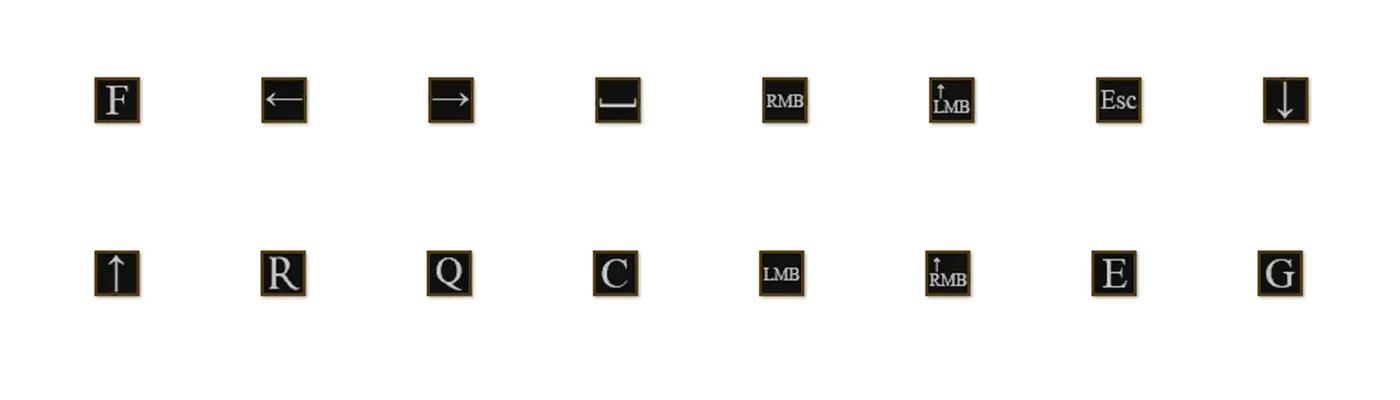
This icons are made of DS font and a bit stylized. But they are pretty "pixelized", so If it's necessary I would make them in common font
There are some issues with letters. For example: it shows Roll as "Q",which is not fixable, but if there is a bigger problem- write a report
Installation:
1. After Installing iGP11 you have to launch iGP11.exe on your desktop.
2. Set it up for DS3.
3. Launch the game through this app.
4. Close the game.
5. Go to your game directory.
6. Open my mod's rar file.
7. Move tex_override folder to your Dark Souls III>Game->iGP11
Some of these icons may not match to the actual buttons, but this is not fixable, because gamepads have less buttons and some of them are making several actions.
Keyboard Icons is a UI mod for the PC version that replaces default key icons with custom ones. With 2,501 endorsements and 94,139 downloads, it's a popular choice for players seeking a fresh look. Last updated in 2018, it remains a simple cosmetic enhancement for interface personalization.
✨ Key Features
📊 Pros & Cons
✅ Pros
- Community favorite with 2,501 endorsements – clearly a lot of players dig it.
- Massive download count (94k) shows it's been tried and tested by many.
- Lightweight UI tweak that doesn't mess with gameplay – just swaps icons.
⚠️ Cons
- Last updated in 2018 – might not play nice with newer game patches.
- No detailed description or install guide – you're on your own for setup.
- Only changes icons for PC – console players get nothing, and it's purely cosmetic.
For PC players who want a fresh look at their keyboard prompts without overhauling the whole UI. If you're tired of the default icons and want something different, this is a quick fix. Skip if you're after gameplay changes or play on console.
💡 Beginner Tips
- Since it's a simple icon swap, just drop the files into your game's data folder – no mod manager needed.
- Check if your game version is compatible, as the mod hasn't been updated since 2018.
- If you're using other UI mods, test for conflicts – icon mods can clash with overhaul mods.
📊 Mod Details
- Game
- Dark Souls 3 Mods
- Author
- OmenBlackbeard
- Version
- 1.0.2
- Downloads
- 94,139
- Endorsements
- 2,501
- Category
- User Interface
- Created
- 9/28/2018
- Updated
- 10/2/2018
🔧 How to Install Dark Souls 3 Mods
Download from Nexus.
📖 Full step-by-step install guide for Dark Souls 3 →
Visit the official mod page for specific installation instructions for this mod.
🎮 Need cheat codes or console commands? Check ur gaming wiki for Dark Souls 3 commands, item IDs, and more.
Keep browsing — more Dark Souls 3 mods await