The Whole Shebang - 100 percent all save slots
⬇ Download on Nexus ModsPreview
About This Mod
This is no longer recommended to use online.
Warning / Update
They have changed their anticheat. These files are no longer recommended to use online.
All information below is left unchanged for archival purposes.
Introduction
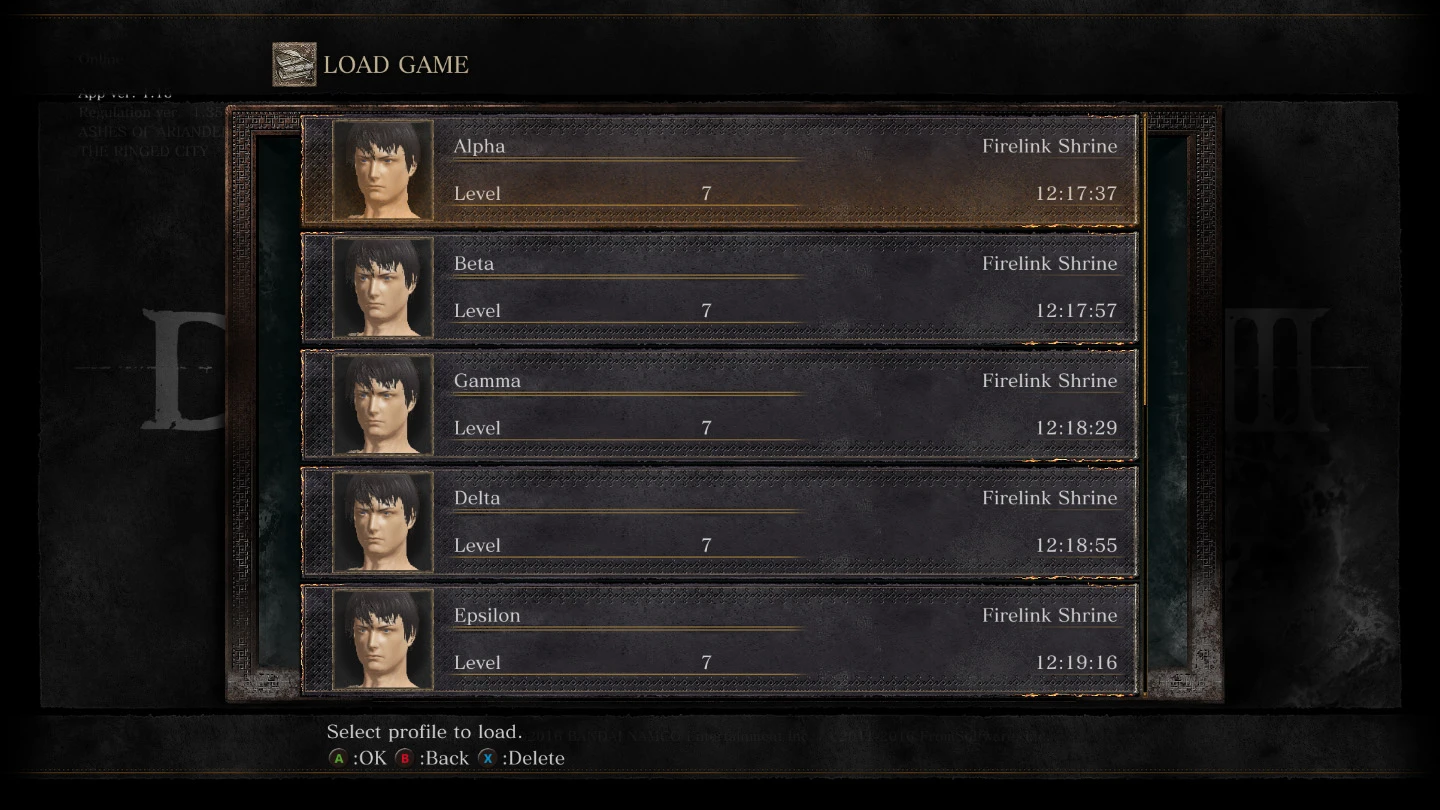
This is a 100% save with all slots populated for testing and making PVP builds, with everything you need to get going. I got tired of replaying the game and swapping out files. Includes DLC. This can safely be used online if installed correctly.
These are modified versions of https://www.nexusmods.com/darksouls3/mods/19" rel="nofollow noopener" target="_blank">RobWeeaboo's Infinite Possibilities saves, specifically the "Wanderer" and "Wanderess". I have also included a link to the software that is needed to properly integrate saves.
- []Level 7 / Male / Warrior OR Level 6 / Female / Sorcerer []NG+0 []All bonfires unlocked and bosses defeated []All weapons / armor / rings obtained []Boss souls haven't been used []No weapons upgraded []Estus fully upgraded []All Rosaria respecs available []Greirat's quest fully completed, ashes given to handmaid []Includes both DLC
How to Install
Follow the same installation process to integrate all saves!
This will take a few minutes, as you will have to load into all ten save slots one at a time. This is a necessary step to ensure that the save will be properly integrated.
It may be possible to get invalid data if you do not install saves correctly. Follow this guide exactly to ensure that you will have a working save.
Detailed guide:
- [] Download this mod and extract it []Download https://mega.nz/#!sKARVLQT!lMRPA3IaTakeU0b-T2eGBLfzbHgCmd... rel="nofollow noopener" target="_blank">this tool and extract it []Switch to offline mode in steam []Launch Dark Souls, do not press anything, []Alt+tab out of the game []Launch the DS3Manager tool and go to patch > allow integration (see pictures for example) []You should should get a box saying the game was successfully patched. Leave the tool running. []Open the Windows Start Menu and type 'run' and press enter []In the window that appears, type '%appdata%' and press enter []Open the DarkSoulsIII folder []Open the folder with the numbers [] Backup your existing save (rename it or move it to a safe folder) []Copy the included save file over []Return to Dark Souls and load EVERY slot, one at a time, sit and the bonfire and get back up [] If you don't load a slot now, the game will detect that it's not 'yours' and prevent you from loading it later []Close Dark Souls 3 and the tool, then restart Steam in online mode [] Enjoy
If there are multiple folders with numbers, that means multiple different accounts have used this installation of Dark Souls 3. You will have to first determine which folder is yours before continuing.
If you cannot find the DarkSoulsIII folder, you will have to look elsewhere. I can not provide advice on this, as I have never had these issues personally.
Simplified guide:
- []Download this mod and https://mega.nz/#!sKARVLQT!lMRPA3IaTakeU0b-T2eGBLfzbHgCmd... rel="nofollow noopener" target="_blank">this tool []Launch in offline mode []Patch the game []Copy the save over []Load each slot []Close everything and launch in online mode
After you correctly install the save, you can move it in or out of the folder as you desire, swapping it with other saves. If you want to, you can make a backup of the save after installing it, but before using it, so that you don't have to go through the process again if you run out of slots.
If you are worried about installing the save incorrectly and getting softbanned, you can make another, disposable steam account and family-share with it!
More Information
You can respec and change your appearance at Rosaria.
I have named each slot using the Greek alphabet in order to make it easy to keep track of the characters. If you do not like these names, you can easily change them with C. E., which I used that to make this file. However, it is not recommended to alter your character's appearance with C. E. as that may will lead to a ban.
I have been used this save for over 5 months with absolutely no issues, however I cannot take responsibility if you have any issues with this, use at your own risk. If you have any issues please put in a bug report or leave a comment.
Known inconveniences in male warrior save:
- []Pale tongues and some other items are in the storage box with auto-refill off, you'll have to enable refill or get them out manually. []The Kiln of the First Flame bonfire is unlit, to begin ng+ go through the Flameless Shrine bonfire first, then link the flame.
I will not be making more mules from scratch, but if you have a mule that you'd like me to convert to all-slots, ask! I can probably do that since it doesn't take nearly as long as making one from scratch.
Invalid Data / Penalization
Please read the following if you are concerned about invalid data or penalization.
What is invalid data and how do I avoid it?
- []Whenever you launch the game in online mode, a copy of your save is uploaded to the servers. The servers only keep one save recorded per user. []Every Tuesday, the latest copy is scanned for weird or suspicious data. The tested saves are clean, and while the untested saves should also be clean, I cannot guarantee them. []Incorrect installation of a save may result in either a broken save or the triggering of invalid data. []Check weekly for at least a month after installing a new save to ensure the save is clean and installed correctly.
What do I do if I get an invalid data warning?
- []If your save triggers the scan, you will get an "invalid data" warning, not a ban. []You can take this opportunity to delete your save and create a new save with a new character. []You will continue to see the invalid data message for a while but it will go away after about a month. Only use a guaranteed clean save in the meantime, preferably by deleting the offending save file and starting the game fresh. []Every Tuesday your save will be scanned again. If the save is detected as invalid while you still have an invalid data message, you will be penalized / softbanned.
And how softbans work:
- []Some actions can result in instant softbans. This save has nothing to do with that. []After a softban, you will only be connected to other softbanned players. []It is possible to get unbanned. I don't know how or why.
Credits etc.
Credit goes to
- []https://www.nexusmods.com/darksouls3/users/6989657" rel="nofollow
...
Mod Details
- Game
- Dark Souls 3
- Author
- Charmics
- Version
- 0.d
- Downloads
- 15,539
- Endorsements
- 410
- Category
- Miscellaneous
- Last Updated
- 6/25/2018
How to Install Dark Souls 3 Mods
Use UXM or Mod Engine. Most mods replace game files.
Visit the Nexus Mods page for specific installation instructions for this mod.
⭐ Rate & Review
FAQ
Is The Whole Shebang - 100 percent all save slots safe to download?
Linked from Nexus Mods which scans all files for viruses. Always download from the official source.
Does this mod work with the latest game update?
Last updated 6/25/2018. Check the official download page for version compatibility.
Where can I learn more about Dark Souls 3 modding?
Check our complete Dark Souls 3 modding tools guide for step-by-step setup instructions.