Dualsense (PS5) Button Icons for Dark Souls III
⚪ Last updated 2021⚠️ Install Order · 1 step
Install in this order, then this mod last — most mods fail to load without their framework and dependencies in place.
Preview
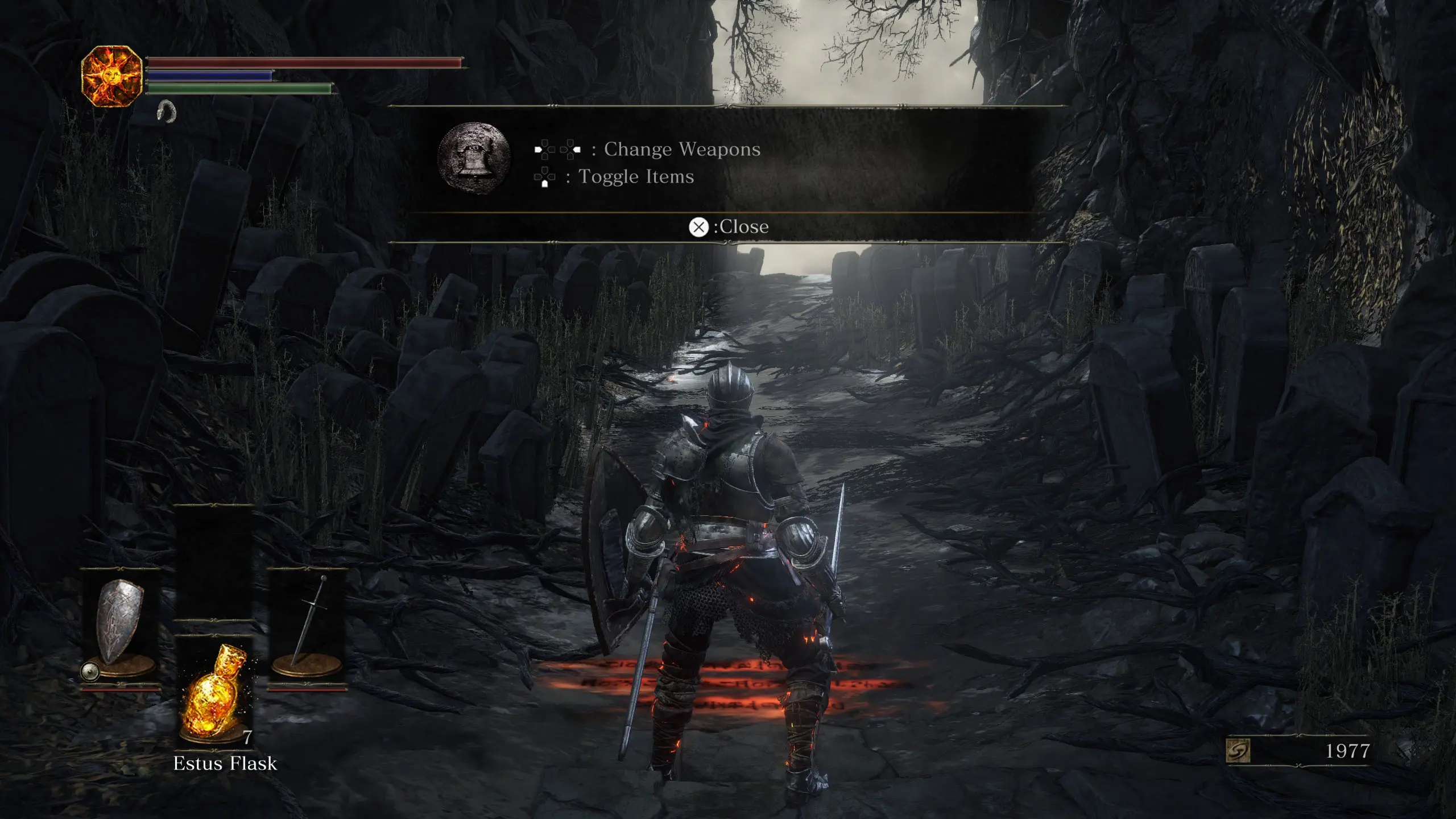
🔍 Analysis
- 👍 2.3% endorsement rate — high engagement, a strong quality signal
- 🏆 #11 of 133 User Interface mods in this game by downloads
📋 About This Mod
This mod was made to work with UXM: UXM at Sekiro: Shadows Die Twice Nexus - Mods and community (nexusmods.com)
Also works with DS3 Mod Engine:DS3 Mod Engine at Dark Souls 3 Nexus - Mods and Community (nexusmods.com)
This mod changes the button prompts in the game to those of the Dualsense controller.
If you would like to use my icons anywhere else you can find a download for the source files in the downloads section.
This UI mod replaces Dark Souls III's button prompts with DualSense (PS5) controller icons. It's a straightforward cosmetic swap for players using a PS5 controller. With 280 endorsements and 12,035 downloads, it's a niche but popular choice. Last updated in May 2021, it may not be compatible with the latest game patches.
✨ Key Features
📊 Pros & Cons
✅ Pros
- Community-approved with 280 endorsements and over 12k downloads.
- Does exactly what it says—no bloat, just the icon swap.
- Great for PS5 controller users who want visual consistency.
⚠️ Cons
- Last updated in May 2021—might break with newer game patches.
- Only changes button icons, no other UI improvements.
For Dark Souls III players who use a DualSense controller and want the on-screen prompts to match their input device. Skip if you're on keyboard/mouse or prefer the original Xbox-style icons.
💡 Beginner Tips
- Make sure to back up your original game files before replacing anything, in case you want to revert.
- If you're using a mod manager like Vortex, check if it supports this mod for easier installation.
- Verify the mod's file structure matches your game's installation directory to avoid issues.
📊 Mod Details
- Game
- Dark Souls 3 Mods
- Author
- Ignire
- Version
- 2
- Downloads
- 12,035
- Endorsements
- 280
- Category
- User Interface
- Created
- 4/23/2021
- Updated
- 5/6/2021
🔧 How to Install Dark Souls 3 Mods
Download from Nexus.
📖 Full step-by-step install guide for Dark Souls 3 →
Visit the official mod page for specific installation instructions for this mod.
🎮 Need cheat codes or console commands? Check ur gaming wiki for Dark Souls 3 commands, item IDs, and more.
Keep browsing — more Dark Souls 3 mods await