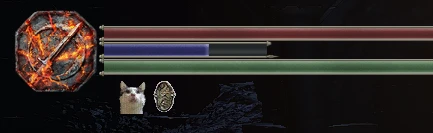
Demon's Souls PS3 - Cat Ring Icon
⚪ Last updated 2021⚠️ Install Order · 1 step
Install in this order, then this mod last — most mods fail to load without their framework and dependencies in place.
Preview
🔍 Analysis
- 🏆 #101 of 133 User Interface mods in this game by downloads
📋 About This Mod
Replaces the Dark Souls III Cat Ring Icon with the Demon's Souls one.
The precious cat of Demon's Souls is back!
INSTALLATION
- Download iGP11
- Install iGP11
- Locate your DarkSoulsIII.exe file
- Click on the texture menu
- Set override mode to "override".
- Click on the arrow on the right side of the bar shown in the image below.
- It should open up a folder called "tex_override"
- Copy the contents of the zip inside the folder
- It should be installed, now you can launch the game in iGP11 if you set it up correctly.
- Click on the green LAUNCH button to start the game.
UNINSTALL
- Follow the steps on opening up the "tex_override" folder.
- Delete the .dds file.
Thanks for reading!
📊 Mod Details
- Game
- Dark Souls 3 Mods
- Author
- Beauclaire
- Version
- 1.0
- Downloads
- 226
- Endorsements
- 18
- Category
- User Interface
- Created
- 6/2/2021
- Updated
- 6/2/2021
🔧 How to Install Dark Souls 3 Mods
Download from Nexus.
📖 Full step-by-step install guide for Dark Souls 3 →
Visit the official mod page for specific installation instructions for this mod.
🎮 Need cheat codes or console commands? Check ur gaming wiki for Dark Souls 3 commands, item IDs, and more.
Keep browsing — more Dark Souls 3 mods await