Clearer covenant icons
⚪ Last updated 2017⚠️ Install Order · 1 step
Install in this order, then this mod last — most mods fail to load without their framework and dependencies in place.
Preview
🔍 Analysis
- 👍 3.8% endorsement rate — high engagement, a strong quality signal
- 🏆 #36 of 133 User Interface mods in this game by downloads
📋 About This Mod
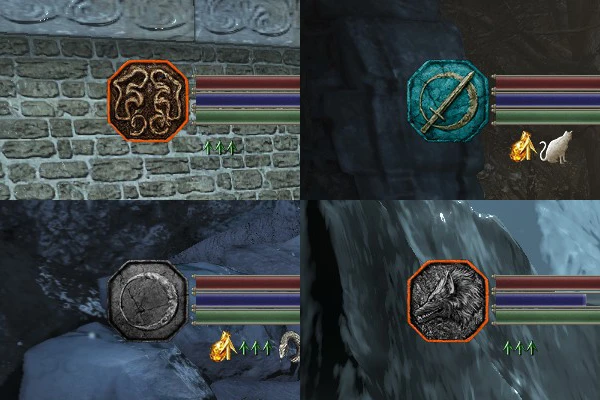
An alternation of ember/hollow effect on HUD covenant icon to give it a clearer look - now ember gives it an orange outline and hollowing switches it into grayscale. Blue Sentinel icon, which was already almost grey, was remade in Way of the Blue colors. Fire and hollowing on the covenant icon might be cool and all, but this version is for people who prefer their HUD clear and pretty.
Updated for Ringed City: now game uses another file to store covenant icons in, so the old version no longer does anything. Remove it if you want and use the new one instead.
This small UI mod replaces the ember/hollow covenant icons with clearer versions for Dark Souls 3. It's a simple visual improvement for players who find the default icons hard to distinguish. With 91 endorsements and 2,382 downloads, it has a modest but dedicated following, though it hasn't been updated since 2017.
✨ Key Features
📊 Pros & Cons
✅ Pros
- Community-approved with 91 endorsements and over 2,300 downloads.
- Does exactly what it says—no bloat, just clearer icons.
- Perfect for players who struggle to tell covenant states at a glance.
⚠️ Cons
- Last updated in 2017—may not be compatible with the latest game patches.
- Only affects covenant icons, so if you wanted a broader UI overhaul, this isn't it.
- No screenshots or detailed install instructions provided by the author.
For Dark Souls 3 players who find the default covenant icons confusing or hard to read, especially during PvP. If you're a completionist or frequent covenant user, this small tweak can save you from misreading your status. Skip if you're looking for a full UI overhaul—this is purely a clarity fix.
💡 Beginner Tips
- Since this mod only changes icons, make sure to back up your original game files before replacing them.
- If you're using a mod manager, you can install this manually by dropping the files into the game's directory.
- Check the mod's compatibility with your game version—since it's from 2017, it might not work with the latest patches.
📊 Mod Details
- Game
- Dark Souls 3 Mods
- Author
- Iris of the White
- Version
- 1.1
- Downloads
- 2,382
- Endorsements
- 91
- Category
- User Interface
- Created
- 12/2/2016
- Updated
- 4/2/2017
🔧 How to Install Dark Souls 3 Mods
Download from Nexus.
📖 Full step-by-step install guide for Dark Souls 3 →
Visit the official mod page for specific installation instructions for this mod.
🎮 Need cheat codes or console commands? Check ur gaming wiki for Dark Souls 3 commands, item IDs, and more.
Keep browsing — more Dark Souls 3 mods await