DebugManager
⚪ Last updated 2024Preview
🔍 Analysis
- 🏆 #31 of 33 Utilities mods in this game by downloads
📋 About This Mod
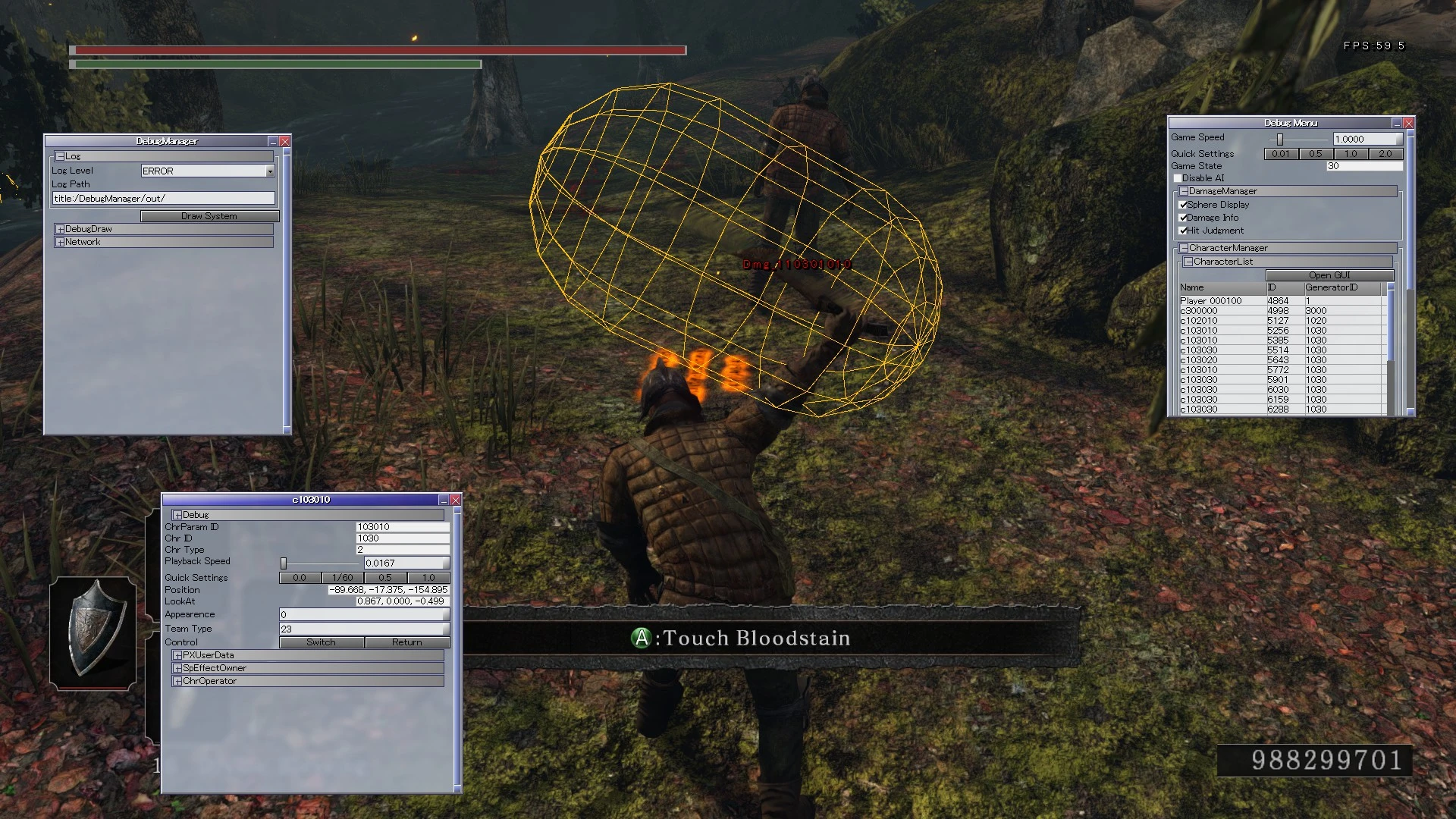
DS2 debugging tools. This lets you see hitboxes, map collisions, control enemies and many more things. Mainly for mod authors, but can be fun to mess around with for casual players too.
DebugManager is a debugging tool for Dark Souls II Scholar of the First Sin. It's main usage is to make mod development easier. It's main features are:
1) Enemy Control
2) Hitbox display
3) Map/character collision display
This mod has a Discord server dedicated to it!
Installation
-
[]Download the mod from GitHub. NexusMod marks the files as unsafe due to the nature of this mod being a DLL wrapper.
[
]Pick the right version of DebugManager, DebugManager.rar if you don't use DS2LightingEngine, or if you use a version up to v0. 8. 10, pick DebugManager_LE.rar otherwise[]Create a backup of DarkSoulsII.exe
[]Run DebugManagerPatcher on the original game's executable (drag and drop DarkSoulsII.exe on DebugManagerPatcher.exe)
[]Rename DarkSoulsII_patched.exe to DarkSoulsII.exe
If you don't use other DLL mods:
- []Rename DebugManager_v2. 0.dll to DINPUT8.dll, drag and drop both the DLL, the DebugManager folder, userconfig.properties and the font folder inside the Game folder (where DarkSoulsII.exe is located)
-
[]Download Lazy Loader by ChurchGuard (https://www.nexusmods.com/darksouls3/mods/677) and install by following the mod page instructions
[
]Drag and drop the DebugManager folder, userconfig.properties and the font folder inside the Game folder (where DarkSoulsII.exe is located)[]Drag and drop DebugManager_v2. 0.dll inside the dllMods folder
-
[]Press L3 + Start or F10 (can be changed in userconfig.propeties) to toggle the Debug GUI
[]Press L3 + R3 to enable Debug Dash. While Debug Dash is active, the player character with move at triple the game's speed and have its gravity entirely disabled.
[]When any Debug GUI is open, right click in the main game window (outside of GUI windows) to bring up a PopUp menu with some extra actions (such as FPS cap, FPS display)
Enemy Control Guide
Attacks:
-
[]DebugManager will map up to 6 of the available inputs for each attack cateogry, which are:
[
]Action set 1 (EnemyBehavourFirst)[]Action set 2 (EnemyBehaviourSecond)
[]Special combat actions, such as ranged attacks (EnemyBehaviourThird)
- Combo attacks (EnemyComboBehaviour)
Holding down L
-
[]DebugManager will map up to 6 of the available inputs for each attack cateogry, which are:
📊 Mod Details
- Game
- Dark Souls 2 Mods
- Author
- Radai
- Version
- v2.1.1
- Downloads
- 0
- Endorsements
- 0
- Category
- Utilities
- Created
- 3/10/2024
- Updated
- 3/10/2024
🔧 How to Install Darksouls 2 Mods
Download from Nexus Mods.
📖 Full step-by-step install guide for Darksouls 2 →
Visit the official mod page for specific installation instructions for this mod.
🎮 Need cheat codes or console commands? Check ur gaming wiki for Darksouls 2 commands, item IDs, and more.
Keep browsing — more Darksouls 2 mods await