Dark Souls 2 Save Game Backup Tool
⚪ Last updated 2014This mod may not work until the author updates it. Check for an update, or see the rollback guide.
Preview
🔍 Analysis
- 👍 5.2% endorsement rate — high engagement, a strong quality signal
- 🏆 #3 of 33 Utilities mods in this game by downloads
📋 About This Mod
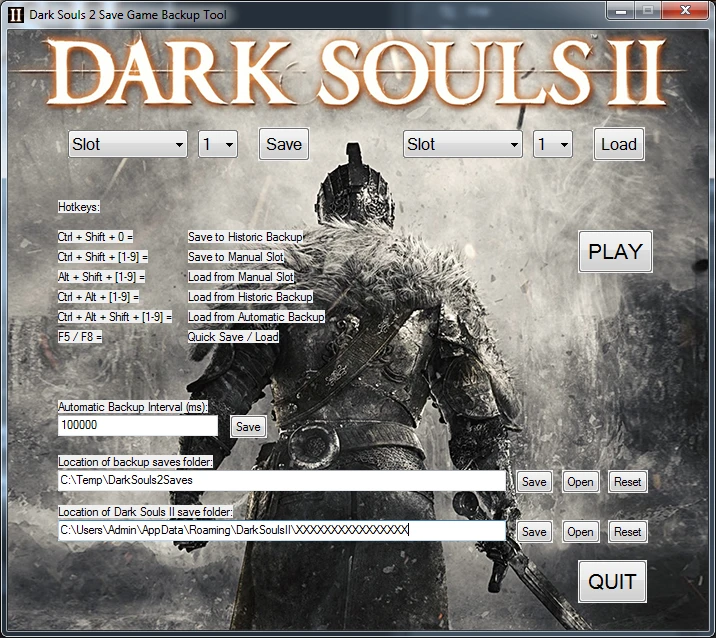
Backup and reload save games. Features automatic history, manual history, and save slots. Program is simple to run. Simply open .rar file and run .exe file. NOTE: Hotkeys only work when Dark Souls II is active and GUI prompts only display
Please note that some antivirus may indicate that there are trojans in this file. These are false positives and relate to all/most AutoHotKey executables. I trust AutoHotKey 100% and I assure you that I have included no malicious code. However, if you are still unsure or you are using a PC that is not yours and don't want to be responsible for any problems then air on the side of caution and don't use my program.
Trojan/Writos.df
http://www.herdprotect.com/autohotkey_l_install.exe-baf135c988dbd3f19cca92638c1b3e335455d8c5.aspx
Installation and Usage: Run DS2_Savegame_Backup.exe from any folder.
Backups can be saved and loaded via either dropdown boxes or via hotkeys.
You need to quit your current game before loading backups.
Hotkeys will only function when Dark Souls II is the active window.
Recommended to run Dark Souls II in 'Borderless', as overlay messages will not appear when running 'Fullscreen'.
Save Game Backup Functions: Automatically makes backups of your save games every 2. 5 minutes (150000ms). However, this value can be changed by entering a new value into the "Automatic Backup Interval (ms)" field. Multiply the value you would like in minutes by 600000 or the value in seconds by 1000.
eg 30 seconds = 30000 or 1 minute = 60000.
I will change this in a future update to be a more palatable representation of the desired time.
Keeps a historic record of 40 save files for automatic backup and 20 for manual historic (any number older than 9 cannot be restored via menus or hotkeys and must be retrieved manually).
Save and load backups into specific slots (1-9).
Save Game Folder Location: The Dark Souls II save game folder should be automatically detected and will be saved. If your games are being saved in an alternative directory for whatever reason or the program fails to detect your folder, it can be entered into the location provided.
It should look something like this: C:|Users|Admin|AppData|Roaming|DarkSoulsII|XXXXXXXXXXXXXXXX (the folder where DARKSII0000.sl2 is stored)
Once saved this location will be remembered even after exiting Dark Souls 2 Save Game Backup Tool. Saving an incorrect file path will cause the program to stop working. If you accidentally save something here incorrectly or this program doesn't seem to be working click '
📊 Mod Details
- Game
- Dark Souls 2 Mods
- Author
- DarkSouls4u2
- Version
- 1.2b
- Downloads
- 19,209
- Endorsements
- 996
- Category
- Utilities
- Created
- 5/16/2014
- Updated
- 5/23/2014
🔧 How to Install Darksouls 2 Mods
Download from Nexus Mods.
📖 Full step-by-step install guide for Darksouls 2 →
Visit the official mod page for specific installation instructions for this mod.
🎮 Need cheat codes or console commands? Check ur gaming wiki for Darksouls 2 commands, item IDs, and more.
Keep browsing — more Darksouls 2 mods await