Dark Souls II FOV Fix (for original game and Scholar of the First Sin)
⚪ Last updated 2015Preview
🔍 Analysis
- 👍 3.9% endorsement rate — high engagement, a strong quality signal
- 🏆 #11 of 69 Visuals and Graphics mods in this game by downloads
📋 About This Mod
Play Dark Souls II (original & Scholar of the First Sin) with correct FOV!These files modify the way the games work, so use them at your own risk
Dark Souls II FOV Fix (for original game and Scholar of the First Sin)
Description:
Play Dark Souls II with correct FOV!
/!\ These files modify the way the games work, so use them at your own risk /!\
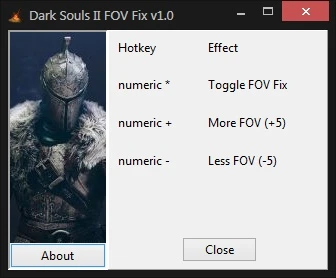
Launch the exe (choose the one that goes with the version of the game you want to play), launch Dark Souls II, press to toggle the FOV Fix on, and adjust your FOV with the and keys. The FOV is increased/increased by 5 degrees at each keypress (default FOV is set at 75).
Known Issues:
- Sometimes the FOV Fix won't work, simply close the program and relaunch it (no need to close the game)
Changelogs:
- Version 1. 0: Initial release
Design by Dr4Wm4N
LUA scripts by jim2point0 and Zanzer (were found on Cheat Engine forums)
These programs were made by Cheat Engine
www.cheatengine.org
📊 Mod Details
- Game
- Dark Souls 2 Mods
- Author
- Dr4Wm4N
- Version
- 1.0
- Downloads
- 7,695
- Endorsements
- 298
- Category
- Visuals and Graphics
- Created
- 4/15/2015
- Updated
- 6/20/2015
🔧 How to Install Darksouls 2 Mods
Download from Nexus Mods.
📖 Full step-by-step install guide for Darksouls 2 →
Visit the official mod page for specific installation instructions for this mod.
🎮 Need cheat codes or console commands? Check ur gaming wiki for Darksouls 2 commands, item IDs, and more.
Keep browsing — more Darksouls 2 mods await