Daggerfall Compass Replacers
⚪ Last updated 2019Preview
🔍 Analysis
- 👍 5.4% endorsement rate — high engagement, a strong quality signal
- 🏆 #80 of 169 Models and Textures mods in this game by downloads
📋 About This Mod
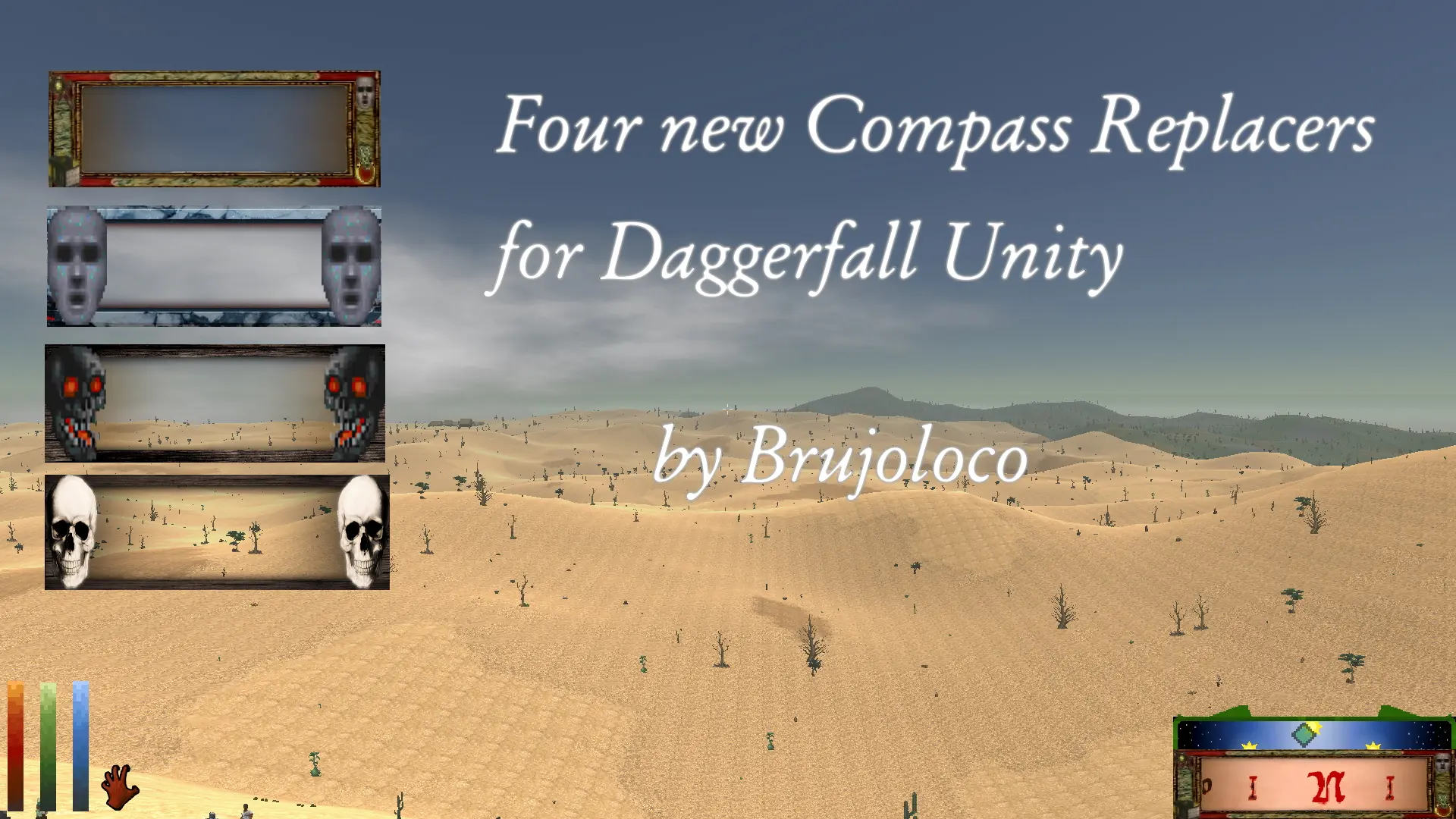
A small set of 4 replacers for the in game compass!
One for my Warlock Necromancer play through with some nice skulls alongside 3 more related to magic items in the world.
Any commentary or criticism please comment! I love feedback!
To install simply drop the files:
COMPASS. IMG.png
COMPBOX. IMG.png
into the IMG folder which should be on the DaggerfallUnity_Data/StreamingAssets/Textures
I have included in this small pack 4 replacers, a Necromancer one with two skulls and 3
themed to magic items in the wonderful world of Daggerfall.
Just pick one!
If you do not have the IMG folder there, then please, create one and drop the images there
Super easy!
If you want to uninstall the compass, then just delete these two files and that should
If you want to have more compass types, please write back! I will happily try to
create some more if time permits!
I love feedback!
Big hug from the lonely Isthmus!
Daggerfall Compass Replacers is a compact cosmetic mod that swaps the in-game compass with 4 new designs. With 85 endorsements and 1,570 downloads, it's a niche pick for players wanting a fresh look. Last updated in 2019, it remains a simple texture replacement.
✨ Key Features
📊 Pros & Cons
✅ Pros
- Small but dedicated following (85 endorsements) — players who grab it seem to like it.
- Downloads are solid (1,570) for a niche cosmetic mod, so it's been tried by a decent chunk of the community.
- Does exactly what it says: swaps the compass with 4 new looks, no bloat.
⚠️ Cons
- Last updated in 2019 — might not play nice with newer Daggerfall Unity builds, so check compatibility.
- No screenshots or install notes in the description, so you're flying blind until you try it.
- Only 4 replacers — if you don't dig the designs, you're out of luck.
For Daggerfall players who want a fresh look at the compass without overhauling the whole UI. If you're into tiny cosmetic tweaks and don't mind a bit of trial and error, this is for you. Skip if you want gameplay changes or need modern updates.
💡 Beginner Tips
- Since it's a texture replacer, just drop the files into your Daggerfall Unity 'Mods' folder or replace the originals — but back up the originals first.
- If you're using Daggerfall Unity, make sure the mod is compatible with your version; if not, you might need to manually adjust the file paths.
- Try each compass design in-game to see which one fits your HUD setup — some might be harder to read than others.
📊 Mod Details
- Game
- Daggerfallunity Mods
- Author
- Brujoloco
- Version
- 1.0
- Downloads
- 1,570
- Endorsements
- 85
- Category
- Models and Textures
- Created
- 8/18/2019
- Updated
- 8/18/2019
🔧 How to Install Daggerfall Unity Mods
Download from Nexus Mods.
📖 Full step-by-step install guide for Daggerfall Unity →
Visit the official mod page for specific installation instructions for this mod.
🎮 Need cheat codes or console commands? Check ur gaming wiki for Daggerfall Unity commands, item IDs, and more.
Keep browsing — more Daggerfall Unity mods await