Basic Roads
⚪ Last updated 2024⚠️ Install Order · 1 step
Install in this order, then this mod last — most mods fail to load without their framework and dependencies in place.
Preview
🔍 Analysis
- 👍 2.2% endorsement rate — high engagement, a strong quality signal
- 🏆 #1 of 200 Gameplay mods in this game by downloads
📋 About This Mod
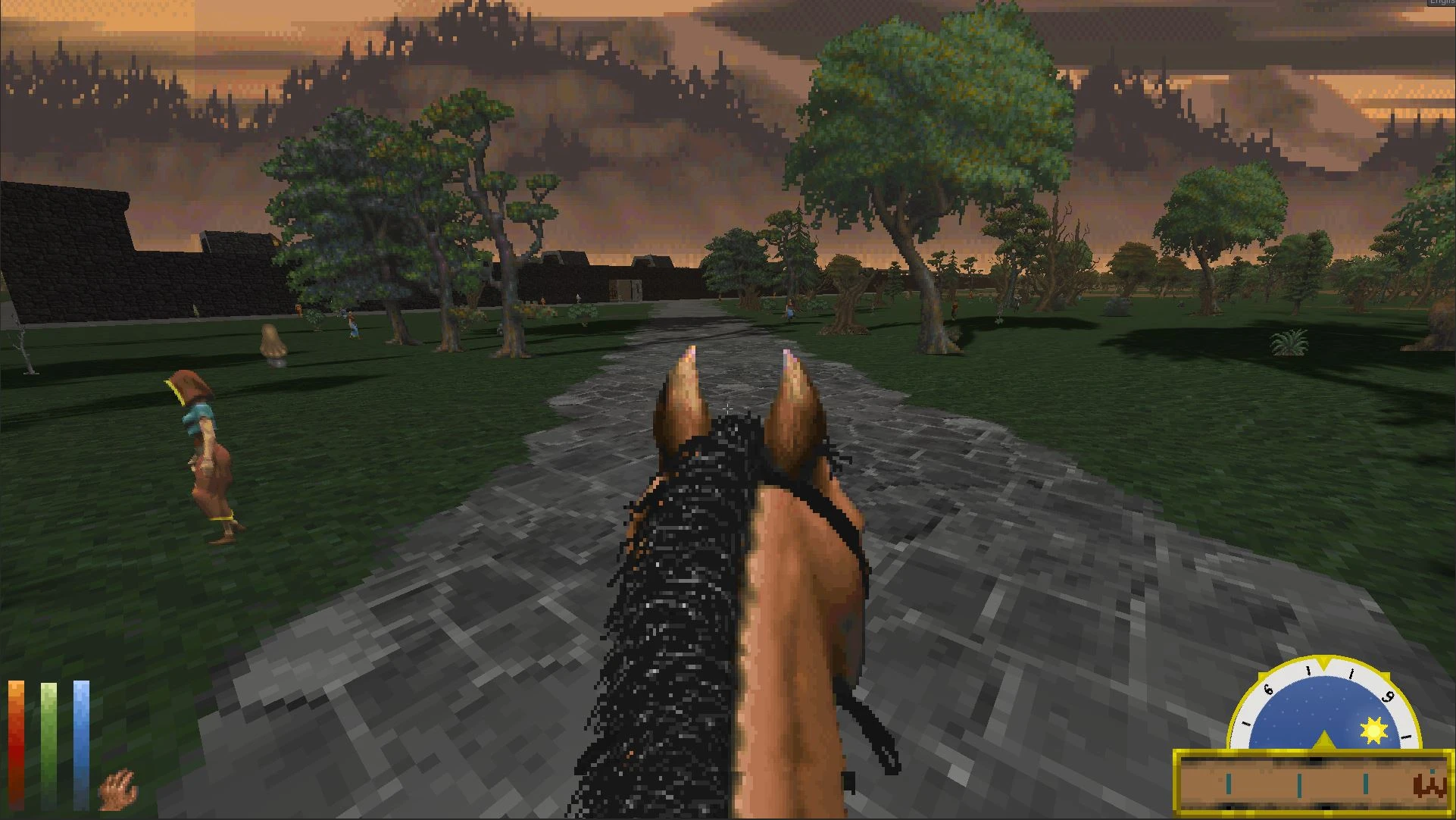
This mod adds roads and dirt tracks to the world of Daggerfall, connecting together towns and cities. Roads ring locations they intersect, since the roads don't line up with city gates. This is because the implementation is simple so that it adds very little overhead to the DFU terrain generation and should run on any system that can run the base game. Someone may create a fancy roads mod in the future I expect, which will require higher spec systems, but Basic Roads will always be available.
The roads are integrated with my other mod Travel Options allowing time accelerated travel along paths by pressing a configurable key to start and stop path following. The roads that encircle locations can be circumnavigated as well, and following will stop when a junction is reached. Following roads give all the benefits of cautious travel but without any speed penalty. Dirt tracks are not visible in winter when the ground is covered by snow, which is realistic, but not very user friendly so I plan to add a download with some textures to make them visible for anyone who wants that.
See the WIP forum thread for more details about how this works, as well as progress on adding roads and tracks to the various regions: viewtopic.php?p=46530
Dirt tracks are not visible in winter as they are covered by snow. If you prefer to be able to see tracks slightly, then install the additional winter visibility textures. This will cause random lines to appear in the snow but you will be able to see the tracks visibly helping playability especially if using travel options to follow paths. Note that this is only for temperate climates, but if this is popular then I will add mountain sets.
Comment from SonOfKrampus regarding mod compatibility:
I recently installed a heckload of mods following some of Jwlar's mod lists, and ended up seeing a bunch of empty textures popping up all over the snowy hillsides of daggerfall, including (but not exclusively) where the "visible winter track paths" were supposed to be
The error was that the loose textures in the texture folder are not the same resolution as the Vanilla Enhanced Textures, a texture replacing. This results in an empty texture being rendered instead of the texture in the folder.
If you are using Vanilla Enhanced textures, simply do not install the "Visible Winter Tracks" texture files included as an optional download on this Basic Roads mod page. Instead, use the "vanilla enhanced - winter tracks.dfmod" included as an optional download on the Vanilla Enhanced mod page. I repeat, do not install the loose textures included on this page for winter tracks if you are using Vanilla Enhanced, they are not compatible with Vanilla Enhanced and will result in blank textures popping up all over the winter terrain.
If you install "vanilla enhanced - winter tracks.dfmod" alongside the other files you can download
Basic Roads adds roads and dirt tracks to Daggerfall's world, which can be traveled on with the Travel Options mod. Roads appear on the in-game travel map only when using Travel Options. This is a gameplay enhancement for Daggerfall players seeking more immersive travel.
✨ Key Features
📊 Pros & Cons
✅ Pros
- Huge community trust with 3,749 endorsements and 168k downloads.
- Seamlessly integrates with Travel Options for a more immersive travel system.
- Simple concept that adds a lot of world-building depth.
⚠️ Cons
- Requires Travel Options mod to actually use the roads—without it, they're just visual.
- Roads only appear on the travel map with Travel Options, so no standalone map integration.
- Potential compatibility risk with other mods that alter Daggerfall's world map or travel systems.
For Daggerfall players who want to make travel feel more grounded and need a reason to use Travel Options. If you're not using Travel Options, this mod is pointless. Skip if you prefer fast travel without extra mechanics.
💡 Beginner Tips
- Make sure you have Travel Options installed and enabled, or the roads won't show on your travel map.
- If you're using Daggerfall Unity, check that both mods are compatible with your game version.
- Consider pairing with other travel-related mods for a more complete overhaul.
📊 Mod Details
- Game
- Daggerfallunity Mods
- Author
- Hazelnut
- Version
- 1.3.1
- Downloads
- 168,101
- Endorsements
- 3,749
- Category
- Gameplay
- Created
- 9/27/2020
- Updated
- 7/21/2024
🧩 Commonly Used Together
Users add these mods to the same collections — a real compatibility signal, not an AI guess.
🔧 How to Install Daggerfall Unity Mods
Download from Nexus Mods.
📖 Full step-by-step install guide for Daggerfall Unity →
Visit the official mod page for specific installation instructions for this mod.
🎮 Need cheat codes or console commands? Check ur gaming wiki for Daggerfall Unity commands, item IDs, and more.
Keep browsing — more Daggerfall Unity mods await