QoL - Higher TV Quality
⚪ Last updated 2024⚠️ Install Order · 6 steps
Install in this order, then this mod last — most mods fail to load without their framework and dependencies in place.
Preview
🔍 Analysis
- 👍 0.3% endorsement rate
- 🏆 #15 of 170 Visuals and Graphics mods in this game by downloads
📋 About This Mod
Basics:
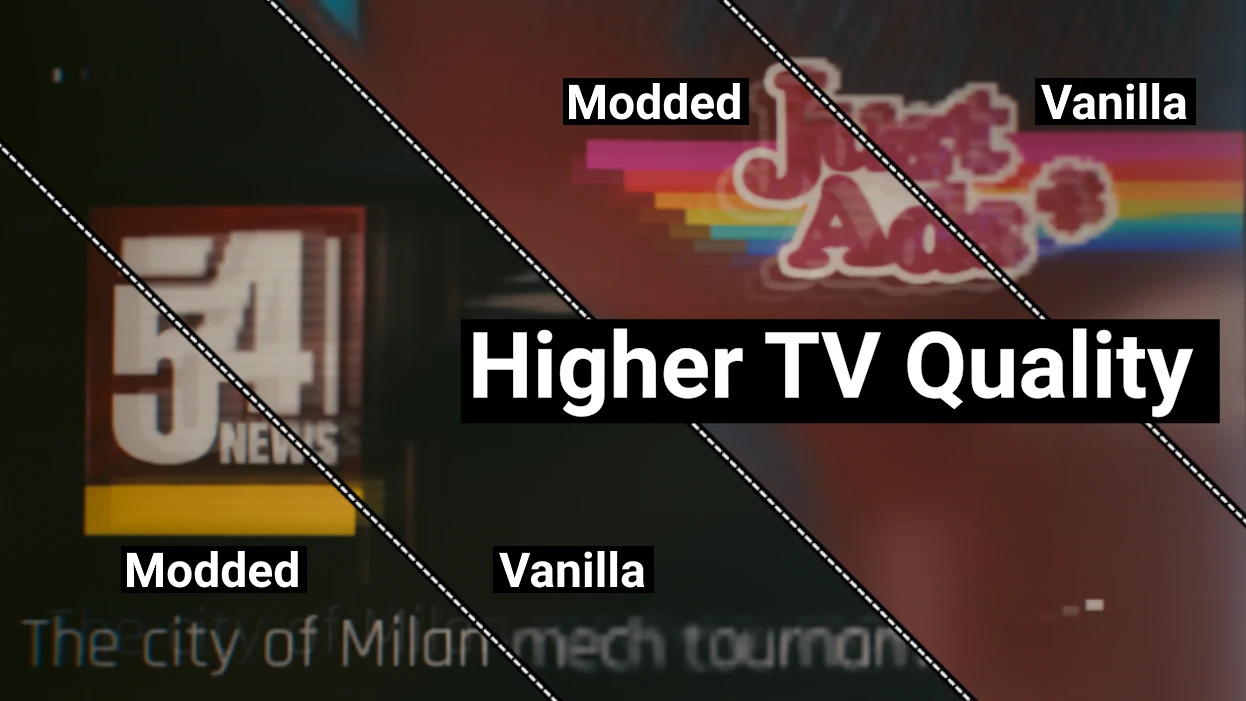
Improves the TV channels texture quality, increasing their resolution by 3x, reducing pixelation and artefacting.
This does NOT increase the core quality of the video files themselves, so there is a limit to how much better they can appear.
The biggest quality increase can be seen on the various channel icons, idents, and text that is displayed along side the videos.
Support me:
Really like my mod(s)?:
Ko-Fi: Deceptious
Patreon: Deceptious
Installation:
Unzip the main zip into "Cyberpunk 2077" folder so that the HigherTvQuality.archive ends up in the "Cyberpunk 2077\archive\pc\mod" folder
Uninstall:
Simply delete the HigherTvQuality.archive file from the "Cyberpunk 2077\archive\pc\mod" folder.
Bugs
I've so far not seen any side effects or performance drops from this material change, if you do please report it on the bugs tab so I can investigate!
This mod enhances the texture quality of TV channels in the game, reducing pixelation and artefacting for a clearer viewing experience. It's a simple visual upgrade for players who notice blurry in-game TVs. With over 2,200 endorsements and 820k downloads, it's a popular quality-of-life improvement.
✨ Key Features
📊 Pros & Cons
✅ Pros
- Huge community trust (2,279 endorsements, 820k downloads)
- Directly fixes a common visual annoyance without changing gameplay
- Lightweight and focused—does exactly what it says
⚠️ Cons
- Only affects TV textures—no other visual improvements
- May not be noticeable on smaller or distant screens
For players who spend time in bases with TVs and notice the blurry picture. If you're a perfectionist about visual clarity, this is a must-have. Skip if you rarely watch in-game TV or prefer larger overhauls.
💡 Beginner Tips
- Since it's a texture mod, make sure to place it in the correct mod folder (e.g., Data/Textures) or use a mod manager if available.
- If you're on a server, ensure the mod is installed client-side to see the effect.
- Check if the game has a texture cache that might need clearing after installation.
📊 Mod Details
- Game
- Cyberpunk 2077 Mods
- Author
- Deceptious
- Version
- 1.0.0
- Downloads
- 820,987
- Endorsements
- 2,279
- Category
- Visuals and Graphics
- Created
- 2/17/2024
- Updated
- 2/17/2024
🔧 How to Install Cyberpunk 2077 Mods
Download from Nexus.
📖 Full step-by-step install guide for Cyberpunk 2077 →
Visit the official mod page for specific installation instructions for this mod.
🎮 Need cheat codes or console commands? Check ur gaming wiki for Cyberpunk 2077 commands, item IDs, and more.
Keep browsing — more Cyberpunk 2077 mods await