NightVision by Salmo
⚪ Last updated 2021⚠️ Install Order · 6 steps
Install in this order, then this mod last — most mods fail to load without their framework and dependencies in place.
Preview
🔍 Analysis
- 👍 5.6% endorsement rate — high engagement, a strong quality signal
- 🏆 #186 of 231 Visuals and Graphics mods in this game by downloads
📋 About This Mod
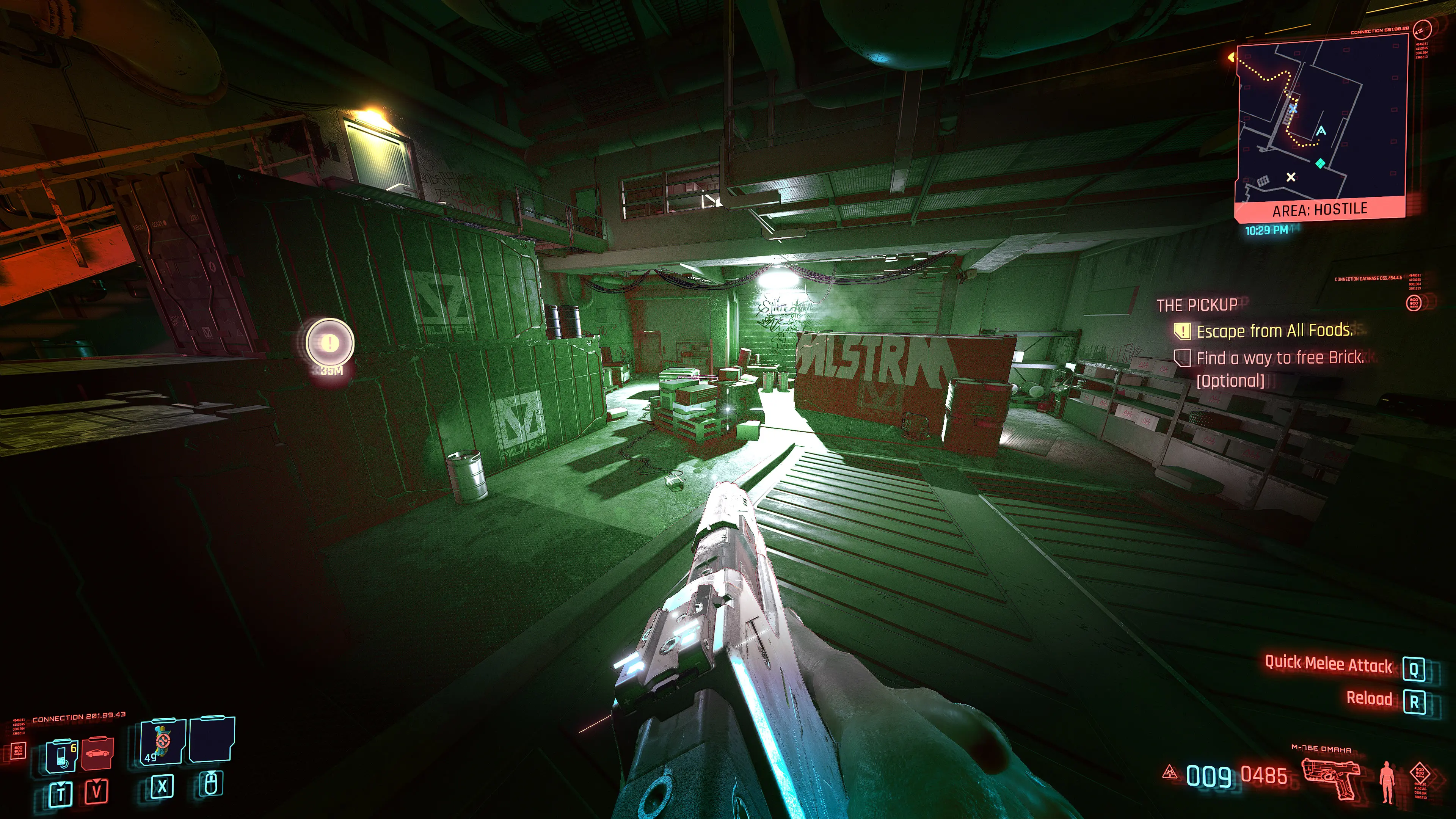
Night vision, a much need feature for any game even more for a supposed futuristic game
Night vision, a much needed feature for any game, even more for a supposed futuristic game
This mod add the night vision ability to the game, I'm using the game's depth and color information to increase the low light visibility.
It is super light less than 2 fps impact, based on my other mod, but without that cartoon look and with a much better visibility.
I improved the sharpening code and made it a separated file so you can toggle the night vision alone.
I apologize for uploading it as a new mod, but I have to do this way so the mod pops up on the "new mods" page and more people can enjoy it.
"Installation"
You MUST download and install the LATEST 4. 91 Reshade , then paste the 2 files in "...\Cyberpunk 2077\bin\x64\reshade-shaders\Shaders\", and enable those once ingame.
You must place the S_sharpening.fx AFTER the NightVision.fx
I HIGHLY suggest that you bind a key (like "B" or something), so you can use it readily.
To do so, bring up the Reshade menu (HOME by default), find the NightVision.fx on the list, right click on it, on the first row you can set up a hotkey.
I suggest to use this mod https://www.nexusmods.com/cyberpunk2077/mods/81 , to disable distant,volumetric and experimental fog
and this https://www.nexusmods.com/cyberpunk2077/mods/107 to disable vignette
Also disable ingame - Chromatic aberration, lens flares, depth of field and motion blur
Known issues
Nvidias's DLSS
The depth buffer get randomly corrupted, the chance increases with lower settings
Since DLSS renders a low resolution image then scales it up, the depth buffer stays at that low resolution so you may have some jagged outlines
Optimized Raytracing, together with this mod https://www.nexusmods.com/cyberpunk2077/mods/491 , you can get a massive performance loss for unknown reasons
It do not work with "dynamic resolution scaling "
📊 Mod Details
- Game
- Cyberpunk 2077 Mods
- Author
- Salmo
- Version
- 1.00
- Downloads
- 1,796
- Endorsements
- 100
- Category
- Visuals and Graphics
- Created
- 1/15/2021
- Updated
- 1/15/2021
🔧 How to Install Cyberpunk 2077 Mods
Download from Nexus.
📖 Full step-by-step install guide for Cyberpunk 2077 →
Visit the official mod page for specific installation instructions for this mod.
🎮 Need cheat codes or console commands? Check ur gaming wiki for Cyberpunk 2077 commands, item IDs, and more.
Keep browsing — more Cyberpunk 2077 mods await