Immersive First Person v2.0 - Native Height and Camera Rework
🟡 Updated this year⚠️ Install Order · 6 steps
Install in this order, then this mod last — most mods fail to load without their framework and dependencies in place.
Preview
🔍 Analysis
- 👍 1.3% endorsement rate — high engagement, a strong quality signal
- 🏆 #3 of 457 Gameplay mods in this game by downloads
📋 About This Mod
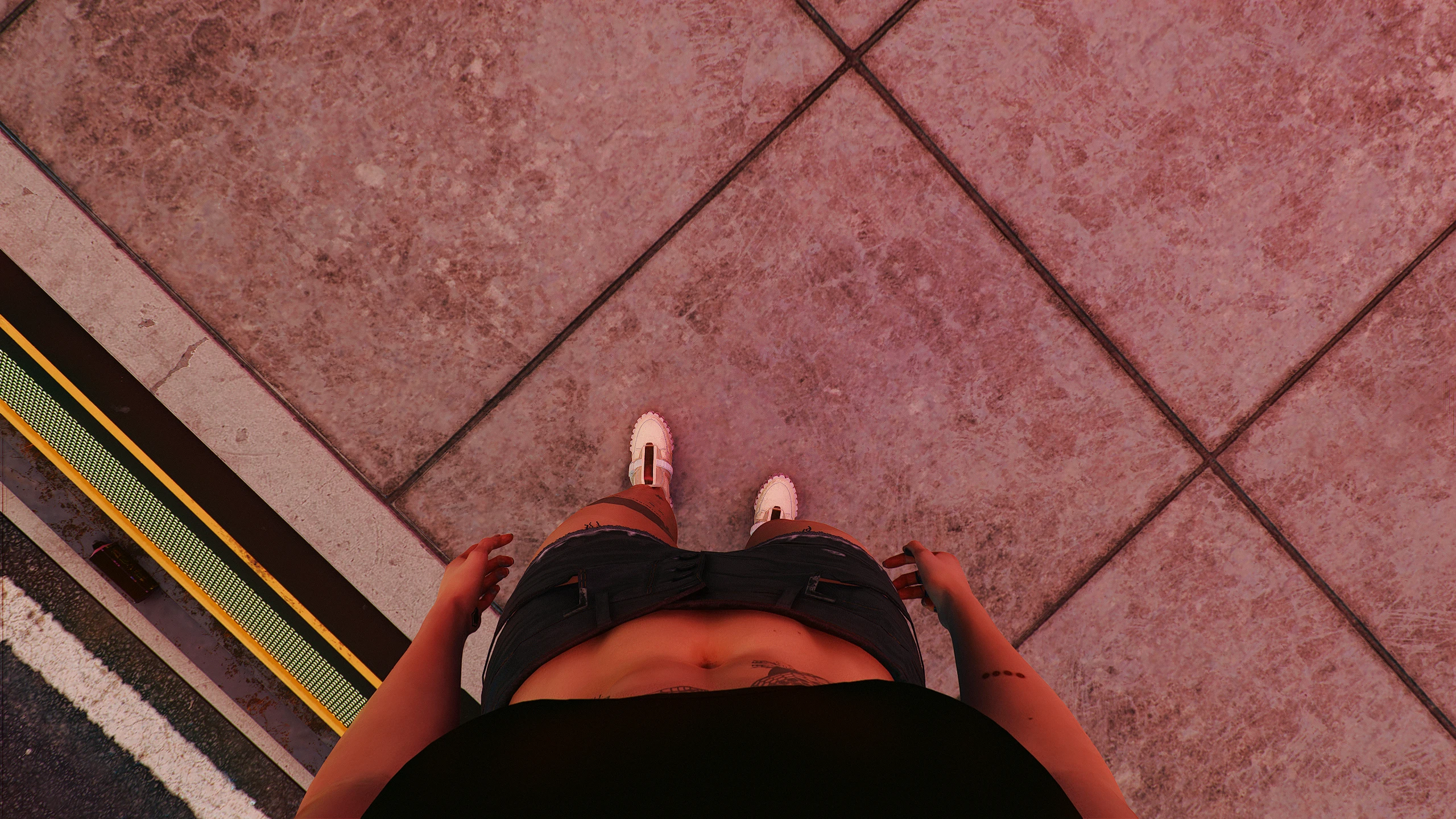
1. Improved first-person body view
See more of V's torso and enjoy your outfits properly in first person.
The view adapts as you look down, keeping the body visible while reducing neck gaps and excessive clipping.
It automatically stays out of the way during vehicles, scripted scenes, traversal, takedowns, knockdowns, body carrying, and other situations where the game needs full control of the camera.
2. FreeLook: look around without rotating V's body
Hold the assigned FreeLook input to rotate the camera independently from V's body.
FreeLook supports mouse and controller input and works with zooming, scanning, dialogue, and interactions. It can also be enabled while holding a weapon.
Weapon FreeLook is intended primarily for looking around. Shots may still follow the direction V's body is facing rather than the offset camera view.
3. Adjustable height
A -50 cm to +50 cm height slider is available in the CET Overlay.
V's visible body and first-person viewpoint rise together, while NPCs continue to meet V's eyes naturally.
The adjustment smoothly returns to normal during vehicles, scripted scenes, climbing, takedowns, knockdowns, and interactions where V's body or hands need to line up with the environment.
For the most natural result, start around +5 to +8 cm.
Values above +12 cm are experimental. Knees, transitions, and interactions may look incorrect at larger values.
The height adjustment is visual and does not affect collision or gameplay physics.
Shortcuts
There are two types of bindings, configured in separate CET menus:
1. CET Overlay -> Bindings -> Hotkeys -> Toggle Enabled
2. CET Overlay -> Bindings -> Inputs -> FreeLook
Requirements
-
[]Cyber Engine Tweaks[/]
[]RED4ext[/]
[]redscript[/]
This version is built and tested for Cyberpunk 2077 2. 31.
Installation
1. Install Cyber Engine Tweaks, RED4ext, and redscript.
2. Install Immersive First Person into the Cyberpunk 2077 directory containing the "bin" folder, or install it with Vortex.
Adjustable height is included in the main installation.
Height compatibility
The height adjustment may conflict with other mods that alter V's base animations or body proportions.
Immersive First Person v2.0 is a gameplay overhaul that enhances body presence in first-person view, adding FreeLook and height adjustments. With over 54,000 endorsements and 4.2 million downloads, it's a highly popular mod for players seeking a more immersive perspective. Last updated in August 2026, it remains actively maintained.
✨ Key Features
📊 Pros & Cons
✅ Pros
- Massive community trust with 54,631 endorsements and 4.2 million downloads.
- Actively updated (August 2026) — likely compatible with current game versions.
- Core features (FreeLook and height) directly enhance immersion without bloating the mod.
⚠️ Cons
- May require configuration to get the height and FreeLook settings just right.
- Potential conflicts with other camera or body mods — no compatibility notes given.
For players who want a more immersive first-person experience with the ability to look around naturally and adjust camera height. Perfect for roleplayers and those who find the default camera too rigid. Skip if you prefer a simple vanilla camera or don't want to tweak settings.
💡 Beginner Tips
- Check if your game has a mod manager (like Vortex or MO2) to install this mod with one click.
- After installing, launch the game and look for a config file or in-game settings to adjust FreeLook sensitivity and height offset.
- If you use other camera mods, disable them first to avoid conflicts.
📊 Mod Details
- Game
- Cyberpunk 2077 Mods
- Author
- Bonaniki
- Version
- 2.1.2
- Downloads
- 4,244,085
- Endorsements
- 54,631
- Category
- Gameplay
- Created
- 5/27/2021
- Updated
- 8/5/2026
🔧 How to Install Cyberpunk 2077 Mods
Download from Nexus.
📖 Full step-by-step install guide for Cyberpunk 2077 →
Visit the official mod page for specific installation instructions for this mod.
🎮 Need cheat codes or console commands? Check ur gaming wiki for Cyberpunk 2077 commands, item IDs, and more.
Keep browsing — more Cyberpunk 2077 mods await