Cyberpunk 2077 Definitive Experience Reshade
⚪ Last updated 2024⚠️ Install Order · 7 steps
Install in this order, then this mod last — most mods fail to load without their framework and dependencies in place.
Preview
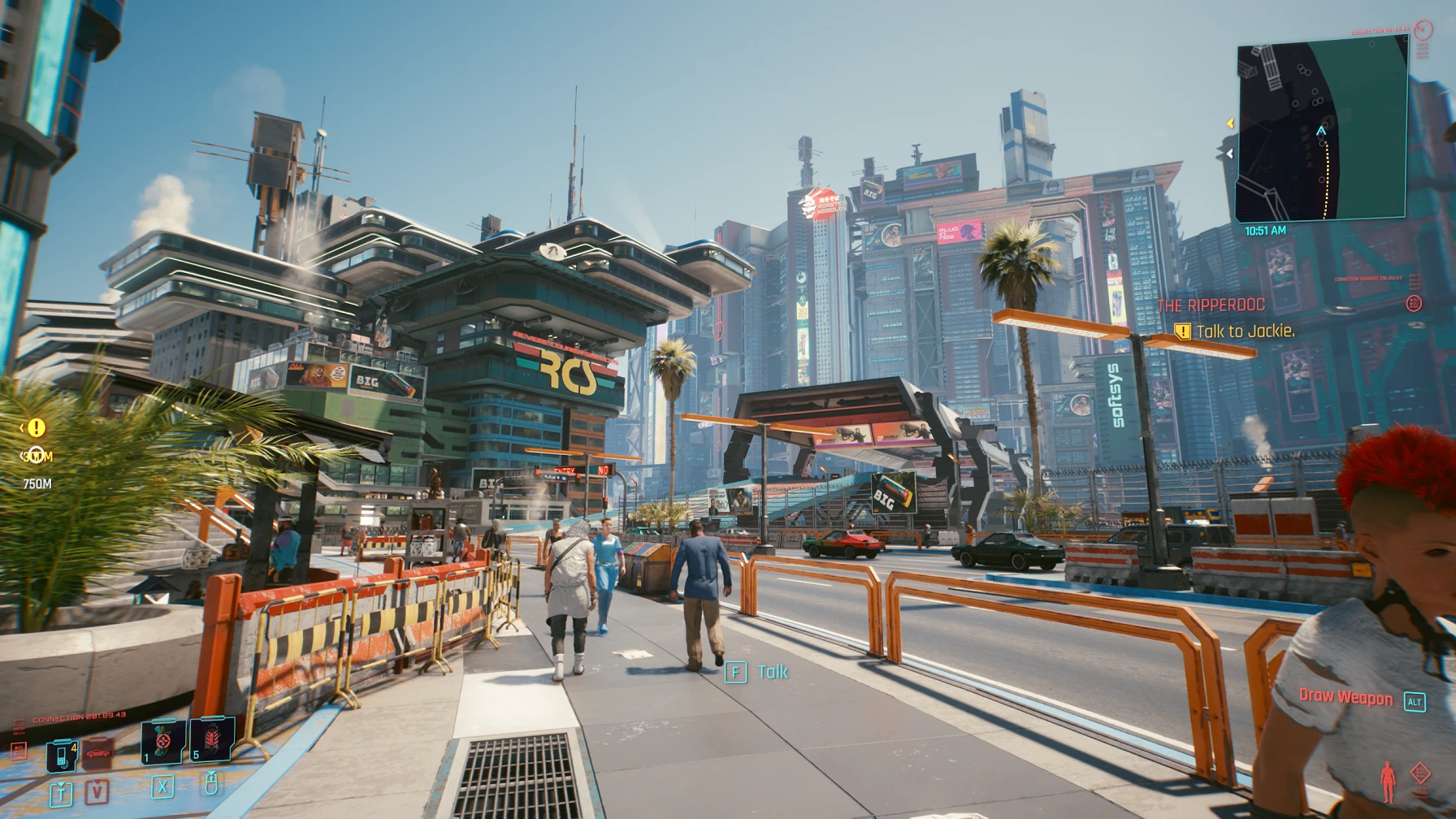
🔍 Analysis
- 👍 2.3% endorsement rate — high engagement, a strong quality signal
- 🏆 #39 of 148 Visuals and Graphics mods in this game by downloads
📋 About This Mod
This Reshade mod removes "milky colors" mixed with fog, adds color/light balance and adds details with slight touch of additional antialiasing without oversharping the picture and insane contrast etc.
V2 - added greatly improved Antialiasing and picture sharpness (FXAA no longer being used), fixed some of the hair aliasing. Also fixed some reported issues with black colors being crushed in several situations and improved framerate drop (3-4fps instead of 7fps in v1. 2) > see V2 pics
V2 Lite - small adjustments to shadow details/visibility to improve details with new Path Tracing lighting method (introduced in patch v1. 62) - see media page for comparison screenshots
V2 Lite Updated - further improved details in shadow areas, especially useful if you're using Raytracing Overdrive optimizations mod
RR - removed AA solution in Reshade, please use preferred DLSS/FSR/DLAA solution in-game.
Nova LUT compatible - same looks as in RR version, Nova LUT compatibility and looks tested
V3 - tweaked some settings to improve details and decrease oversharpening, especially in low-light areas. Added new shader to improve overall details, shadows and grant additional depth to a scene.
Check IMAGES section for expected results.
To install:
- make sure to disable Film grain in game settings and set your gamma to 1. 0 (default value), leave all other settings as you like
- install Reshade (6. 0+) with all shader options (except Legacy) to make sure no shaders are missing
- unzip mod file to Cyberpunk 2077\bin\x64
- launch the game and select Cyberpunked.ini preset in Reshade's drop-down menu to activate
A Reshade preset for Cyberpunk 2077 that removes fog, enhances lighting, and boosts detail while preserving the developer's intended visual style. With 445 endorsements and 19,051 downloads, it's a popular choice for players wanting a cleaner, more vibrant look without overhauling the game's aesthetic.
✨ Key Features
📊 Pros & Cons
✅ Pros
- Community-approved with 445 endorsements and 19k downloads
- Keeps the game's original look while improving clarity
- No fog means better visibility for exploring Night City
⚠️ Cons
- Requires Reshade, which some players find intimidating to install
- No before/after screenshots provided, so you can't preview the effect
- Last updated in March 2024 — may not be tested with the latest game patches
For Cyberpunk 2077 players who want a cleaner, more vibrant look without straying from the game's intended aesthetic. Perfect if you find the default fog too heavy or want better lighting for screenshots. Skip if you prefer heavy visual overhauls or don't want to mess with Reshade.
💡 Beginner Tips
- Make sure you download Reshade first and run it on Cyberpunk 2077's executable before adding this preset.
- Use the Reshade in-game overlay (Home key) to toggle effects and adjust intensity to your liking.
- If the game updates, reinstall Reshade to ensure compatibility with the latest version.
📊 Mod Details
- Game
- Cyberpunk 2077 Mods
- Author
- IcedFREELANCER
- Version
- 3.0
- Downloads
- 19,051
- Endorsements
- 445
- Category
- Visuals and Graphics
- Created
- 12/28/2020
- Updated
- 3/19/2024
🔧 How to Install Cyberpunk 2077 Mods
Download from Nexus.
📖 Full step-by-step install guide for Cyberpunk 2077 →
Visit the official mod page for specific installation instructions for this mod.
🎮 Need cheat codes or console commands? Check ur gaming wiki for Cyberpunk 2077 commands, item IDs, and more.
Keep browsing — more Cyberpunk 2077 mods await