Party Manager
⚪ Last updated 2020Preview
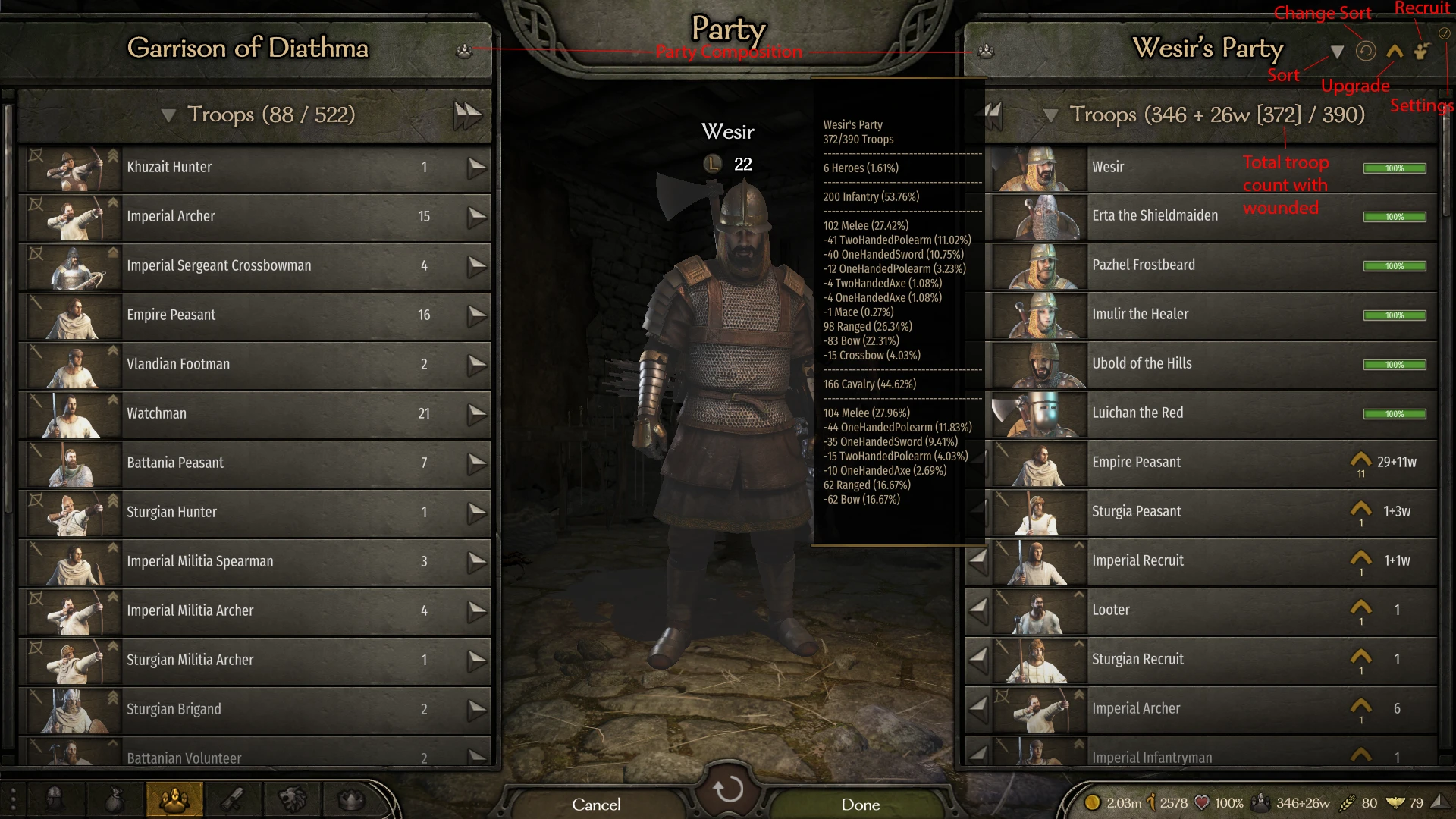
🔍 Analysis
- 👍 3.0% endorsement rate — high engagement, a strong quality signal
- 🏆 #13 of 92 User Interface mods in this game by downloads
📋 About This Mod
Current Features
-
[]Buttons to upgrade/recruit all units,
[
]Saved Upgrade Tier decisions (set it and forget it), go left, right, or even split for each unit[]Party Composition numbers
[]Buttons to sort or cycle your sort type
[]Custom user defined sorting
[]Saved Formations
[]Transfer Half/All/Custom unit counts
[]Hotkeys
-
[]Some issues with Improved Garrisons 2. 0, think I might have fixed it but if you have issues please turn off custompartysize in Improved Garrisons
[
]This mod will most likely have issues if you have mods that replace base game files instead of patching their changes into existing ones, nothing I can do about that other than suggest finding a mod that doesn't do that as half the mods you try to use will probably have similar issues.[]Sometimes clicking the upgrade button will put a message at the top saying that you require a horse/warhorse, shouldn't cause any issues
[]Having the wrong/outdated version of frugal cavalry can lead to crashes when clicking the upgrade button, seems to happen when users manually upgrade as well so it's an issue with frugal cavalry's error handling
Sort Button:
Left Click to sort by your selected sorting option
Right Click to sort all recruitable prisoners and upgradeable units to the top (available upgrades that are missing things like horses will be below the ones that have at least one upgrade ready to go)
Cycle Sort Button:
Left/Right click to cycle your sort type
Sort types:
All will have companions/heroes at the top, make sure when you update the node there aren't any spaces or the behavior might be off:
-
[]TierDesc - (default option) Ordered by Tier descending
[
]TierAsc - Ordered by Tier ascending[]TierDescType - Ordered by Tier descending followed by mounted/foot and then ranged/melee
[]TierAscType - Ordered by Tier ascending followed by mounted/foot and then ranged/melee
[]MountRangeTierDesc - Ordered by mounted/foot followed by ranged/melee then Tier descending
[]MountRangeTierAsc - Ordered by mounted/foot followed by ranged/melee then Tier ascending
[]CultureTierDesc - Ordered by culture then Tier descending
[]CultureTierAsc - Ordered by culture then Tier ascending
[]RangeMountTierDesc - Melee/Ranged then by mounted then tier desc
[]RangeMountTierAsc - Melee/Ranged then by mounted then tier Asc
[]Custom - User defined sort order, see readme for examples/instructions, currently only way to change it is by updating the config but I added a reload settings button in the game to make it easier (I'm working on a UI, function over form right?), the config file won't be generated until after the mod is loaded for the first time
If you're familiar with Linq queries the sort types are located here if it makes them more understandable (CreateFlattenedRoster method):
https://github.com/data54/BannerlordMods/blob/master/SortParty/SortPartyHelpers.cs
Auto sorting on party screen opening can be disabled in the config (instructions in readme file)
Sorting on upgrade all/recruit all can be enabled in the config, off by default to improve performance
Base Game Enhancements:
-
[]CTRL clicking the transfer button on a unit will transfer all of them
[]CTRL+SHIFT clicking the transfer button on a unit will transfer half
[]SHIFT clicking the transfer button on a unit can be configured to any number between 1-500 in the settings, defaults to 5, can be returned to base behavior in the settings
Sticky Slots:
-
[]Users can define between 0-50 slots below their heroes to ignore when sorting, allowing them to keep favorite units at top and let the rest of them be sorted
Upgrade Button:
[
]Upgrade all units button will only upgrade units with a single upgrade path by default[]CTRL+left clicking a unit's upgrade will set that upgrade path as the target for the future
[]CTRL+SHIFT+Left clicking an upgrade path will split
-
[]Users can define between 0-50 slots below their heroes to ignore when sorting, allowing them to keep favorite units at top and let the rest of them be sorted
-
[]CTRL clicking the transfer button on a unit will transfer all of them
-
[]TierDesc - (default option) Ordered by Tier descending
Party Manager is a UI overhaul for Mount & Blade II: Bannerlord that streamlines party management with bulk upgrade/recruit buttons, saved upgrade tiers, custom sorting, saved formations, and hotkeys. It has 3,471 endorsements and 116,881 downloads, last updated in May 2020. Ideal for players who want to reduce repetitive clicks and manage large parties efficiently.
✨ Key Features
📊 Pros & Cons
✅ Pros
- Community favorite with 3,471 endorsements and 116,881 downloads, showing widespread use.
- Saves time with bulk actions and automated upgrade tiers—set it and forget it.
- Custom sorting and saved formations give you control over party organization.
⚠️ Cons
- Known compatibility issues with Improved Garrisons 2.0; you may need to disable custompartysize in that mod.
- Will likely break if you use mods that replace base game files instead of patching—common conflict.
- Outdated (last updated May 2020) and may have issues with current game versions or other mods.
For Bannerlord players who lead large armies and hate micromanaging upgrades and recruitment. If you're tired of clicking through every unit, this mod is a lifesaver. Skip if you prefer vanilla UI or rarely manage big parties.
💡 Beginner Tips
- If you use Improved Garrisons, turn off custompartysize in its settings to avoid conflicts.
- Use the right-click sort to quickly bring recruitable prisoners and upgradeable units to the top.
- Set your upgrade tier preferences once and let the mod handle the rest—just remember to update the node without spaces.
📊 Mod Details
- Game
- Bannerlord Mods
- Author
- Wesir54
- Version
- 1.13.3
- Downloads
- 116,881
- Endorsements
- 3,471
- Category
- User Interface
- Created
- 4/13/2020
- Updated
- 5/2/2020
🔧 How to Install Bannerlord Mods
Use Vortex or manual. Enable mods in launcher. Harmony required.
📖 Full step-by-step install guide for Bannerlord →
Visit the official mod page for specific installation instructions for this mod.
🎮 Need cheat codes or console commands? Check ur gaming wiki for Bannerlord commands, item IDs, and more.
Keep browsing — more Bannerlord mods await