I Dont Care - Campaign Log Filter
🟡 Updated this yearPreview
🔍 Analysis
- 👍 0.9% endorsement rate
- 🏆 #10 of 92 User Interface mods in this game by downloads
📋 About This Mod
I don't Care!
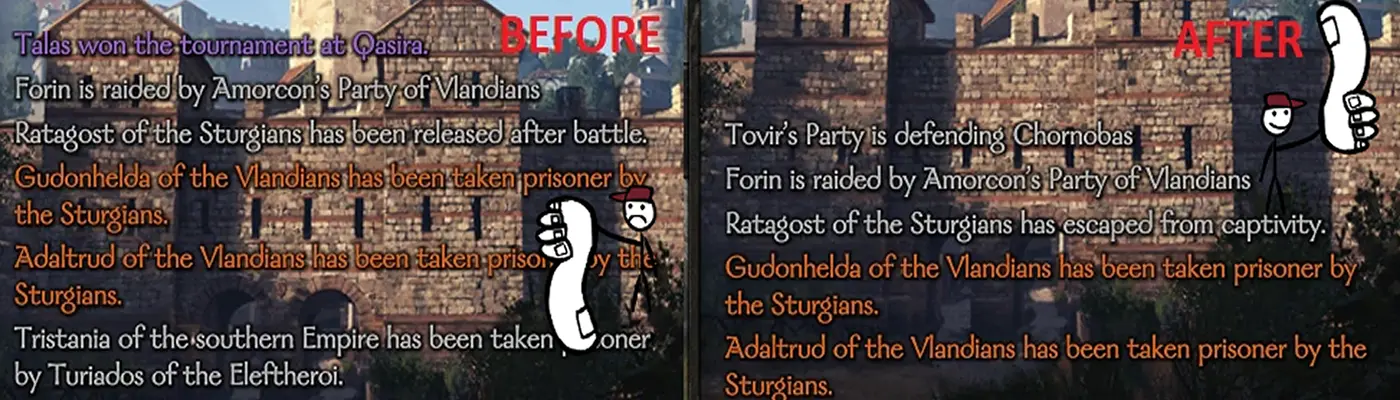
I've made this mod after seeing how much useless (for me, at least) info is being displayed in Campaign log . Who the hell cares about some Khuzait lord that was taken prisoner when you're a Vlandian vassal fighting Battanians, when none of those two are even close to Khuzait kingdom! I don't care about this!
So yes, it does exactly that. Mod basically checks what log is about, and filters it out depending on factions involved (or different settings, it's up to what you set). It basically checks if any of factions involved are allies or enemies to the player (or just player's faction). If it's true, the log is displayed so you actually get to know when your fellow vassal ButterLord is being demolished by your enemies, while you're not spammed about some Lady giving birth/Village being raided on the other side of the world!
Bannerlord before displaying a campaign log e.g.: "Lord_X was taken prisoner by Faction_Y" saves it in some log history. Most likely it's used for encyclopedia pages, and even though I do not care about them being displayed, I care about them being saved, because that info MIGHT prove useful.
MCM Settings
- Default - default settings - filter by factions involved, explained in the description above
- Filter All - It blocks ALL the messages of that type, to get more info what type of message that is, hover over the setting name, the hint may help
- Filter Nothing - Same as above, but this time it doesn't filter anything. Those logs are completely ignored and passed freely
- Only Me - Will block all the logs that are not related directly to the player's character, that is - the log entry needs to include player's character in order to be displayed
- Only My Clan - As the name says - only logs related to the player character's clan
- Only My Kingdom - Same as above, but on the kingdom level. You don't need to be the king/queen, just being part of kingdom is enough (merc/lord). In case that player has no kingdom yet, it will work like Only My Clan setting.
- Relation changed with Player for Notable:
There are 2 settings:
- On Relation Change Positive - So you can set over what point are you no longer interested in relation change. E.g.: Setting it to 50, will display all relation changes from 0 to 50. Setting it to -1, will disable all changes resulting positive relations.
- On Relation Change Negative - Similar to above but for negative relations. E.g.: Setting it to -50, will display all relations from -50 to -1. Setting it to 0 will disable all changes resulting in negative relations.
- Advanced Filtering:
This is a small textbox containing localization Ids that you do not want to see at all in your game, if you put an Id in there, the mod will try it hardest to not display to you any text related to that particular given text. Format is simple: {=localizationId};{=yetAnotherId};{=...};...
You may notice that clicking checkboxes related to other mods may populate the textbox, that's fine! It's supposed to work like that! :)
Installation
Let the mod manager do it's magic. Just download through it and let it flooooow.
Download and unzip into main bannerlord folder. Be sure to have Required files installed! This version uses MCM so you can freely edit things
Compatibility
I've added a generic filtering textbox where you can input localization Ids, which then will be pruned by mod. But please take care with those, don't just input whatever, or you will have nothing displayed at all, and you won't like it. If you're not sure, just stick to checkboxes. :)
Serve As Soldier - I've included fancy checkboxes for you to click if you don't want to see some messages from that given mod. They're based on localizationIds, so if those are changed, I'd have to update the mod, or you can update them manually through the Advanced Filtering.
I've used harmony to patch code related to displaying new log entries and events. Any other mod that touches that code (modders: visit source below) might just not fully work, depending on what it does. I tried to keep it compatible in a way that my mod will just ignore some new additions in the worst case.
If you happen to use mod that adds new factions/clans/whatever, the mod should also support them.
Uninstalling
This mod can be freely and safely added/removed mid-game. It literally just blocks messages, so if something gets updated and mod starts crashing game, just remove it.
I Dont Care - Campaign Log Filter is a UI mod for Crusader Kings III that removes useless information from the Campaign Log. It has 1,060 endorsements and 123,599 downloads, with a recent update in December 2025. The mod is simple and focused, appealing to players who want a cleaner log.
✨ Key Features
📊 Pros & Cons
✅ Pros
- Massive download count (123k+) shows it's a popular fix.
- Recent update (Dec 2025) means it's still maintained.
- Simple concept—just cleans up your log, no clutter.
⚠️ Cons
- Only filters the Campaign Log—doesn't touch other UI elements.
- May not be customizable; you get what the mod gives you.
- Compatibility risk with other UI mods that alter the same log.
If you're tired of scrolling through pointless entries in your Campaign Log, this is for you. It's perfect for players who want a cleaner, more focused log without overhauling the whole UI. Also great for modded playthroughs where the log gets extra noisy.
💡 Beginner Tips
- Place the mod in your Crusader Kings III mod folder and activate it in the launcher.
- If you use other UI mods, test them together to ensure no conflicts with the log.
- Check the mod's page for any optional settings or compatibility patches.
📊 Mod Details
- Game
- Bannerlord Mods
- Author
- PajTajster
- Version
- 2.9.0
- Downloads
- 123,599
- Endorsements
- 1,060
- Category
- User Interface
- Created
- 9/19/2020
- Updated
- 12/6/2025
🧩 Commonly Used Together
Users add these mods to the same collections — a real compatibility signal, not an AI guess.
🔧 How to Install Bannerlord Mods
Use Vortex or manual. Enable mods in launcher. Harmony required.
📖 Full step-by-step install guide for Bannerlord →
Visit the official mod page for specific installation instructions for this mod.
🎮 Need cheat codes or console commands? Check ur gaming wiki for Bannerlord commands, item IDs, and more.
Keep browsing — more Bannerlord mods await