Fast Dialogue (UPDATED)
🟡 Updated this year⚠️ Install Order · 1 step
Install in this order, then this mod last — most mods fail to load without their framework and dependencies in place.
Preview
🔍 Analysis
- 👍 0.7% endorsement rate
- 🏆 #9 of 92 User Interface mods in this game by downloads
📋 About This Mod
An updated version of the Fast Dialogue mod originally created by Dallen1393.
Original mod : https://www.nexusmods.com/mountandblade2bannerlord/mods/68
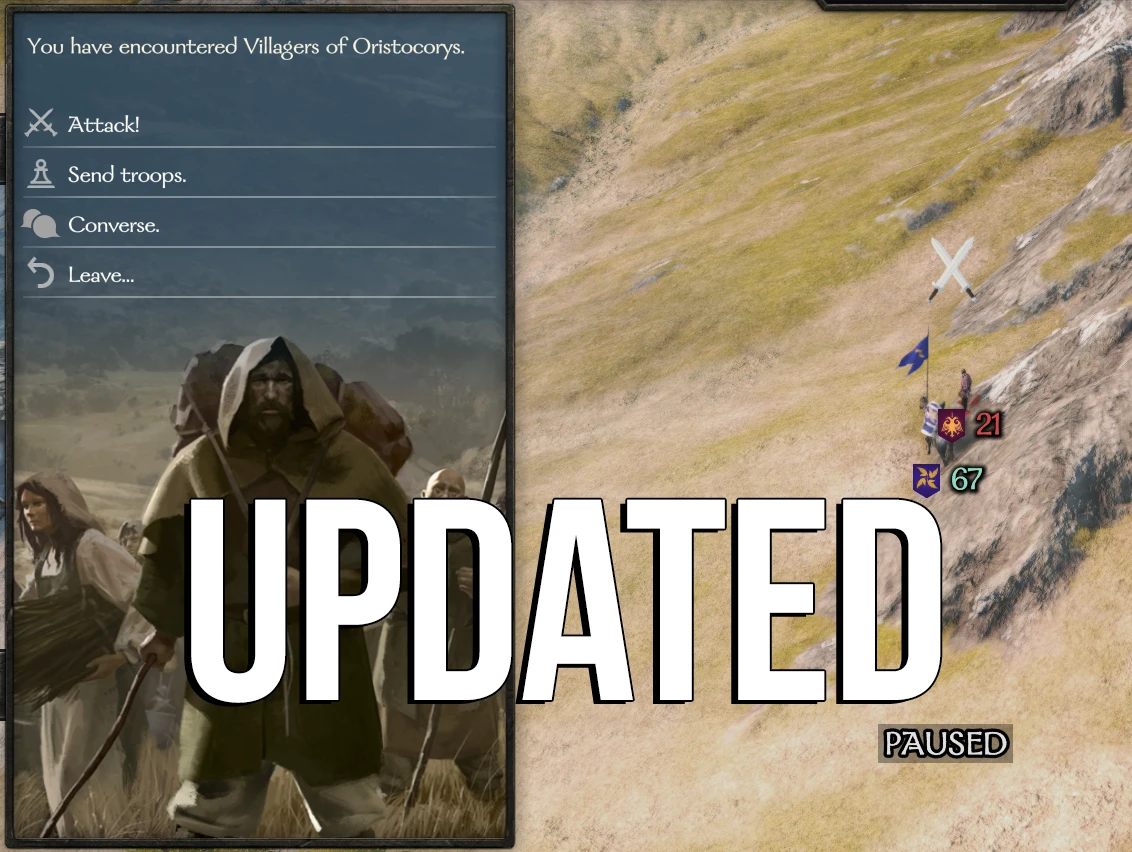
Interacting with looters, bandits, and enemy lords now uses menus instead of dialogue interactions. This removes at least two unnecessary
loading screens.
INSTALLATION
-
[]Install latest version of Harmony[/]
[]Install the mod with Vortex manager, or extract manually in your Modules folder[/]
[]Load MBFastDialogue after Harmony and default modules on the launcher[/]
[]Check that the DLLs are not blocked
MBFastDialogue > bin > Win64_Shipping_Client > Right click on MBFastDialogue.dll > Propriety > If it is blocked, you will see "Unblock DLL", click on it.[/]
Settings
You can choose which parties are affected by the mod by editing the settings.xml in the root of the mod folder.
By default, settings.xml looks like this and affects all parties :
<MBFastDialogue. Settings>
<pattern_whitelist>
<!--pattern>looter</pattern-->
<!--pattern>bandit</pattern-->
</pattern_whitelist>
<toggle_key>X</toggle_key>
</MBFastDialogue. Settings>
For example, if you want the mod affect only looters and bandits, you can uncomment these lines :
<MBFastDialogue. Settings>
<pattern_whitelist>
<pattern>looter</pattern>
<pattern>bandit</pattern>
</pattern_whitelist>
<toggle_key>X</toggle_key>
</MBFastDialogue. Settings>
FOR MODDERS
From version 2. 5. 9, menu options added to the native menu ID "encounter" by mods are automatically added to Fast Dialogue.
If you wish to add specific menu options to Fast Dialogue, add them to menu ID "fast_combat_menu".
LANGUAGE SUPPORT
The mod supports all languages available in the game.
Any issues or questions?
Don't hesitate to use the "posts" and "bugs" tabs!
Credits
All credits go to their original creators (Dallen1393 & Aragasas). Thanks to them!
The updated version includes minor fixes and compatibility patch for the latest version.
Github : https://github.com/FlorianV85/MBFastDialogueUpdated
An updated version of the Fast Dialogue mod for Mount & Blade II: Bannerlord, replacing dialogue interactions with looters, bandits, and enemy lords with menus to skip at least two loading screens. Includes configurable whitelist settings and modder support. With 1,152 endorsements and 171,791 downloads, it's a popular quality-of-life improvement.
✨ Key Features
📊 Pros & Cons
✅ Pros
- Huge community trust with 1,152 endorsements and 171,791 downloads.
- Saves real time by skipping loading screens during repetitive encounters.
- Actively maintained, last updated June 2026, with modder-friendly features.
⚠️ Cons
- Requires Harmony as a dependency, adding an extra install step.
- Manual DLL unblocking may be needed, which can confuse less technical users.
- Configuration via XML editing might be intimidating for players who prefer in-game options.
For Bannerlord players who are tired of loading screens every time they talk to looters or lords. If you value your time and want smoother encounters, this is a must-have. Skip if you enjoy the dialogue interactions or don't mind the extra loads.
💡 Beginner Tips
- Make sure to install Harmony first and load MBFastDialogue after it in the launcher.
- If the mod doesn't work, right-click MBFastDialogue.dll, go to Properties, and click 'Unblock' if the option appears.
- Edit settings.xml to limit the mod to specific parties like looters and bandits if you want to keep dialogue for other encounters.
📊 Mod Details
- Game
- Bannerlord Mods
- Author
- ORIGINAL MOD by Dallen and Aragasas
- Version
- v4.0.0
- Downloads
- 171,791
- Endorsements
- 1,152
- Category
- User Interface
- Created
- 10/29/2022
- Updated
- 6/11/2026
🧩 Commonly Used Together
Users add these mods to the same collections — a real compatibility signal, not an AI guess.
🔧 How to Install Bannerlord Mods
Use Vortex or manual. Enable mods in launcher. Harmony required.
📖 Full step-by-step install guide for Bannerlord →
Visit the official mod page for specific installation instructions for this mod.
🎮 Need cheat codes or console commands? Check ur gaming wiki for Bannerlord commands, item IDs, and more.
Keep browsing — more Bannerlord mods await