CITEditor
⚪ Last updated 2020Preview
🔍 Analysis
- 👍 3.6% endorsement rate — high engagement, a strong quality signal
- 🏆 #163 of 678 Gameplay mods in this game by downloads
📋 About This Mod
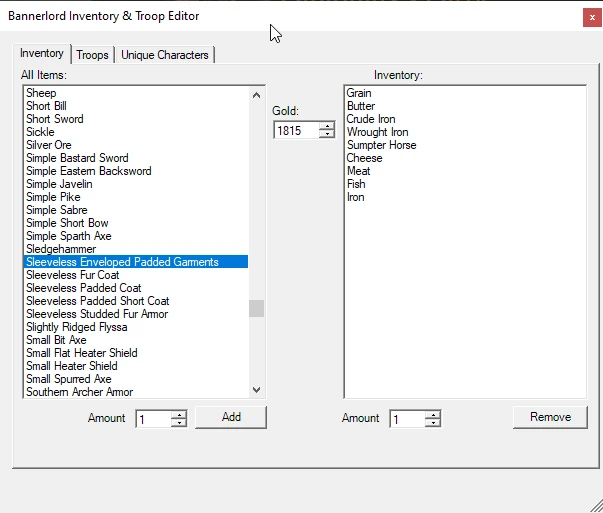
The mod allows you to add, remove, and change pretty much everything about your party's inventory and troop roster. It also allows you to change stats and perks (but not traits or appearance) for all unique characters.
Press Ctrl+Alt+E from the map screen to access the editor.
Installation:
- []Manual Installation:
-
[] Download the archive and select to open it upon completion.
[]Extract the contents to the Modules directory inside your Mount and Blade 2 installation directory.
[]Unblock the DLL and XML files (they may not be locked, but for most people they seem to be). For more information on how to do that, please see this link: Unblocking .dll File
[]Start the launcher and select the Character, Inventory, and Troop Editor from the list of available modules on the Mods tab.
[]Hit Play.
- []Vortex Installation:
-
[]I do not use Vortex, so I can not provide detailed instructions. I do however know that this file is Vortex compatible. Make sure to unblock the dll and xml file according to the instructions above.
A few things to note:
-
[]The editor locks your game while it's open. This is to prevent erroneous updates where inventory or troops have changed between the time you've opened the editor and the time you make changes.
[
]If you close the game in a non-standard way (closing by Alt-Tabbing and clicking the X, closing using a right click on the taskbar, etc.) with the editor window open...the editor window will stay open. I can not find an "OnApplicationClose" type function to override, and I'd really like to avoid taking up resources with something like a background timer that checks to make sure the game is still open...so if you quit in a non-standard way, you'll have to close the editor as well. - If you press the buttons and it seems like nothing is happening...use Alt+Tab to check behind the game window. Despite setting this to always be on top of other windows, it does not always work out that way, and it can sometimes be hidden by the main game window.
Incompatibilities:
This mod is incompatible with mods that also use hotkeys from the Map screen. This includes Character Trainer. Please discontinue use of / disable those mods before reporting any issues with this module, thanks.
-
[]The editor locks your game while it's open. This is to prevent erroneous updates where inventory or troops have changed between the time you've opened the editor and the time you make changes.
CITEditor is a gameplay mod for Mount & Blade II: Bannerlord that lets you add, remove, and modify your party's inventory and troop roster, plus change stats and perks for unique characters. It has 2,282 endorsements and 64,079 downloads, last updated April 2020. Access via Ctrl+Alt+E from the map screen.
✨ Key Features
📊 Pros & Cons
✅ Pros
- Community favorite with 2,282 endorsements and 64k downloads.
- Deep customization for inventory and troops, plus unique character stats and perks.
- Simple hotkey access from the map screen.
⚠️ Cons
- Last updated in 2020 — may not work with the latest game patches.
- Author doesn't use Vortex, so no detailed Vortex instructions provided.
- Editor window can stay open if you close the game in non-standard ways (e.g., Alt-Tab and X).
For Bannerlord players who want full control over their party's gear and roster without grinding. Great for testing builds or fixing mistakes. Skip if you prefer pure vanilla gameplay or want trait/appearance editing.
💡 Beginner Tips
- After extracting to Modules, right-click the DLL and XML files, go to Properties, and check 'Unblock' if the option exists.
- Launch the game via the launcher and select 'Character, Inventory, and Troop Editor' from the Mods tab before hitting Play.
- If buttons seem unresponsive, press Alt+Tab to check behind the game window — the editor may be hidden.
📊 Mod Details
- Game
- Bannerlord Mods
- Author
- Carlzilla
- Version
- 1.2.1
- Downloads
- 64,079
- Endorsements
- 2,282
- Category
- Gameplay
- Created
- 4/4/2020
- Updated
- 4/12/2020
🔧 How to Install Bannerlord Mods
Use Vortex or manual. Enable mods in launcher. Harmony required.
📖 Full step-by-step install guide for Bannerlord →
Visit the official mod page for specific installation instructions for this mod.
🎮 Need cheat codes or console commands? Check ur gaming wiki for Bannerlord commands, item IDs, and more.
Keep browsing — more Bannerlord mods await