PS3 Contoler Setup
⚪ Last updated 2012Preview
🔍 Analysis
- 🏆 #3 of 14 Utilities mods in this game by downloads
📋 About This Mod
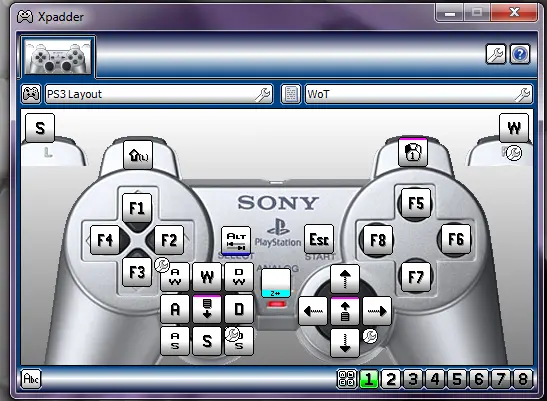
This Allows You To Use A PS3 Controller on World Of Tanks using DS3 Tool And Xpadder
Set Up 1.) Install Motion Joy software 2.)Make Sure Run DS3 Tool checkbox is checked 3.)Plug In PS3 Controll/Bluetooth 4.)Open the DS3 tool, go to “Driver manager” and press the “Load Driver” button. 5.)Your PS3 controller is ready for use when you see a message: “SUCCESS: Install Completed”. 6.)Click on the “Profiles” tab 7.)Click On The Second PS2 Controler Profile And then open your “Game Controller Panel”to test your PS3 controller. 8.)The Ds3 Tool can now be closed http://www.motioninjoy.com/wiki/en/install/latest 9.)Open Xpadder 5. 7 10.)Load The PS3 Layout And The WOT Profile Controls See Xpadder Use The PS button to switch Between Play mode and Menu Mode Play!!! A Six axis profile Coming Soon ADD ME ON WORLD OF TANKS Xplosive_Sniper
📊 Mod Details
- Game
- Worldoftanks Mods
- Author
- Xplosive_Sniper
- Version
- 1.0
- Downloads
- 394
- Endorsements
- 22
- Category
- Utilities
- Created
- 5/8/2012
- Updated
- 5/8/2012
🔧 How to Install World of Tanks Mods
Download from Nexus Mods.
📖 Full step-by-step install guide for World of Tanks →
Visit the official mod page for specific installation instructions for this mod.
🎮 Need cheat codes or console commands? Check ur gaming wiki for World of Tanks commands, item IDs, and more.
Keep browsing — more World of Tanks mods await