Accurate Serverside Crosshairs
⚪ Last updated 2012⚠️ Potentially Incompatible — Recent Game Update
This mod may not work until the author updates it. Check for an update, or see the rollback guide.
Preview
🔍 Analysis
- 👍 3.3% endorsement rate — high engagement, a strong quality signal
- 🏆 #1 of 19 User Interface mods in this game by downloads
📋 About This Mod
Description
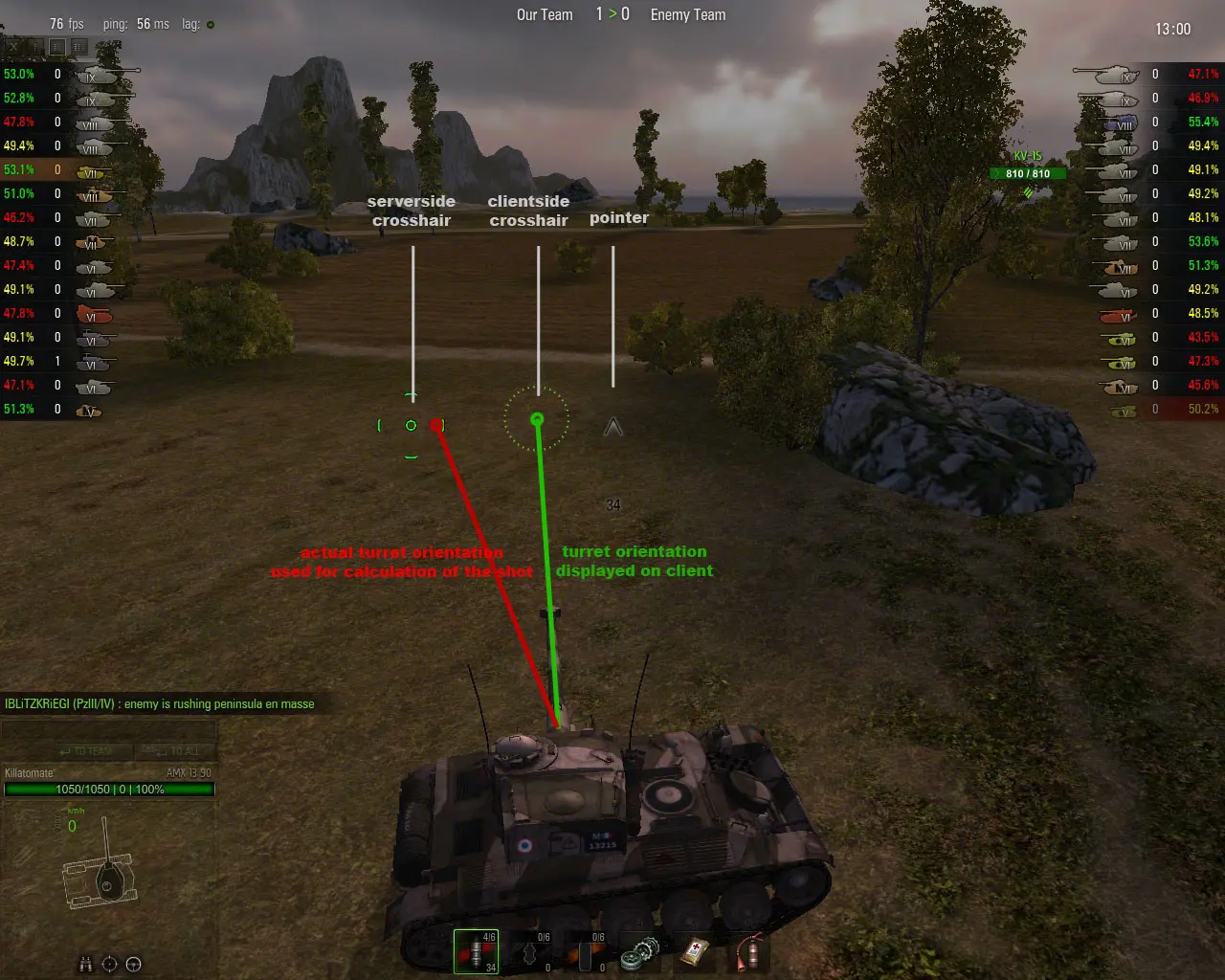
This mod replaces the blue serverside crosshair with an accurate high contrast crosshair in the color of your choice and activates serverside crosshair by default. Crosshair mods such as \"Reload Timer\" still work.Why use the serverside crosshair?
The clientside crosshair is very inaccurate. there are huge differences in serverside accuracy calculation and also the turret lags far behind the clientside crosshair on the screen. The serverside crosshair is simply more accurate. But the main reason for using serverside crosshair is server-lag. the serverside crosshair takes lag into account while the clientside crosshair doesnt. (very important when firing on the move or turning the turret!) if you peek around a corner and fire at the enemy using the clientside crosshair, your shot often will hit a wall next to you, even though you had a clear shot at the enemy. thats because the server fired you gun from the position you were 2 seconds ago (still behind the wall). If you have the serverside crosshair on the enemy, you will always hit him (unless you have paketloss of course). When turning the turret at max speed the gap between clientside crosshair and actual turret orientation becomes huge. even more with lag and paketloss. and even more when turning the hull. today i did a u-turn in my Lorraine and the difference between client crosshair and serverside crosshair was 90° (!) over a period of 5 seconds. While the clientside crosshair is often totally off, the serverside crosshair is displayed with only a minor error of 40-100msSupport for colour-blind players
Most game developers do not take into account that many players have trouble seeing certain colors. The amount of players with color weaknesses is higher than one might think. Most players dont even know they have a weakness. Red/Green weakness: aprox 15% of players Blue weakness: less than 1% of players I dont have a blue weakness but still i had trouble to see the blue default crosshair. That\'s why i have created this mod. All players should have equal chances. The optional \"Crosshair Pack\" offers crosshairs in 8 colors and good contrast so that all players get the chance to play with a perfectly visible crosshair.Installation instructions
-copy and paste \"gun_marker_blue.dds\" to \"res_mods\\0. 7. 1. 1\\gui\\maps\\ingame\\aim\" (if folder doesnt exist, create it) -copy and paste \"avatar.pyc\" to \"res_mods\\0. 7. 1. 1\\scripts\\client\" (if folder doesnt exist, create it) -start the game and change \"Reticle\" settings according to the screenshot (removing clientside crosshair) changing crosshair color and shape: -open the \"crosshair_catalog\" image file and pick a shape and color -go to the \"crosshairs\" folder and copy the crosshair of your choice to \"res_mods\\0. 7. 1. 1\\gui\\maps\\ingame\\aim\", then rename it to: \"gun_marker_blue.dds\"🤖 AI-enhanced — based on mod data
This UI mod replaces the default blue serverside crosshair with a high-contrast, color-customizable crosshair and enables serverside crosshair by default. It's compatible with crosshair mods like Reload Timer. With 630 endorsements and 19,349 downloads, it's a proven choice for players seeking better aim visibility.
✨ Key Features
Replaces the blue serverside crosshair with a high-contrast crosshair
Allows you to choose the color of the crosshair
Activates serverside crosshair by default
Compatible with other crosshair mods such as Reload Timer
📊 Pros & Cons
✅ Pros
- Community-trusted with 630 endorsements and nearly 20k downloads
- High-contrast design improves visibility in bright or busy scenes
- Color customization lets you match your UI or preferences
⚠️ Cons
- Last updated in 2012, so it may not be compatible with newer game versions
- Only affects the serverside crosshair; clientside crosshairs remain unchanged
- Potential conflicts with other crosshair mods that modify the same element
🎯 Is This For You?
For players who find the default blue crosshair hard to see and want a clearer, personalized aiming reticle. Also for those who prefer serverside crosshair enabled by default. Skip if you're happy with your current crosshair or play on servers that force their own crosshair settings.
For players who find the default blue crosshair hard to see and want a clearer, personalized aiming reticle. Also for those who prefer serverside crosshair enabled by default. Skip if you're happy with your current crosshair or play on servers that force their own crosshair settings.
📦 Install:Easy· Under 1 minute
💡 Beginner Tips
- If you use a mod manager, install this mod through it to easily enable/disable it.
- Test the crosshair color in a low-light map to ensure it stands out.
- Check your server's crosshair settings; some servers may override the mod.
📊 Mod Details
- Game
- Worldoftanks Mods
- Author
- Killatomate
- Version
- 4
- Downloads
- 19,349
- Endorsements
- 630
- Category
- User Interface
- Created
- 4/12/2012
- Updated
- 4/12/2012
🔧 How to Install World of Tanks Mods
Download from Nexus Mods.
📖 Full step-by-step install guide for World of Tanks →
Visit the official mod page for specific installation instructions for this mod.
🎮 Need cheat codes or console commands? Check ur gaming wiki for World of Tanks commands, item IDs, and more.
Keep browsing — more World of Tanks mods await