xTcLayout - Controller Button Layout
⚪ Last updated 2022Preview
🔍 Analysis
- 🏆 #34 of 41 Controller Button Layout mods in this game by downloads
📋 About This Mod
Heavy Controller Button Layout to access most things quickly and to include many useful mods.
I build my own Xpadder Profile the way i like and need it.
This is inspired by Instant Sign Casting for Controller xbox 360 or Gamepad.(and i stole the instructions.)
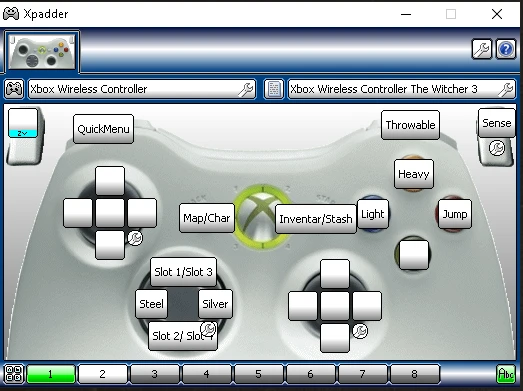
You can see the layout in the picture. Many buttons have 2 options, for example: Map/Char - Press to open Map, Hold to open Charakter Menu.
You enter the second page while holding L2. On this page you have Quests/Gwent-Meditation. Press to open Quets, Hold to start Meditation or win an active Gwent Game.
---------------------------------------------------------------------------------------------------------------------------------------------------------------------------------------------
Instructions:
1. Download and install Xpadder, don't launch it yet.
2. Extract input.setting into your "Documents/The Witcher 3" folder and overwrite. (Download the latest version even if you play with and old patch)
3. Extract the xpadder profile and controller profile (if you use the Xbox One controller, or make one for yor gamepad, very easy) into a folder of your choosing.
4. Start Xpadder (as administrator) and load the profiles - See picture for help.
5. Play the game and enjoy.
After the first time all you need to do is start Xpadder and then the game.
---------------------------------------------------------------------------------------------------------------------------------------------------------------------------------------------
Disable control scheme popup. (Highly recommended)(optional)
This will solve some very annoying issues (e.g. getting off the horse, inventory and potions UI and more.)
1. Open your The witcher 3\bin\config\base folder
2. Open hidden.ini with notepad and change "LockControlScheme=0" to "LockControlScheme=2"
3. Save and exit
Since patch 1. 05 you can turn off Control Hints under Options > Video > HUD Configuration. But I advise to lock the scheme anyway, is more efficient
---------------------------------------------------------------------------------------------------------------------------------------------------------------------------------------------
Uninstallation
Just delete the modded input.settings in your Documents/The Witcher 3 folder and play without Xppader. No need to replace anything.
---------------------------------------------------------------------------------------------------------------------------------------------------------------------------------------------
📊 Mod Details
- Game
- Witcher3 Mods
- Author
- xTcisloVe
- Version
- 1.0
- Downloads
- 121
- Endorsements
- 5
- Category
- Controller Button Layout
- Created
- 8/21/2022
- Updated
- 8/22/2022
🔧 How to Install The Witcher 3 Mods
Download from Nexus Mods.
📖 Full step-by-step install guide for The Witcher 3 →
Visit the official mod page for specific installation instructions for this mod.
🎮 Need cheat codes or console commands? Check ur gaming wiki for The Witcher 3 commands, item IDs, and more.
Keep browsing — more The Witcher 3 mods await